

Configuration
Configure the following to define how the node requests and processes human input:- Delivery method: How the request form reaches recipients.
- Form content: What information recipients will see and what they can interact with.
- User action: What decisions recipients can make and how the workflow proceeds accordingly.
- Timeout strategy: How long to wait and what happens if no recipient responds.
Delivery Method
Choose the channel through which the request is delivered. Currently available methods:-
Web app: Displays the request form to the web app end user. Not available in workflows started by a Trigger.
External clients can drive the web app form lifecycle through the Service API. See API Integration Flow.
- Email: Sends a request link via email to specific workspace members, external email addresses, or every member of the workspace. Anyone with the link can respond, no Dify account required.
The request closes after the first response regardless of delivery method.
Form Content
Customize the form recipients see and interact with:- Format and structure with Markdown Use headings, lists, bold text, links, and other Markdown elements to present information clearly.
- Display dynamic data with variables Reference workflow variables to show dynamic content, such as AI-generated text for review or a file someone uploaded at an upstream Human Input node for approval. In web app delivery, the form itself displays to end users. Any variables you reference render their values directly in the form, so no Answer or Output node is needed before the Human Input node.
-
Collect input with form fields
Add fields into the request form to capture different types of input from recipients. Each field becomes a variable for downstream use.
For example, in a blog review workflow, you can pass recipient feedback to a downstream LLM node for content revision.
Only Paragraph is optional; Select, Single File, and File List are mandatory. The form’s action buttons stay disabled until all mandatory fields are filled.
__rendered_content variable. File field values render as plain-text placeholders: [file] for Single File and [N files] for File List.
User Action
Define the decision buttons that recipients can click, each routing the workflow to a different execution path. For example, aPost branch might lead to nodes that trigger content publishing, while a Regenerate branch might loop back to an LLM node to revise the content.
Each button has a display title and an action ID. When a button is clicked, its ID is exposed downstream as __action_id and its title (button text) as __action_value.

Timeout Strategy
Configure how long the request stays open before it expires. The default is 3 days. If no recipient responds before the timeout, the workflow follows the timeout branch from the node. Wire this branch to a fallback path, such as a notification or a retry loop. If no timeout branch is connected, the workflow ends.Example: Content Review Workflow
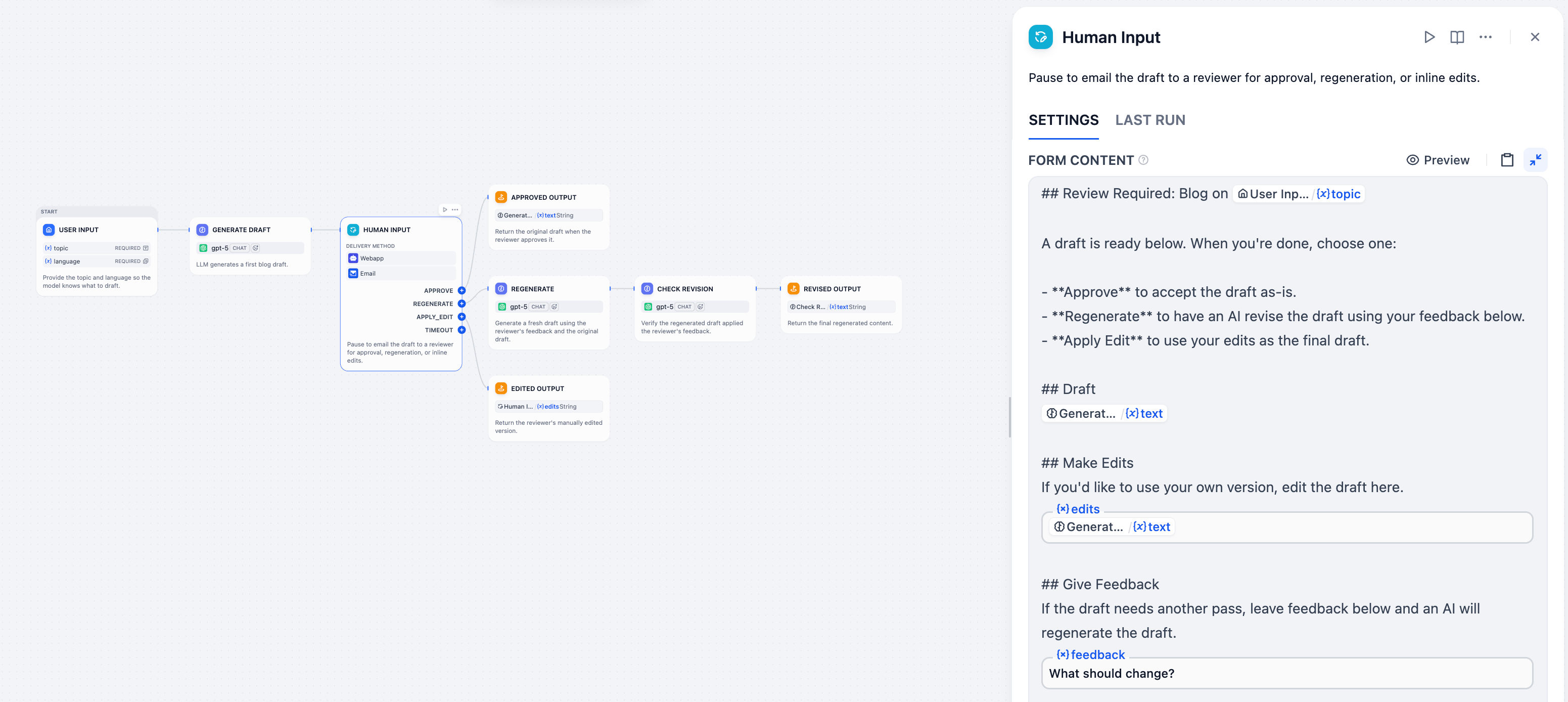
Workflow Example
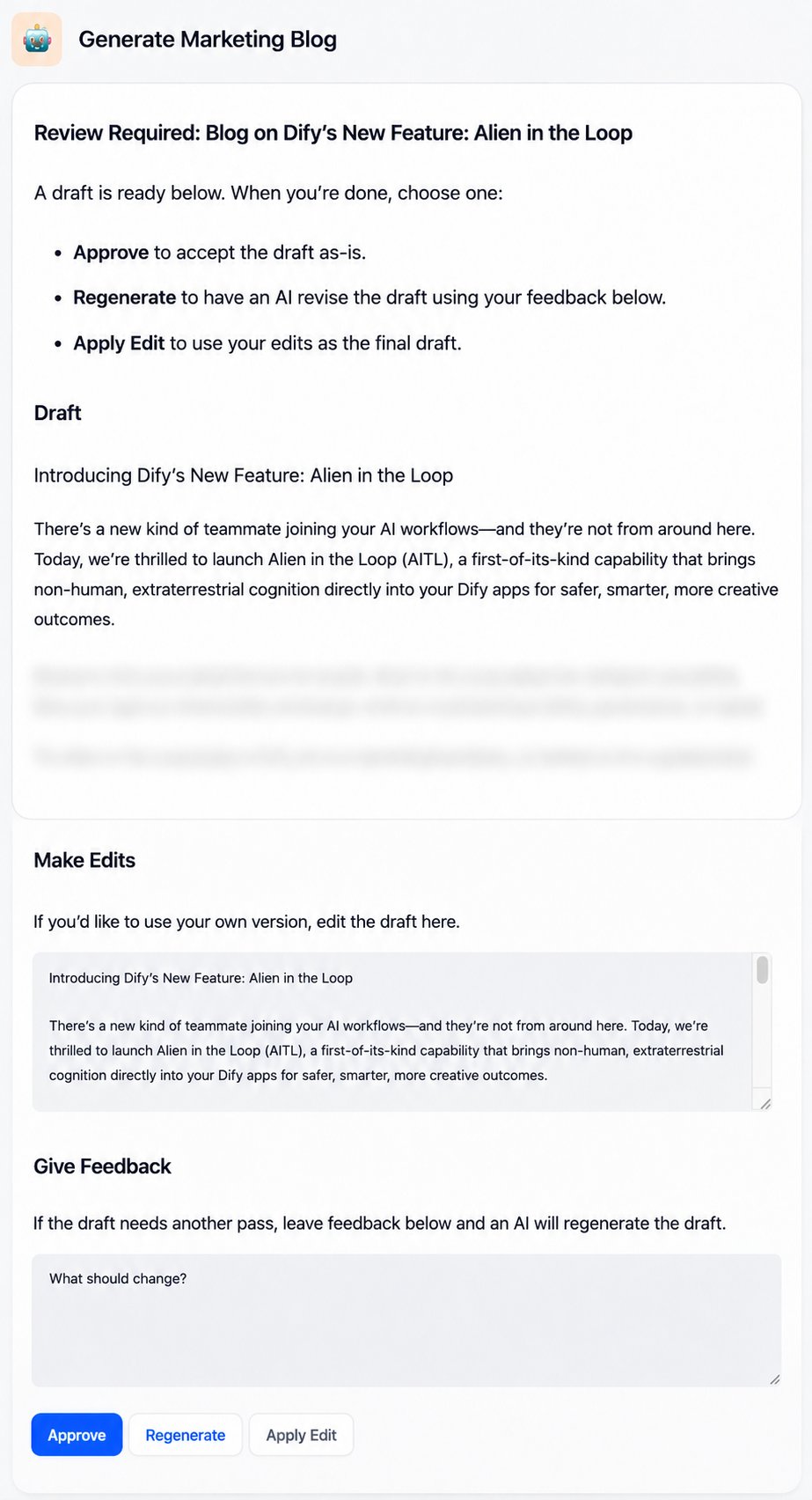
Request Form Example
topic and language that a workflow initiator inputs, emails the draft to a reviewer, and finalizes the output based on the reviewer’s choice.
It is designed around three things the reviewer should be able to do:
-
See the AI-generated draft: Reference the upstream LLM node’s
textvariable in the form so the rendered form displays the draft directly. -
Edit the draft directly if needed: Add a Paragraph field named
editsin the form, pre-filled with the sametextvariable, so the reviewer sees the draft as starting content and can edit in place. Because blog posts are long, the form’s Markdown display (point 1) reads better than a Paragraph field on its own. For shorter content, the pre-filled Paragraph field alone can handle both reading and editing. -
Provide feedback for an AI revision:
- Add a Paragraph field named
feedbackin the form for the reviewer’s feedback. - Connect two downstream LLM nodes in sequence:
- A Regenerate node that takes the original draft
textand the reviewer’sfeedbackto produce a revised draft. - A Check Revision node that takes
feedbackand the revised draft to verify whether the revision addresses the feedback. The verified result is what flows downstream.
- A Regenerate node that takes the original draft
- Add a Paragraph field named
- Approve: the original draft from the upstream LLM
- Apply Edit: the reviewer’s edited content from the
editsfield - Regenerate: the revised draft from the downstream LLM pipeline
LLM Node Prompts for Reference
LLM Node Prompts for Reference
- Generate Draft
- Regenerate
- Check Revision
SystemUser