Documentation Index
Fetch the complete documentation index at: https://docs.dify.ai/llms.txt
Use this file to discover all available pages before exploring further.
You can extend module capabilities through API extensions. Currently, the following extension types are supported:
moderation Sensitive content moderationexternal_data_tool External data tools
Before extending module capabilities, you need to prepare an API and an API Key for authentication.
In addition to developing the corresponding module capabilities, you also need to follow the specifications below to ensure Dify correctly calls the API.
API Specification
Dify will call your interface with the following specification:
| Header | Value | Desc |
|---|
Content-Type | application/json | The request content is in JSON format. |
Authorization | Bearer {api_key} | The API Key is transmitted as a Token. You need to parse the api_key and verify that it matches the provided API Key to ensure interface security. |
Request Body
{
    "point":  string, //  Extension point, different modules may contain multiple extension points
    "params": {
        ...  // Parameters passed to each module extension point
    }
}
API Response
{
    ...  // Content returned by the API, see the specification design of different modules for different extension point returns
}
Validation
When configuring an API-based Extension in Dify, Dify will send a request to the API Endpoint to verify API availability.
When the API Endpoint receives point=ping, the interface should return result=pong, as follows:
Content-Type: application/json
Authorization: Bearer {api_key}
Request Body
Expected API Response
Example
Here we use an external data tool as an example, where the scenario is to retrieve external weather information by region as context.
API Example
POST https://fake-domain.com/api/dify/receive
Content-Type: application/json
Authorization: Bearer 123456
{
    "point": "app.external_data_tool.query",
    "params": {
        "app_id": "61248ab4-1125-45be-ae32-0ce91334d021",
        "tool_variable": "weather_retrieve",
        "inputs": {
            "location": "London"
        },
        "query": "How's the weather today?"
    }
}
{
    "result": "City: London\nTemperature: 10°C\nRealFeel®: 8°C\nAir Quality: Poor\nWind Direction: ENE\nWind Speed: 8 km/h\nWind Gusts: 14 km/h\nPrecipitation: Light rain"
}
Code Example
The code is based on the Python FastAPI framework.
-
Install dependencies
pip install fastapi[all] uvicorn
-
Write code according to the interface specification
from fastapi import FastAPI, Body, HTTPException, Header
from pydantic import BaseModel

app = FastAPI()


class InputData(BaseModel):
    point: str
    params: dict = {}


@app.post("/api/dify/receive")
async def dify_receive(data: InputData = Body(...), authorization: str = Header(None)):
    """
    Receive API query data from Dify.
    """
    expected_api_key = "123456"  # TODO Your API key of this API
    auth_scheme, _, api_key = authorization.partition(' ')

    if auth_scheme.lower() != "bearer" or api_key != expected_api_key:
        raise HTTPException(status_code=401, detail="Unauthorized")

    point = data.point

    # for debug
    print(f"point: {point}")

    if point == "ping":
        return {
            "result": "pong"
        }
    if point == "app.external_data_tool.query":
        return handle_app_external_data_tool_query(params=data.params)
    # elif point == "{point name}":
        # TODO other point implementation here

    raise HTTPException(status_code=400, detail="Not implemented")


def handle_app_external_data_tool_query(params: dict):
    app_id = params.get("app_id")
    tool_variable = params.get("tool_variable")
    inputs = params.get("inputs")
    query = params.get("query")

    # for debug
    print(f"app_id: {app_id}")
    print(f"tool_variable: {tool_variable}")
    print(f"inputs: {inputs}")
    print(f"query: {query}")

    # TODO your external data tool query implementation here,
    #  return must be a dict with key "result", and the value is the query result
    if inputs.get("location") == "London":
        return {
            "result": "City: London\nTemperature: 10°C\nRealFeel®: 8°C\nAir Quality: Poor\nWind Direction: ENE\nWind "
                      "Speed: 8 km/h\nWind Gusts: 14 km/h\nPrecipitation: Light rain"
        }
    else:
        return {"result": "Unknown city"}
-
Start the API service. The default port is 8000, the complete API address is:
http://127.0.0.1:8000/api/dify/receive, and the configured API Key is 123456.
uvicorn main:app --reload --host 0.0.0.0
-
Configure this API in Dify.
-
Select this API extension in the App.
When debugging the App, Dify will request the configured API and send the following content (example):
{
    "point": "app.external_data_tool.query",
    "params": {
        "app_id": "61248ab4-1125-45be-ae32-0ce91334d021",
        "tool_variable": "weather_retrieve",
        "inputs": {
            "location": "London"
        },
        "query": "How's the weather today?"
    }
}
{
    "result": "City: London\nTemperature: 10°C\nRealFeel®: 8°C\nAir Quality: Poor\nWind Direction: ENE\nWind Speed: 8 km/h\nWind Gusts: 14 km/h\nPrecipitation: Light rain"
}
Local Debugging
Since the Dify cloud version cannot access internal network API services, you can use Ngrok to expose the API service endpoint to the public network to enable cloud debugging of local code. Steps:
-
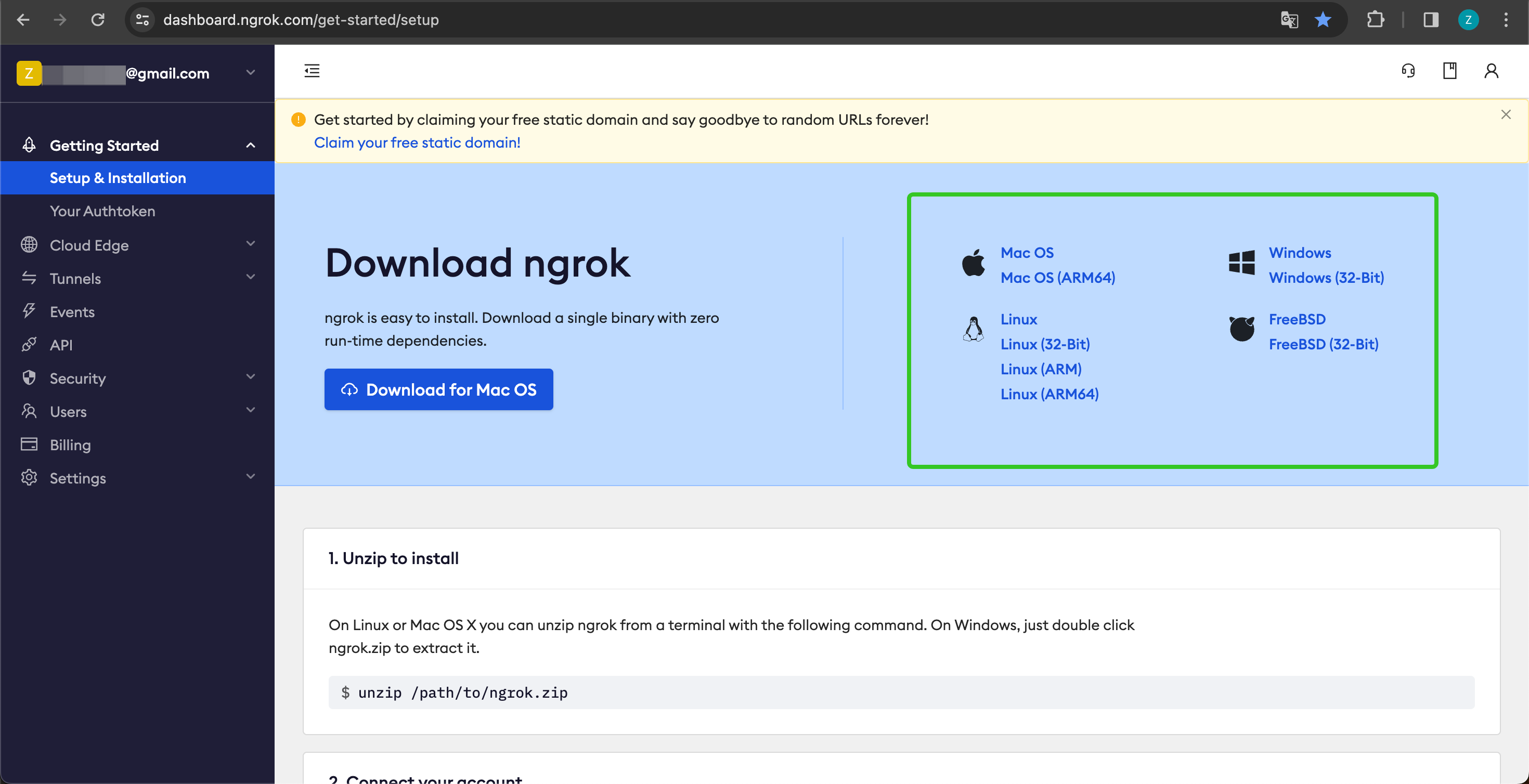
Go to https://ngrok.com, register and download the Ngrok file.
-
After downloading, go to the download directory, extract the archive according to the instructions below, and execute the initialization script in the instructions.
unzip /path/to/ngrok.zip
./ngrok config add-authtoken your-token
-
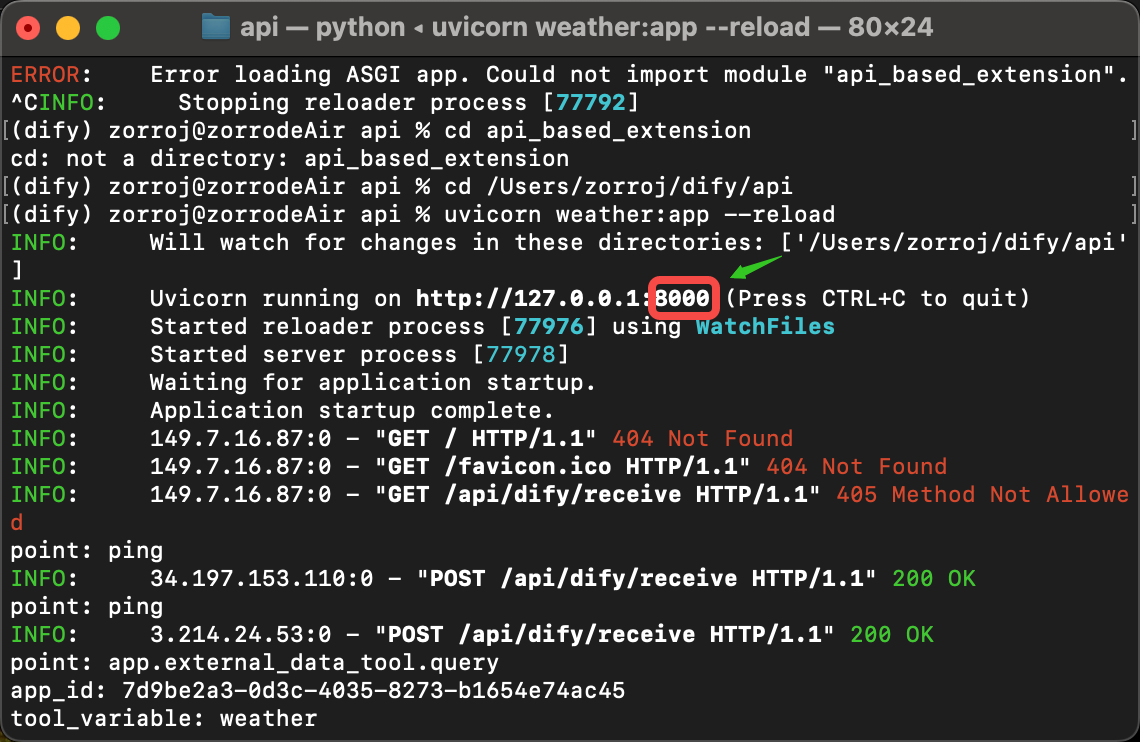
Check the port of your local API service:
And run the following command to start:
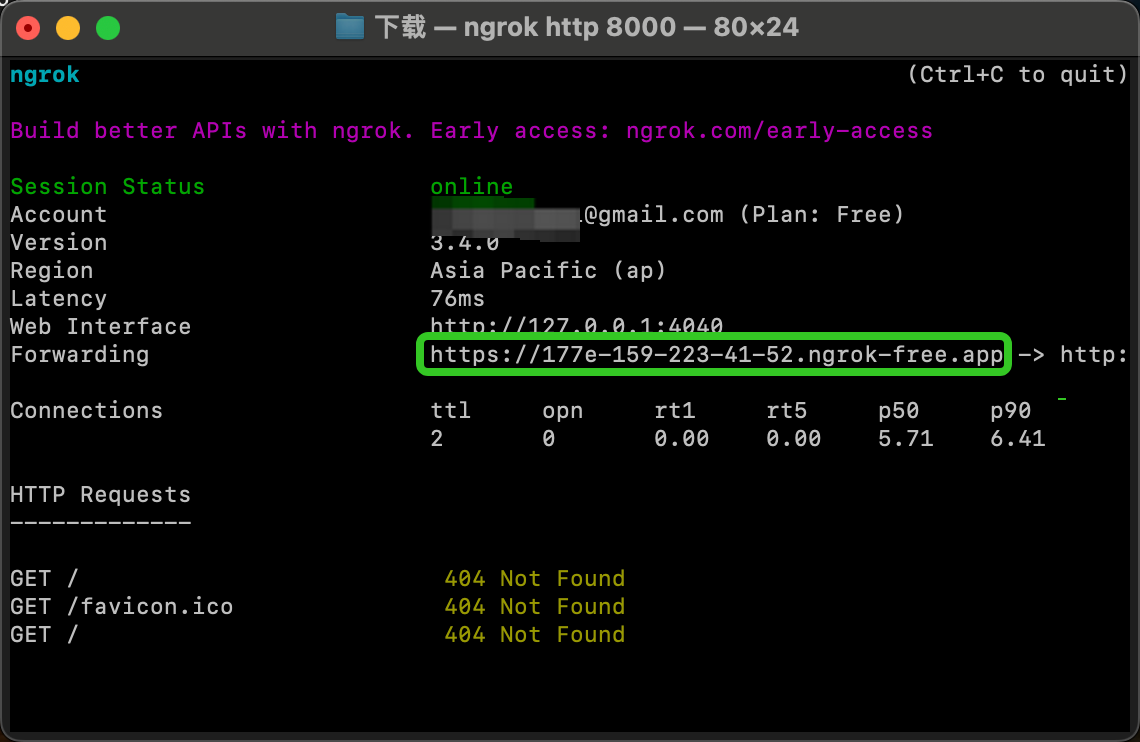
A successful startup example looks like this:
-
Find the Forwarding address, as shown above:
https://177e-159-223-41-52.ngrok-free.app (this is an example domain, please replace with your own), which is the public domain.
Following the example above, we expose the locally started service endpoint and replace the code example interface: http://127.0.0.1:8000/api/dify/receive with https://177e-159-223-41-52.ngrok-free.app/api/dify/receive
This API endpoint can now be accessed publicly. At this point, we can configure this API endpoint in Dify for local code debugging. For configuration steps, please refer to External Data Tool.
Deploy API Extensions Using Cloudflare Workers
We recommend using Cloudflare Workers to deploy your API extensions because Cloudflare Workers can conveniently provide a public network address and can be used for free.
For detailed instructions, see Deploy API Extensions Using Cloudflare Workers.

 A successful startup example looks like this: