跳转到主要内容
⚠️ 本文档由 AI 自动翻译。如有任何不准确之处,请参考英文原版
数据源插件是 Dify 1.9.0 中引入的一种新型插件。在知识库管道中,它们作为文档数据源和整个管道的起点。 本文介绍如何开发数据源插件,涵盖插件架构、代码示例和调试方法,帮助你快速开发和发布数据源插件。

前置条件

在继续阅读之前,请确保你对知识库管道有基本了解,并具备一些插件开发知识。你可以在这里找到相关信息:

数据源插件类型

Dify 支持三种类型的数据源插件:网页爬虫、在线文档和在线云盘。在实现插件代码时,提供插件功能的类必须继承自特定的数据源类。三种插件类型分别对应不同的父类。
要了解如何通过继承父类来实现插件功能,请参阅 Dify 插件开发:Hello World 指南 - 4.4 实现工具逻辑
每种数据源插件类型支持多个数据源。例如:
  • 网页爬虫:Jina Reader、FireCrawl
  • 在线文档:Notion、Confluence、GitHub
  • 在线云盘:OneDrive、Google Drive、Box、AWS S3、腾讯 COS
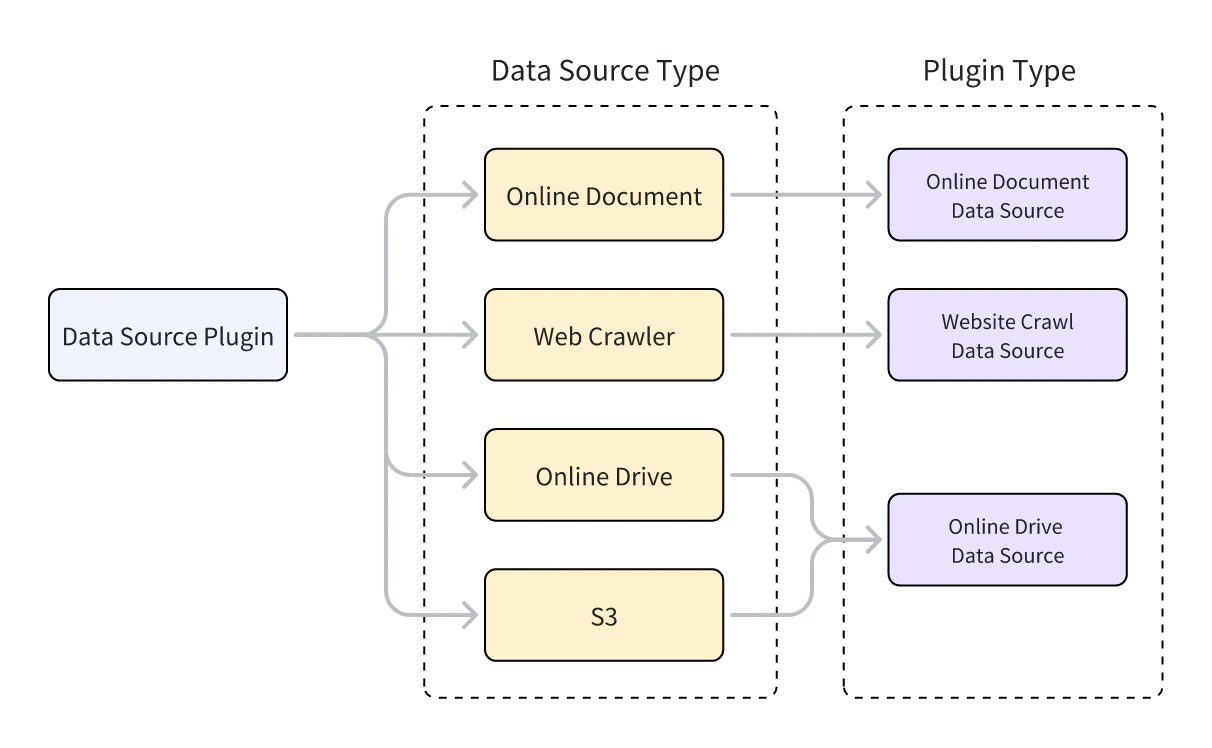
数据源类型和数据源插件类型之间的关系如下图所示。

开发数据源插件

创建数据源插件

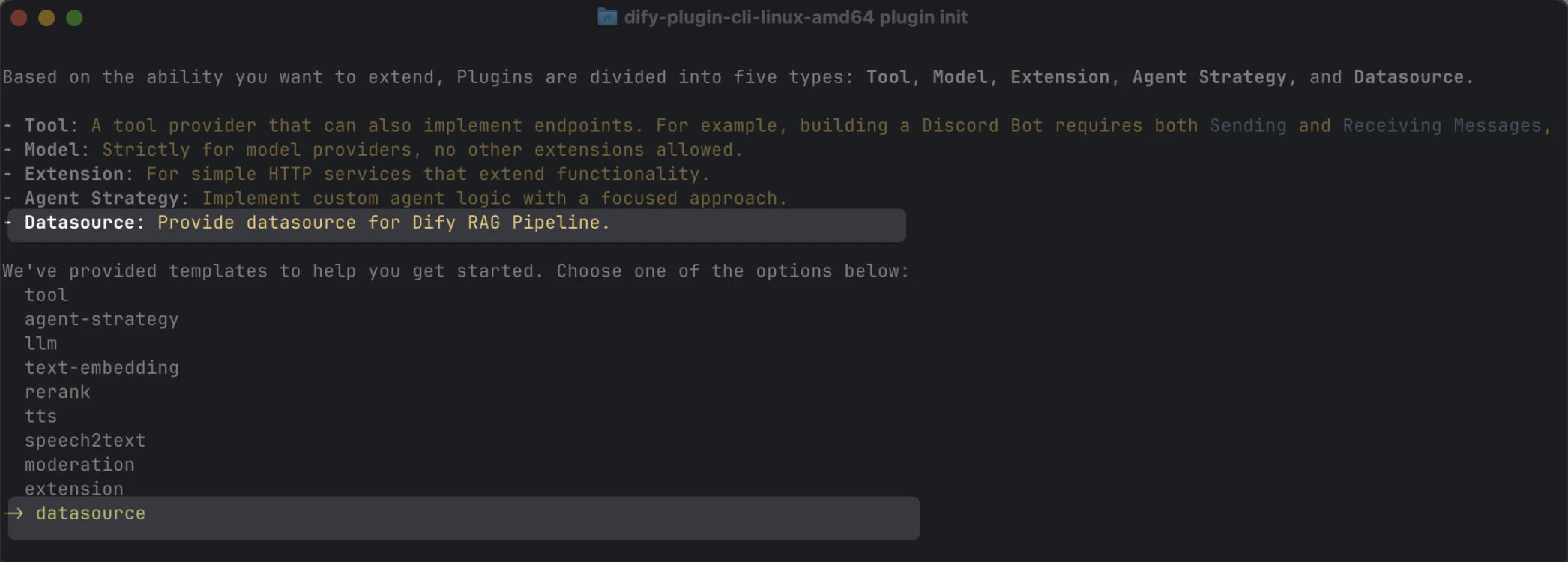
你可以使用脚手架命令行工具,通过选择 datasource 类型来创建数据源插件。完成设置后,命令行工具将自动生成插件项目代码。
dify plugin init
通常,数据源插件不需要使用 Dify 平台的其他功能,因此不需要额外的权限。

数据源插件结构

数据源插件由三个主要部分组成:
  • manifest.yaml 文件:描述插件的基本信息。
  • provider 目录:包含插件提供者的描述和认证实现代码。
  • datasources 目录:包含从数据源获取数据的描述和核心逻辑。
├── _assets
│   └── icon.svg
├── datasources
│   ├── your_datasource.py
│   └── your_datasource.yaml
├── main.py
├── manifest.yaml
├── PRIVACY.md
├── provider
│   ├── your_datasource.py
│   └── your_datasource.yaml
├── README.md
└── requirements.txt

设置正确的版本和标签

  • manifest.yaml 文件中,按如下方式设置最低支持的 Dify 版本:
    minimum_dify_version: 1.9.0
    
  • manifest.yaml 文件中,添加以下标签以在 Dify Marketplace 的数据源类别下显示插件:
    tags:
      - rag
    
  • requirements.txt 文件中,按如下方式设置数据源插件开发所使用的插件 SDK 版本:
    dify-plugin>=0.5.0,<0.6.0
    

添加数据源提供者

创建提供者 YAML 文件

提供者 YAML 文件的内容与工具插件的基本相同,只有以下两点不同:
# 指定数据源插件的提供者类型:online_drive、online_document 或 website_crawl
provider_type: online_drive # online_document, website_crawl

# 指定数据源
datasources:
  - datasources/PluginName.yaml
有关创建提供者 YAML 文件的更多信息,请参阅 Dify 插件开发:Hello World 指南 - 4.3 配置提供者凭证
数据源插件支持通过 OAuth 2.0 或 API Key 进行认证。要配置 OAuth,请参阅为你的工具插件添加 OAuth 支持

创建提供者代码文件

  • 使用 API Key 认证模式时,数据源插件的提供者代码文件与工具插件相同。你只需要将提供者类继承的父类更改为 DatasourceProvider
    class YourDatasourceProvider(DatasourceProvider):
    
        def _validate_credentials(self, credentials: Mapping[str, Any]) -> None:
            try:
                """
                IMPLEMENT YOUR VALIDATION HERE
                """
            except Exception as e:
                raise ToolProviderCredentialValidationError(str(e))
    
  • 使用 OAuth 认证模式时,数据源插件与工具插件略有不同。通过 OAuth 获取访问权限时,数据源插件可以同时返回要在前端显示的用户名和头像。因此,_oauth_get_credentials_oauth_refresh_credentials 需要返回包含 nameavatar_urlexpires_atcredentialsDatasourceOAuthCredentials 类型。 DatasourceOAuthCredentials 类定义如下,返回时必须设置为相应的类型:
    class DatasourceOAuthCredentials(BaseModel):
        name: str | None = Field(None, description="The name of the OAuth credential")
        avatar_url: str | None = Field(None, description="The avatar url of the OAuth")
        credentials: Mapping[str, Any] = Field(..., description="The credentials of the OAuth")
        expires_at: int | None = Field(
            default=-1,
            description="""The expiration timestamp (in seconds since Unix epoch, UTC) of the credentials.
            Set to -1 or None if the credentials do not expire.""",
        )
    
_oauth_get_authorization_url_oauth_get_credentials_oauth_refresh_credentials 的函数签名如下:
  • _oauth_get_authorization_url
  • _oauth_get_credentials
  • _oauth_refresh_credentials
def _oauth_get_authorization_url(self, redirect_uri: str, system_credentials: Mapping[str, Any]) -> str:
"""
Generate the authorization URL for {{ .PluginName }} OAuth.
"""
try:
    """
    IMPLEMENT YOUR AUTHORIZATION URL GENERATION HERE
    """
except Exception as e:
    raise DatasourceOAuthError(str(e))
return ""

添加数据源

三种数据源类型的 YAML 文件格式和数据源代码格式各不相同。

网页爬虫

在网页爬虫数据源插件的提供者 YAML 文件中,output_schema 必须始终返回四个参数:source_urlcontenttitledescription
output_schema:
    type: object
    properties:
      source_url:
        type: string
        description: the source url of the website
      content:
        type: string
        description: the content from the website
      title:
        type: string
        description: the title of the website
      "description":
        type: string
        description: the description of the website
在网页爬虫插件的主要逻辑代码中,类必须继承自 WebsiteCrawlDatasource 并实现 _get_website_crawl 方法。然后你需要使用 create_crawl_message 方法返回网页爬取消息。 要爬取多个网页并分批返回,你可以将 WebSiteInfo.status 设置为 processing,并使用 create_crawl_message 方法返回每批爬取的页面。所有页面爬取完成后,将 WebSiteInfo.status 设置为 completed
class YourDataSource(WebsiteCrawlDatasource):

    def _get_website_crawl(
        self, datasource_parameters: dict[str, Any]
    ) -> Generator[ToolInvokeMessage, None, None]:

        crawl_res = WebSiteInfo(web_info_list=[], status="", total=0, completed=0)
        crawl_res.status = "processing"
        yield self.create_crawl_message(crawl_res)
        
        ### your crawl logic
           ...
        crawl_res.status = "completed"
        crawl_res.web_info_list = [
            WebSiteInfoDetail(
                title="",
                source_url="",
                description="",
                content="",
            )
        ]
        crawl_res.total = 1
        crawl_res.completed = 1

        yield self.create_crawl_message(crawl_res)

在线文档

在线文档数据源插件的返回值必须至少包含一个 content 字段来表示文档内容。例如:
output_schema:
    type: object
    properties:
      workspace_id:
        type: string
        description: workspace id
      page_id:
        type: string
        description: page id
      content:
        type: string
        description: page content
在在线文档插件的主要逻辑代码中,类必须继承自 OnlineDocumentDatasource 并实现两个方法:_get_pages_get_content 当用户运行插件时,它首先调用 _get_pages 方法获取文档列表。用户从列表中选择文档后,它再调用 _get_content 方法获取文档内容。
  • _get_pages
  • _get_content
def _get_pages(self, datasource_parameters: dict[str, Any]) -> DatasourceGetPagesResponse:
    # your get pages logic
    response = requests.get(url, headers=headers, params=params, timeout=30)
    pages = []
    for item in  response.json().get("results", []):
        page = OnlineDocumentPage(
            page_name=item.get("title", ""),
            page_id=item.get("id", ""),
            type="page",  
            last_edited_time=item.get("version", {}).get("createdAt", ""),
            parent_id=item.get("parentId", ""),
            page_icon=None, 
        )
        pages.append(page)
    online_document_info = OnlineDocumentInfo(
        workspace_name=workspace_name,
        workspace_icon=workspace_icon,
        workspace_id=workspace_id,
        pages=[page],
        total=pages.length(),
    )
    return DatasourceGetPagesResponse(result=[online_document_info])

在线云盘

在线云盘数据源插件返回文件,因此必须遵循以下规范:
output_schema:
    type: object
    properties:
      file:
        $ref: "https://dify.ai/schemas/v1/file.json"
在在线云盘插件的主要逻辑代码中,类必须继承自 OnlineDriveDatasource 并实现两个方法:_browse_files_download_file 当用户运行插件时,它首先调用 _browse_files 获取文件列表。此时,prefix 为空,表示请求根目录的文件列表。文件列表包含文件夹和文件两种类型的变量。如果用户打开文件夹,会再次调用 _browse_files 方法。此时,OnlineDriveBrowseFilesRequest 中的 prefix 将是用于检索该文件夹内文件列表的文件夹 ID。 用户选择文件后,插件使用 _download_file 方法和文件 ID 获取文件内容。你可以使用 _get_mime_type_from_filename 方法获取文件的 MIME 类型,使管道能够适当处理不同的文件类型。 当文件列表包含多个文件时,你可以将 OnlineDriveFileBucket.is_truncated 设置为 True,并将 OnlineDriveFileBucket.next_page_parameters 设置为获取下一页文件列表所需的参数,例如下一页的请求 ID 或 URL,具体取决于服务提供商。
  • _browse_files
  • _download_file
def _browse_files(
self, request: OnlineDriveBrowseFilesRequest
) -> OnlineDriveBrowseFilesResponse:

credentials = self.runtime.credentials
bucket_name = request.bucket
prefix = request.prefix or ""  # Allow empty prefix for root folder; When you browse the folder, the prefix is the folder id
max_keys = request.max_keys or 10
next_page_parameters = request.next_page_parameters or {}

files = []
files.append(OnlineDriveFile(
    id="", 
    name="", 
    size=0, 
    type="folder" # or "file"
))

return OnlineDriveBrowseFilesResponse(result=[
    OnlineDriveFileBucket(
        bucket="", 
        files=files, 
        is_truncated=False, 
        next_page_parameters={}
    )
])
对于 AWS S3 等存储服务,prefixbucketid 变量有特殊用途,可以在开发过程中根据需要灵活应用:
  • prefix:表示文件路径前缀。例如,prefix=container1/folder1/container1 存储桶的 folder1 文件夹中检索文件或文件列表。
  • bucket:表示文件存储桶。例如,bucket=container1 检索 container1 存储桶中的文件或文件列表。对于非标准 S3 协议的云盘,此字段可以留空。
  • id:由于 _download_file 方法不使用 prefix 变量,因此完整文件路径必须包含在 id 中。例如,id=container1/folder1/file1.txt 表示从 container1 存储桶的 folder1 文件夹中检索 file1.txt 文件。
你可以参考官方 Google Drive 插件官方 AWS S3 插件的具体实现。

调试插件

数据源插件支持两种调试方法:远程调试或作为本地插件安装进行调试。请注意以下事项:
  • 如果插件使用 OAuth 认证,远程调试的 redirect_uri 与本地插件不同。请在服务提供商的 OAuth App 中相应更新相关配置。
  • 虽然数据源插件支持单步调试,但我们仍建议在完整的知识库管道中测试它们,以确保完整功能。

最终检查

在打包和发布之前,请确保你已完成以下所有事项:
  • 将最低支持的 Dify 版本设置为 1.9.0
  • 将 SDK 版本设置为 dify-plugin>=0.5.0,<0.6.0
  • 编写 README.mdPRIVACY.md 文件。
  • 代码文件中仅包含英文内容。
  • 将默认图标替换为数据源提供商的 logo。

打包和发布

在插件目录中,运行以下命令生成 .difypkg 插件包:
dify plugin package . -o your_datasource.difypkg
接下来,你可以:
  • 在你的 Dify 环境中导入和使用插件。
  • 通过提交 pull request 将插件发布到 Dify Marketplace。
有关插件发布流程,请参阅发布插件

Edit this page | Report an issue