

本文档由 AI 自动翻译。如有任何不准确之处,请参考 英文原版。Agent 策略插件为 LLM 提供推理与决策逻辑,使其能够选择工具、调用工具并处理工具结果,从而自主解决问题。 本指南将带你构建一个 Function Calling 策略,让模型自行获取当前时间。
前置条件
- Dify 插件脚手架工具
- Python 环境(版本 3.12)
在终端中运行
dify version 以确认脚手架工具已安装。1. 初始化插件模板
运行以下命令为你的 Agent 插件创建开发模板:dify plugin init
➜  Dify Plugins Developing dify plugin init
Edit profile of the plugin
Plugin name (press Enter to next step): # Enter the plugin name
Author (press Enter to next step): Author name # Enter the plugin author
Description (press Enter to next step): Description # Enter the plugin description
---
Select the language you want to use for plugin development, and press Enter to con
BTW, you need Python 3.12+ to develop the Plugin if you choose Python.
-> python # Select Python environment
  go (not supported yet)
---
Based on the ability you want to extend, we have divided the Plugin into four type

- Tool: It's a tool provider, but not only limited to tools, you can implement an
- Model: Just a model provider, extending others is not allowed.
- Extension: Other times, you may only need a simple http service to extend the fu
- Agent Strategy: Implement your own logics here, just by focusing on Agent itself

What's more, we have provided the template for you, you can choose one of them b
  tool
-> agent-strategy # Select Agent strategy template
  llm
  text-embedding
---
Configure the permissions of the plugin, use up and down to navigate, tab to sel
Backwards Invocation:
Tools:
    Enabled: [✔]  You can invoke tools inside Dify if it's enabled # Enabled by default
Models:
    Enabled: [✔]  You can invoke models inside Dify if it's enabled # Enabled by default
    LLM: [✔]  You can invoke LLM models inside Dify if it's enabled # Enabled by default
    Text Embedding: [✘]  You can invoke text embedding models inside Dify if it'
    Rerank: [✘]  You can invoke rerank models inside Dify if it's enabled
...
├── GUIDE.md               # User guide and documentation
├── PRIVACY.md             # Privacy policy and data handling guidelines
├── README.md              # Project overview and setup instructions
├── _assets/               # Static assets directory
│   └── icon.svg           # Agent strategy provider icon/logo
├── main.py                # Main application entry point
├── manifest.yaml          # Basic plugin configuration
├── provider/              # Provider configurations directory
│   └── basic_agent.yaml   # Your agent provider settings
├── requirements.txt       # Python dependencies list
└── strategies/            # Strategy implementation directory
    ├── basic_agent.py     # Basic agent strategy implementation
    └── basic_agent.yaml   # Basic agent strategy configuration
strategies/ 目录中。
2. 开发插件
Agent 策略插件的开发围绕两个文件展开:- 插件声明:
strategies/basic_agent.yaml - 插件实现:
strategies/basic_agent.py
2.1 定义参数
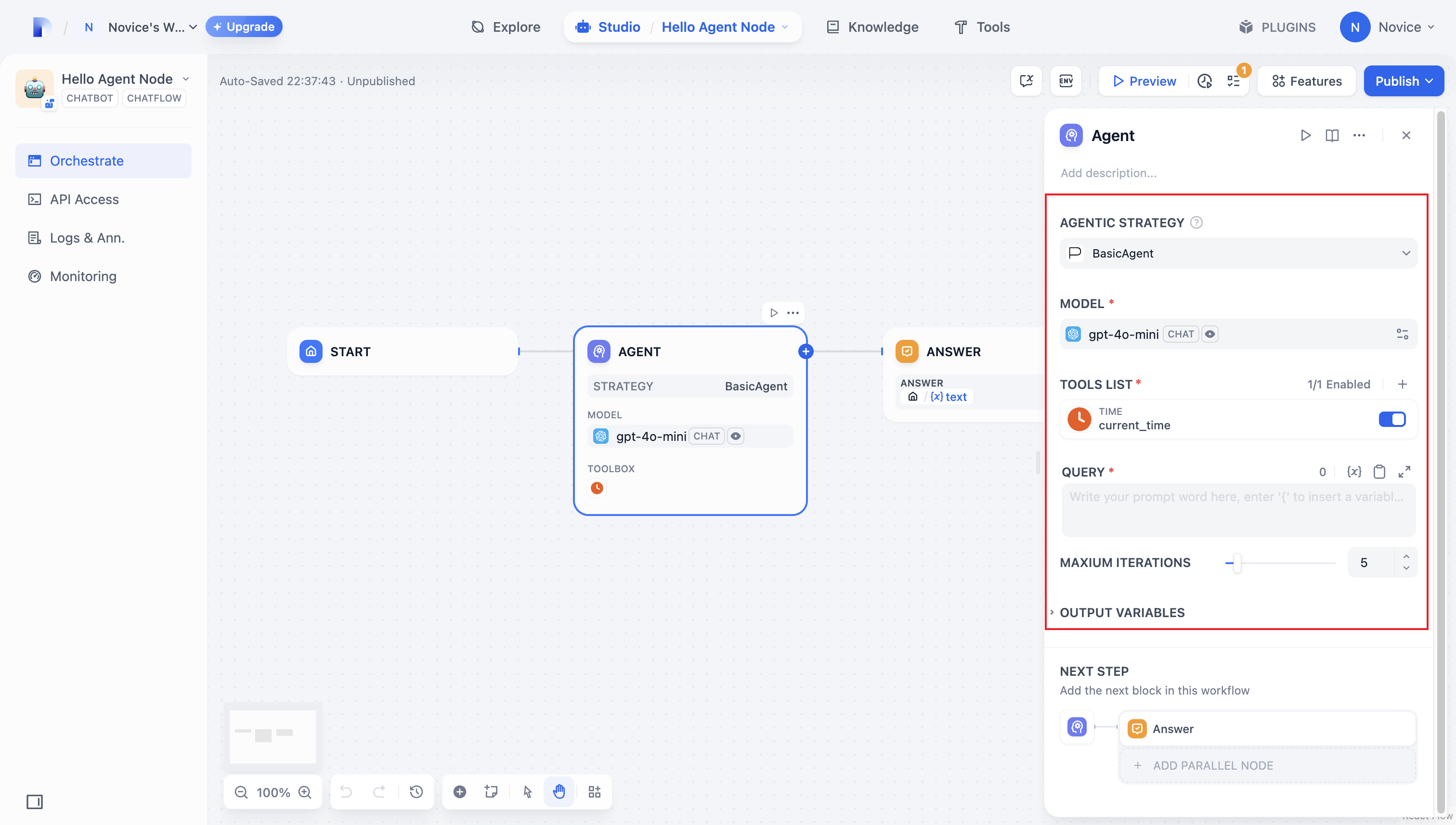
首先在strategies/basic_agent.yaml 中声明插件的参数。这些参数驱动插件的核心功能,例如调用 LLM 或使用工具。
建议先从以下四个参数开始:
model:要调用的大语言模型(例如 GPT-4、GPT-4o-mini)。tools:增强插件功能的工具列表。query:发送给模型的用户输入或提示词内容。maximum_iterations:最大迭代次数,用于防止过度计算。
identity:
  name: basic_agent # the name of the agent_strategy
  author: novice # the author of the agent_strategy
  label:
    en_US: BasicAgent # the English label of the agent_strategy
description:
  en_US: BasicAgent # the English description of the agent_strategy
parameters:
  - name: model # the name of the model parameter
    type: model-selector # model-type
    scope: tool-call&llm # the scope of the parameter
    required: true
    label:
      en_US: Model
      zh_Hans: 模型
      pt_BR: Model
  - name: tools # the name of the tools parameter
    type: array[tools] # the type of tool parameter
    required: true
    label:
      en_US: Tools list
      zh_Hans: 工具列表
      pt_BR: Tools list
  - name: query # the name of the query parameter
    type: string # the type of query parameter
    required: true
    label:
      en_US: Query
      zh_Hans: 查询
      pt_BR: Query
  - name: maximum_iterations
    type: number
    required: false
    default: 5
    label:
      en_US: Maxium Iterations
      zh_Hans: 最大迭代次数
      pt_BR: Maxium Iterations
    max: 50 # if you set the max and min value, the display of the parameter will be a slider
    min: 1
extra:
  python:
    source: strategies/basic_agent.py
2.2 获取参数并执行
用户填写这些字段后,插件会收到提交的值。在strategies/basic_agent.py 中,定义一个 Pydantic 模型来校验传入的参数:
from dify_plugin.entities.agent import AgentInvokeMessage
from dify_plugin.interfaces.agent import AgentModelConfig, AgentStrategy, ToolEntity
from pydantic import BaseModel

class BasicParams(BaseModel):
    maximum_iterations: int
    model: AgentModelConfig
    tools: list[ToolEntity]
    query: str
_invoke 中解析参数并运行你的策略逻辑:
class BasicAgentAgentStrategy(AgentStrategy):
    def _invoke(self, parameters: dict[str, Any]) -> Generator[AgentInvokeMessage]:
        params = BasicParams(**parameters)
3. 调用模型
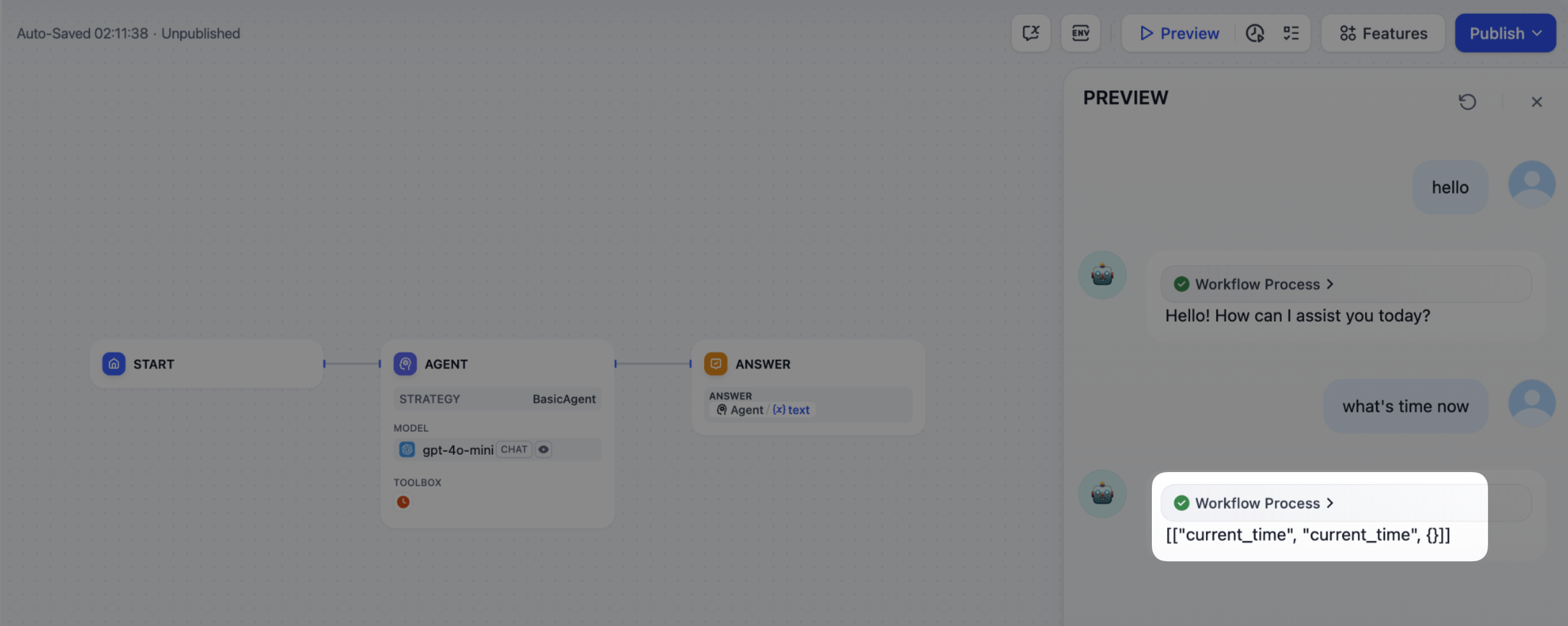
调用模型是 Agent 策略的核心。使用 SDK 中的session.model.llm.invoke() 调用 LLM,处理文本生成、对话等任务。
要让 LLM 驱动工具调用,它必须输出与各工具接口匹配的结构化参数,即根据用户指令推导出工具可接受的输入。
该方法接受以下参数:
modelprompt_messagestoolsstopstream
def invoke(
        self,
        model_config: LLMModelConfig,
        prompt_messages: list[PromptMessage],
        tools: list[PromptMessageTool] | None = None,
        stop: list[str] | None = None,
        stream: bool = True,
    ) -> Generator[LLMResultChunk, None, None] | LLMResult:...
4. 调用工具
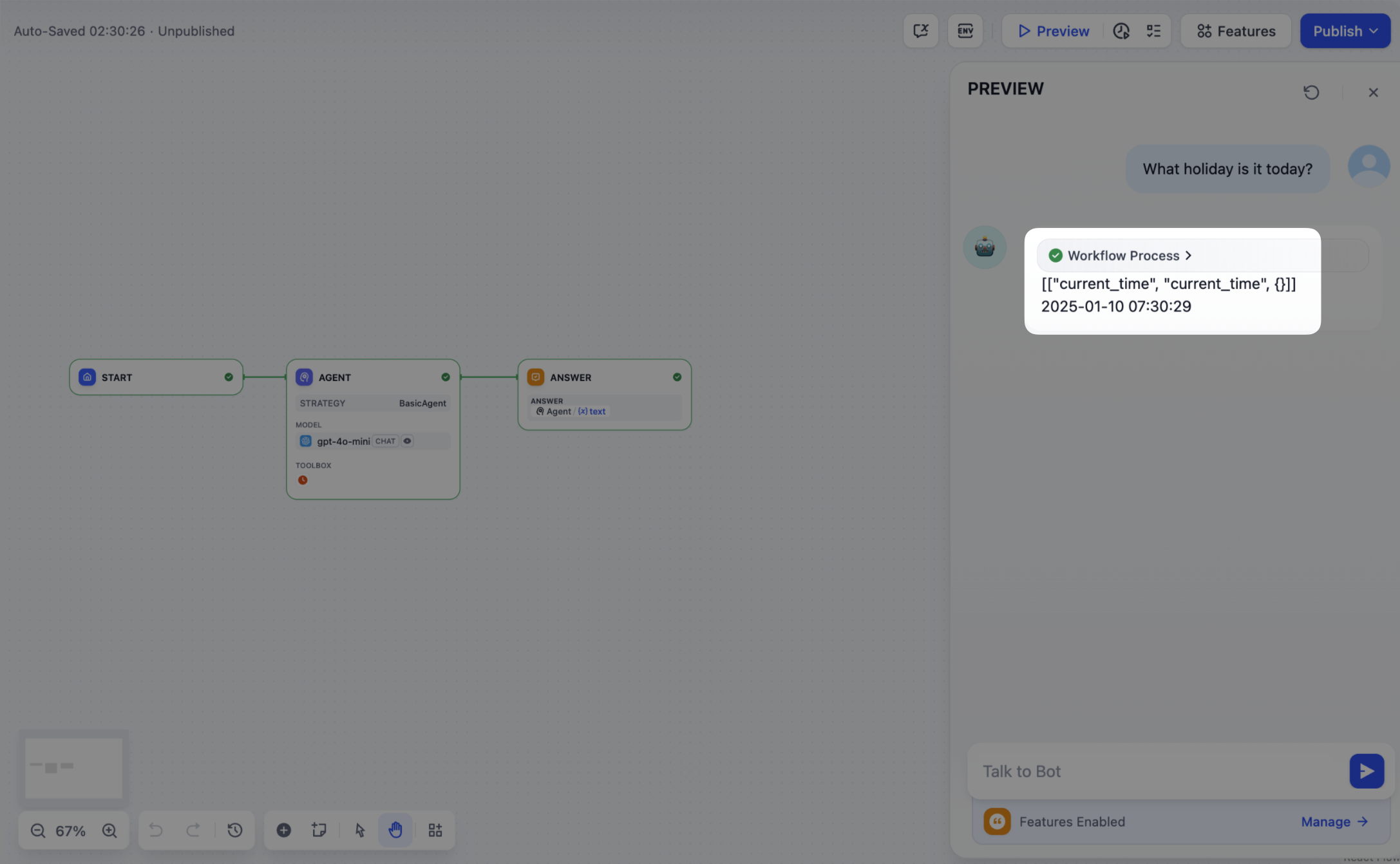
模型生成工具参数后,插件必须实际调用这些工具。使用session.tool.invoke() 发起这些请求。
该方法接受以下参数:
providertool_nameparameters
 def invoke(
        self,
        provider_type: ToolProviderType,
        provider: str,
        tool_name: str,
        parameters: dict[str, Any],
    ) -> Generator[ToolInvokeMessage, None, None]:...
tool_instances = (
    {tool.identity.name: tool for tool in params.tools} if params.tools else {}
)
for tool_call_id, tool_call_name, tool_call_args in tool_calls:
    tool_instance = tool_instances[tool_call_name]
    self.session.tool.invoke(
        provider_type=ToolProviderType.BUILT_IN,
        provider=tool_instance.identity.provider,
        tool_name=tool_instance.identity.name,
        parameters={**tool_instance.runtime_parameters, **tool_call_args},
    )
5. 创建日志
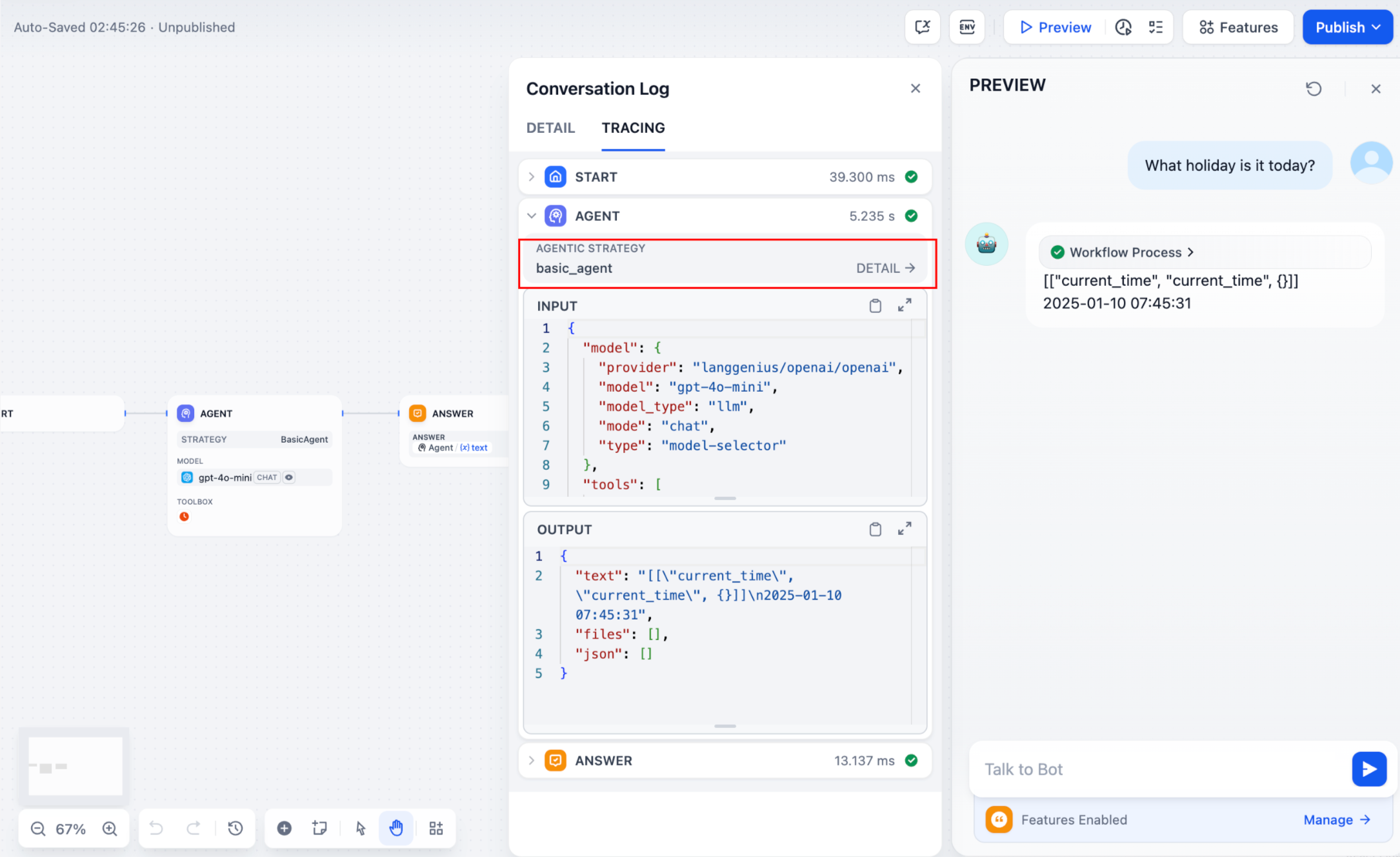
复杂任务通常需要多个步骤,你需要跟踪每一步的结果,以分析决策并优化策略。SDK 的create_log_message 和 finish_log_message 可在每次调用前后记录状态,从而加快问题诊断。
例如:
- 在调用模型之前记录一条「开始模型调用」消息,以显示执行进度。
- 模型响应后记录一条「调用成功」消息,使其输出可端到端追踪。
model_log = self.create_log_message(
            label=f"{params.model.model} Thought",
            data={},
            metadata={"start_at": model_started_at, "provider": params.model.provider},
            status=ToolInvokeMessage.LogMessage.LogStatus.START,
        )
yield model_log
self.session.model.llm.invoke(...)
yield self.finish_log_message(
    log=model_log,
    data={
        "output": response,
        "tool_name": tool_call_names,
        "tool_input": tool_call_inputs,
    },
    metadata={
        "started_at": model_started_at,
        "finished_at": time.perf_counter(),
        "elapsed_time": time.perf_counter() - model_started_at,
        "provider": params.model.provider,
    },
)
parent 参数,将日志嵌套为层级结构,便于跟踪:
function_call_round_log = self.create_log_message(
    label="Function Call Round1 ",
    data={},
    metadata={},
)
yield function_call_round_log

model_log = self.create_log_message(
    label=f"{params.model.model} Thought",
    data={},
    metadata={"start_at": model_started_at, "provider": params.model.provider},
    status=ToolInvokeMessage.LogMessage.LogStatus.START,
    # add parent log
    parent=function_call_round_log,
)
yield model_log
示例代码
- 调用模型
- 处理工具
- 完整功能代码示例
以下代码为 Agent 策略插件赋予调用模型的能力:
import json
from collections.abc import Generator
from typing import Any, cast

from dify_plugin.entities.agent import AgentInvokeMessage
from dify_plugin.entities.model.llm import LLMModelConfig, LLMResult, LLMResultChunk
from dify_plugin.entities.model.message import (
    PromptMessageTool,
    UserPromptMessage,
)
from dify_plugin.entities.tool import ToolInvokeMessage, ToolParameter, ToolProviderType
from dify_plugin.interfaces.agent import AgentModelConfig, AgentStrategy, ToolEntity
from pydantic import BaseModel

class BasicParams(BaseModel):
    maximum_iterations: int
    model: AgentModelConfig
    tools: list[ToolEntity]
    query: str

class BasicAgentAgentStrategy(AgentStrategy):
    def _invoke(self, parameters: dict[str, Any]) -> Generator[AgentInvokeMessage]:
        params = BasicParams(**parameters)
        chunks: Generator[LLMResultChunk, None, None] | LLMResult = (
            self.session.model.llm.invoke(
                model_config=LLMModelConfig(**params.model.model_dump(mode="json")),
                prompt_messages=[UserPromptMessage(content=params.query)],
                tools=[
                    self._convert_tool_to_prompt_message_tool(tool)
                    for tool in params.tools
                ],
                stop=params.model.completion_params.get("stop", [])
                if params.model.completion_params
                else [],
                stream=True,
            )
        )
        response = ""
        tool_calls = []
        tool_instances = (
            {tool.identity.name: tool for tool in params.tools} if params.tools else {}
        )

        for chunk in chunks:
            # check if there is any tool call
            if self.check_tool_calls(chunk):
                tool_calls = self.extract_tool_calls(chunk)
                tool_call_names = ";".join([tool_call[1] for tool_call in tool_calls])
                try:
                    tool_call_inputs = json.dumps(
                        {tool_call[1]: tool_call[2] for tool_call in tool_calls},
                        ensure_ascii=False,
                    )
                except json.JSONDecodeError:
                    # ensure ascii to avoid encoding error
                    tool_call_inputs = json.dumps(
                        {tool_call[1]: tool_call[2] for tool_call in tool_calls}
                    )
                print(tool_call_names, tool_call_inputs)
            if chunk.delta.message and chunk.delta.message.content:
                if isinstance(chunk.delta.message.content, list):
                    for content in chunk.delta.message.content:
                        response += content.data
                        print(content.data, end="", flush=True)
                else:
                    response += str(chunk.delta.message.content)
                    print(str(chunk.delta.message.content), end="", flush=True)

            if chunk.delta.usage:
                # usage of the model
                usage = chunk.delta.usage

        yield self.create_text_message(
            text=f"{response or json.dumps(tool_calls, ensure_ascii=False)}\n"
        )
        result = ""
        for tool_call_id, tool_call_name, tool_call_args in tool_calls:
            tool_instance = tool_instances[tool_call_name]
            tool_invoke_responses = self.session.tool.invoke(
                provider_type=ToolProviderType.BUILT_IN,
                provider=tool_instance.identity.provider,
                tool_name=tool_instance.identity.name,
                parameters={**tool_instance.runtime_parameters, **tool_call_args},
            )
            if not tool_instance:
                tool_invoke_responses = {
                    "tool_call_id": tool_call_id,
                    "tool_call_name": tool_call_name,
                    "tool_response": f"there is not a tool named {tool_call_name}",
                }
            else:
                # invoke tool
                tool_invoke_responses = self.session.tool.invoke(
                    provider_type=ToolProviderType.BUILT_IN,
                    provider=tool_instance.identity.provider,
                    tool_name=tool_instance.identity.name,
                    parameters={**tool_instance.runtime_parameters, **tool_call_args},
                )
                result = ""
                for tool_invoke_response in tool_invoke_responses:
                    if tool_invoke_response.type == ToolInvokeMessage.MessageType.TEXT:
                        result += cast(
                            ToolInvokeMessage.TextMessage, tool_invoke_response.message
                        ).text
                    elif (
                        tool_invoke_response.type == ToolInvokeMessage.MessageType.LINK
                    ):
                        result += (
                            f"result link: {cast(ToolInvokeMessage.TextMessage, tool_invoke_response.message).text}."
                            + " please tell user to check it."
                        )
                    elif tool_invoke_response.type in {
                        ToolInvokeMessage.MessageType.IMAGE_LINK,
                        ToolInvokeMessage.MessageType.IMAGE,
                    }:
                        result += (
                            "image has been created and sent to user already, "
                            + "you do not need to create it, just tell the user to check it now."
                        )
                    elif (
                        tool_invoke_response.type == ToolInvokeMessage.MessageType.JSON
                    ):
                        text = json.dumps(
                            cast(
                                ToolInvokeMessage.JsonMessage,
                                tool_invoke_response.message,
                            ).json_object,
                            ensure_ascii=False,
                        )
                        result += f"tool response: {text}."
                    else:
                        result += f"tool response: {tool_invoke_response.message!r}."

                tool_response = {
                    "tool_call_id": tool_call_id,
                    "tool_call_name": tool_call_name,
                    "tool_response": result,
                }
        yield self.create_text_message(result)

    def _convert_tool_to_prompt_message_tool(
        self, tool: ToolEntity
    ) -> PromptMessageTool:
        """
        convert tool to prompt message tool
        """
        message_tool = PromptMessageTool(
            name=tool.identity.name,
            description=tool.description.llm if tool.description else "",
            parameters={
                "type": "object",
                "properties": {},
                "required": [],
            },
        )

        parameters = tool.parameters
        for parameter in parameters:
            if parameter.form != ToolParameter.ToolParameterForm.LLM:
                continue

            parameter_type = parameter.type
            if parameter.type in {
                ToolParameter.ToolParameterType.FILE,
                ToolParameter.ToolParameterType.FILES,
            }:
                continue
            enum = []
            if parameter.type == ToolParameter.ToolParameterType.SELECT:
                enum = (
                    [option.value for option in parameter.options]
                    if parameter.options
                    else []
                )

            message_tool.parameters["properties"][parameter.name] = {
                "type": parameter_type,
                "description": parameter.llm_description or "",
            }

            if len(enum) > 0:
                message_tool.parameters["properties"][parameter.name]["enum"] = enum

            if parameter.required:
                message_tool.parameters["required"].append(parameter.name)

        return message_tool

    def check_tool_calls(self, llm_result_chunk: LLMResultChunk) -> bool:
        """
        Check if there is any tool call in llm result chunk
        """
        return bool(llm_result_chunk.delta.message.tool_calls)

    def extract_tool_calls(
        self, llm_result_chunk: LLMResultChunk
    ) -> list[tuple[str, str, dict[str, Any]]]:
        """
        Extract tool calls from llm result chunk

        Returns:
            List[Tuple[str, str, Dict[str, Any]]]: [(tool_call_id, tool_call_name, tool_call_args)]
        """
        tool_calls = []
        for prompt_message in llm_result_chunk.delta.message.tool_calls:
            args = {}
            if prompt_message.function.arguments != "":
                args = json.loads(prompt_message.function.arguments)

            tool_calls.append(
                (
                    prompt_message.id,
                    prompt_message.function.name,
                    args,
                )
            )

        return tool_calls
以下代码调用模型,并向模型所选的工具发送格式规范的请求:
import json
from collections.abc import Generator
from typing import Any, cast

from dify_plugin.entities.agent import AgentInvokeMessage
from dify_plugin.entities.model.llm import LLMModelConfig, LLMResult, LLMResultChunk
from dify_plugin.entities.model.message import (
    PromptMessageTool,
    UserPromptMessage,
)
from dify_plugin.entities.tool import ToolInvokeMessage, ToolParameter, ToolProviderType
from dify_plugin.interfaces.agent import AgentModelConfig, AgentStrategy, ToolEntity
from pydantic import BaseModel

class BasicParams(BaseModel):
    maximum_iterations: int
    model: AgentModelConfig
    tools: list[ToolEntity]
    query: str

class BasicAgentAgentStrategy(AgentStrategy):
    def _invoke(self, parameters: dict[str, Any]) -> Generator[AgentInvokeMessage]:
        params = BasicParams(**parameters)
        chunks: Generator[LLMResultChunk, None, None] | LLMResult = (
            self.session.model.llm.invoke(
                model_config=LLMModelConfig(**params.model.model_dump(mode="json")),
                prompt_messages=[UserPromptMessage(content=params.query)],
                tools=[
                    self._convert_tool_to_prompt_message_tool(tool)
                    for tool in params.tools
                ],
                stop=params.model.completion_params.get("stop", [])
                if params.model.completion_params
                else [],
                stream=True,
            )
        )
        response = ""
        tool_calls = []
        tool_instances = (
            {tool.identity.name: tool for tool in params.tools} if params.tools else {}
        )

        for chunk in chunks:
            # check if there is any tool call
            if self.check_tool_calls(chunk):
                tool_calls = self.extract_tool_calls(chunk)
                tool_call_names = ";".join([tool_call[1] for tool_call in tool_calls])
                try:
                    tool_call_inputs = json.dumps(
                        {tool_call[1]: tool_call[2] for tool_call in tool_calls},
                        ensure_ascii=False,
                    )
                except json.JSONDecodeError:
                    # ensure ascii to avoid encoding error
                    tool_call_inputs = json.dumps(
                        {tool_call[1]: tool_call[2] for tool_call in tool_calls}
                    )
                print(tool_call_names, tool_call_inputs)
            if chunk.delta.message and chunk.delta.message.content:
                if isinstance(chunk.delta.message.content, list):
                    for content in chunk.delta.message.content:
                        response += content.data
                        print(content.data, end="", flush=True)
                else:
                    response += str(chunk.delta.message.content)
                    print(str(chunk.delta.message.content), end="", flush=True)

            if chunk.delta.usage:
                # usage of the model
                usage = chunk.delta.usage

        yield self.create_text_message(
            text=f"{response or json.dumps(tool_calls, ensure_ascii=False)}\n"
        )
        result = ""
        for tool_call_id, tool_call_name, tool_call_args in tool_calls:
            tool_instance = tool_instances[tool_call_name]
            tool_invoke_responses = self.session.tool.invoke(
                provider_type=ToolProviderType.BUILT_IN,
                provider=tool_instance.identity.provider,
                tool_name=tool_instance.identity.name,
                parameters={**tool_instance.runtime_parameters, **tool_call_args},
            )
            if not tool_instance:
                tool_invoke_responses = {
                    "tool_call_id": tool_call_id,
                    "tool_call_name": tool_call_name,
                    "tool_response": f"there is not a tool named {tool_call_name}",
                }
            else:
                # invoke tool
                tool_invoke_responses = self.session.tool.invoke(
                    provider_type=ToolProviderType.BUILT_IN,
                    provider=tool_instance.identity.provider,
                    tool_name=tool_instance.identity.name,
                    parameters={**tool_instance.runtime_parameters, **tool_call_args},
                )
                result = ""
                for tool_invoke_response in tool_invoke_responses:
                    if tool_invoke_response.type == ToolInvokeMessage.MessageType.TEXT:
                        result += cast(
                            ToolInvokeMessage.TextMessage, tool_invoke_response.message
                        ).text
                    elif (
                        tool_invoke_response.type == ToolInvokeMessage.MessageType.LINK
                    ):
                        result += (
                            f"result link: {cast(ToolInvokeMessage.TextMessage, tool_invoke_response.message).text}."
                            + " please tell user to check it."
                        )
                    elif tool_invoke_response.type in {
                        ToolInvokeMessage.MessageType.IMAGE_LINK,
                        ToolInvokeMessage.MessageType.IMAGE,
                    }:
                        result += (
                            "image has been created and sent to user already, "
                            + "you do not need to create it, just tell the user to check it now."
                        )
                    elif (
                        tool_invoke_response.type == ToolInvokeMessage.MessageType.JSON
                    ):
                        text = json.dumps(
                            cast(
                                ToolInvokeMessage.JsonMessage,
                                tool_invoke_response.message,
                            ).json_object,
                            ensure_ascii=False,
                        )
                        result += f"tool response: {text}."
                    else:
                        result += f"tool response: {tool_invoke_response.message!r}."

                tool_response = {
                    "tool_call_id": tool_call_id,
                    "tool_call_name": tool_call_name,
                    "tool_response": result,
                }
        yield self.create_text_message(result)

    def _convert_tool_to_prompt_message_tool(
        self, tool: ToolEntity
    ) -> PromptMessageTool:
        """
        convert tool to prompt message tool
        """
        message_tool = PromptMessageTool(
            name=tool.identity.name,
            description=tool.description.llm if tool.description else "",
            parameters={
                "type": "object",
                "properties": {},
                "required": [],
            },
        )

        parameters = tool.parameters
        for parameter in parameters:
            if parameter.form != ToolParameter.ToolParameterForm.LLM:
                continue

            parameter_type = parameter.type
            if parameter.type in {
                ToolParameter.ToolParameterType.FILE,
                ToolParameter.ToolParameterType.FILES,
            }:
                continue
            enum = []
            if parameter.type == ToolParameter.ToolParameterType.SELECT:
                enum = (
                    [option.value for option in parameter.options]
                    if parameter.options
                    else []
                )

            message_tool.parameters["properties"][parameter.name] = {
                "type": parameter_type,
                "description": parameter.llm_description or "",
            }

            if len(enum) > 0:
                message_tool.parameters["properties"][parameter.name]["enum"] = enum

            if parameter.required:
                message_tool.parameters["required"].append(parameter.name)

        return message_tool

    def check_tool_calls(self, llm_result_chunk: LLMResultChunk) -> bool:
        """
        Check if there is any tool call in llm result chunk
        """
        return bool(llm_result_chunk.delta.message.tool_calls)

    def extract_tool_calls(
        self, llm_result_chunk: LLMResultChunk
    ) -> list[tuple[str, str, dict[str, Any]]]:
        """
        Extract tool calls from llm result chunk

        Returns:
            List[Tuple[str, str, Dict[str, Any]]]: [(tool_call_id, tool_call_name, tool_call_args)]
        """
        tool_calls = []
        for prompt_message in llm_result_chunk.delta.message.tool_calls:
            args = {}
            if prompt_message.function.arguments != "":
                args = json.loads(prompt_message.function.arguments)

            tool_calls.append(
                (
                    prompt_message.id,
                    prompt_message.function.name,
                    args,
                )
            )

        return tool_calls
一个完整示例,涵盖模型调用、工具处理和多轮日志记录:
import json
import time
from collections.abc import Generator
from typing import Any, cast

from dify_plugin.entities.agent import AgentInvokeMessage
from dify_plugin.entities.model.llm import LLMModelConfig, LLMResult, LLMResultChunk
from dify_plugin.entities.model.message import (
    PromptMessageTool,
    UserPromptMessage,
)
from dify_plugin.entities.tool import ToolInvokeMessage, ToolParameter, ToolProviderType
from dify_plugin.interfaces.agent import AgentModelConfig, AgentStrategy, ToolEntity
from pydantic import BaseModel

class BasicParams(BaseModel):
    maximum_iterations: int
    model: AgentModelConfig
    tools: list[ToolEntity]
    query: str

class BasicAgentAgentStrategy(AgentStrategy):
    def _invoke(self, parameters: dict[str, Any]) -> Generator[AgentInvokeMessage]:
        params = BasicParams(**parameters)
        function_call_round_log = self.create_log_message(
            label="Function Call Round1 ",
            data={},
            metadata={},
        )
        yield function_call_round_log
        model_started_at = time.perf_counter()
        model_log = self.create_log_message(
            label=f"{params.model.model} Thought",
            data={},
            metadata={"start_at": model_started_at, "provider": params.model.provider},
            status=ToolInvokeMessage.LogMessage.LogStatus.START,
            parent=function_call_round_log,
        )
        yield model_log
        chunks: Generator[LLMResultChunk, None, None] | LLMResult = (
            self.session.model.llm.invoke(
                model_config=LLMModelConfig(**params.model.model_dump(mode="json")),
                prompt_messages=[UserPromptMessage(content=params.query)],
                tools=[
                    self._convert_tool_to_prompt_message_tool(tool)
                    for tool in params.tools
                ],
                stop=params.model.completion_params.get("stop", [])
                if params.model.completion_params
                else [],
                stream=True,
            )
        )
        response = ""
        tool_calls = []
        tool_instances = (
            {tool.identity.name: tool for tool in params.tools} if params.tools else {}
        )
        tool_call_names = ""
        tool_call_inputs = ""
        for chunk in chunks:
            # check if there is any tool call
            if self.check_tool_calls(chunk):
                tool_calls = self.extract_tool_calls(chunk)
                tool_call_names = ";".join([tool_call[1] for tool_call in tool_calls])
                try:
                    tool_call_inputs = json.dumps(
                        {tool_call[1]: tool_call[2] for tool_call in tool_calls},
                        ensure_ascii=False,
                    )
                except json.JSONDecodeError:
                    # ensure ascii to avoid encoding error
                    tool_call_inputs = json.dumps(
                        {tool_call[1]: tool_call[2] for tool_call in tool_calls}
                    )
                print(tool_call_names, tool_call_inputs)
            if chunk.delta.message and chunk.delta.message.content:
                if isinstance(chunk.delta.message.content, list):
                    for content in chunk.delta.message.content:
                        response += content.data
                        print(content.data, end="", flush=True)
                else:
                    response += str(chunk.delta.message.content)
                    print(str(chunk.delta.message.content), end="", flush=True)

            if chunk.delta.usage:
                # usage of the model
                usage = chunk.delta.usage

        yield self.finish_log_message(
            log=model_log,
            data={
                "output": response,
                "tool_name": tool_call_names,
                "tool_input": tool_call_inputs,
            },
            metadata={
                "started_at": model_started_at,
                "finished_at": time.perf_counter(),
                "elapsed_time": time.perf_counter() - model_started_at,
                "provider": params.model.provider,
            },
        )
        yield self.create_text_message(
            text=f"{response or json.dumps(tool_calls, ensure_ascii=False)}\n"
        )
        result = ""
        for tool_call_id, tool_call_name, tool_call_args in tool_calls:
            tool_instance = tool_instances[tool_call_name]
            tool_invoke_responses = self.session.tool.invoke(
                provider_type=ToolProviderType.BUILT_IN,
                provider=tool_instance.identity.provider,
                tool_name=tool_instance.identity.name,
                parameters={**tool_instance.runtime_parameters, **tool_call_args},
            )
            if not tool_instance:
                tool_invoke_responses = {
                    "tool_call_id": tool_call_id,
                    "tool_call_name": tool_call_name,
                    "tool_response": f"there is not a tool named {tool_call_name}",
                }
            else:
                # invoke tool
                tool_invoke_responses = self.session.tool.invoke(
                    provider_type=ToolProviderType.BUILT_IN,
                    provider=tool_instance.identity.provider,
                    tool_name=tool_instance.identity.name,
                    parameters={**tool_instance.runtime_parameters, **tool_call_args},
                )
                result = ""
                for tool_invoke_response in tool_invoke_responses:
                    if tool_invoke_response.type == ToolInvokeMessage.MessageType.TEXT:
                        result += cast(
                            ToolInvokeMessage.TextMessage, tool_invoke_response.message
                        ).text
                    elif (
                        tool_invoke_response.type == ToolInvokeMessage.MessageType.LINK
                    ):
                        result += (
                            f"result link: {cast(ToolInvokeMessage.TextMessage, tool_invoke_response.message).text}."
                            + " please tell user to check it."
                        )
                    elif tool_invoke_response.type in {
                        ToolInvokeMessage.MessageType.IMAGE_LINK,
                        ToolInvokeMessage.MessageType.IMAGE,
                    }:
                        result += (
                            "image has been created and sent to user already, "
                            + "you do not need to create it, just tell the user to check it now."
                        )
                    elif (
                        tool_invoke_response.type == ToolInvokeMessage.MessageType.JSON
                    ):
                        text = json.dumps(
                            cast(
                                ToolInvokeMessage.JsonMessage,
                                tool_invoke_response.message,
                            ).json_object,
                            ensure_ascii=False,
                        )
                        result += f"tool response: {text}."
                    else:
                        result += f"tool response: {tool_invoke_response.message!r}."

                tool_response = {
                    "tool_call_id": tool_call_id,
                    "tool_call_name": tool_call_name,
                    "tool_response": result,
                }
        yield self.create_text_message(result)

    def _convert_tool_to_prompt_message_tool(
        self, tool: ToolEntity
    ) -> PromptMessageTool:
        """
        convert tool to prompt message tool
        """
        message_tool = PromptMessageTool(
            name=tool.identity.name,
            description=tool.description.llm if tool.description else "",
            parameters={
                "type": "object",
                "properties": {},
                "required": [],
            },
        )

        parameters = tool.parameters
        for parameter in parameters:
            if parameter.form != ToolParameter.ToolParameterForm.LLM:
                continue

            parameter_type = parameter.type
            if parameter.type in {
                ToolParameter.ToolParameterType.FILE,
                ToolParameter.ToolParameterType.FILES,
            }:
                continue
            enum = []
            if parameter.type == ToolParameter.ToolParameterType.SELECT:
                enum = (
                    [option.value for option in parameter.options]
                    if parameter.options
                    else []
                )

            message_tool.parameters["properties"][parameter.name] = {
                "type": parameter_type,
                "description": parameter.llm_description or "",
            }

            if len(enum) > 0:
                message_tool.parameters["properties"][parameter.name]["enum"] = enum

            if parameter.required:
                message_tool.parameters["required"].append(parameter.name)

        return message_tool

    def check_tool_calls(self, llm_result_chunk: LLMResultChunk) -> bool:
        """
        Check if there is any tool call in llm result chunk
        """
        return bool(llm_result_chunk.delta.message.tool_calls)

    def extract_tool_calls(
        self, llm_result_chunk: LLMResultChunk
    ) -> list[tuple[str, str, dict[str, Any]]]:
        """
        Extract tool calls from llm result chunk

        Returns:
            List[Tuple[str, str, Dict[str, Any]]]: [(tool_call_id, tool_call_name, tool_call_args)]
        """
        tool_calls = []
        for prompt_message in llm_result_chunk.delta.message.tool_calls:
            args = {}
            if prompt_message.function.arguments != "":
                args = json.loads(prompt_message.function.arguments)

            tool_calls.append(
                (
                    prompt_message.id,
                    prompt_message.function.name,
                    args,
                )
            )

        return tool_calls
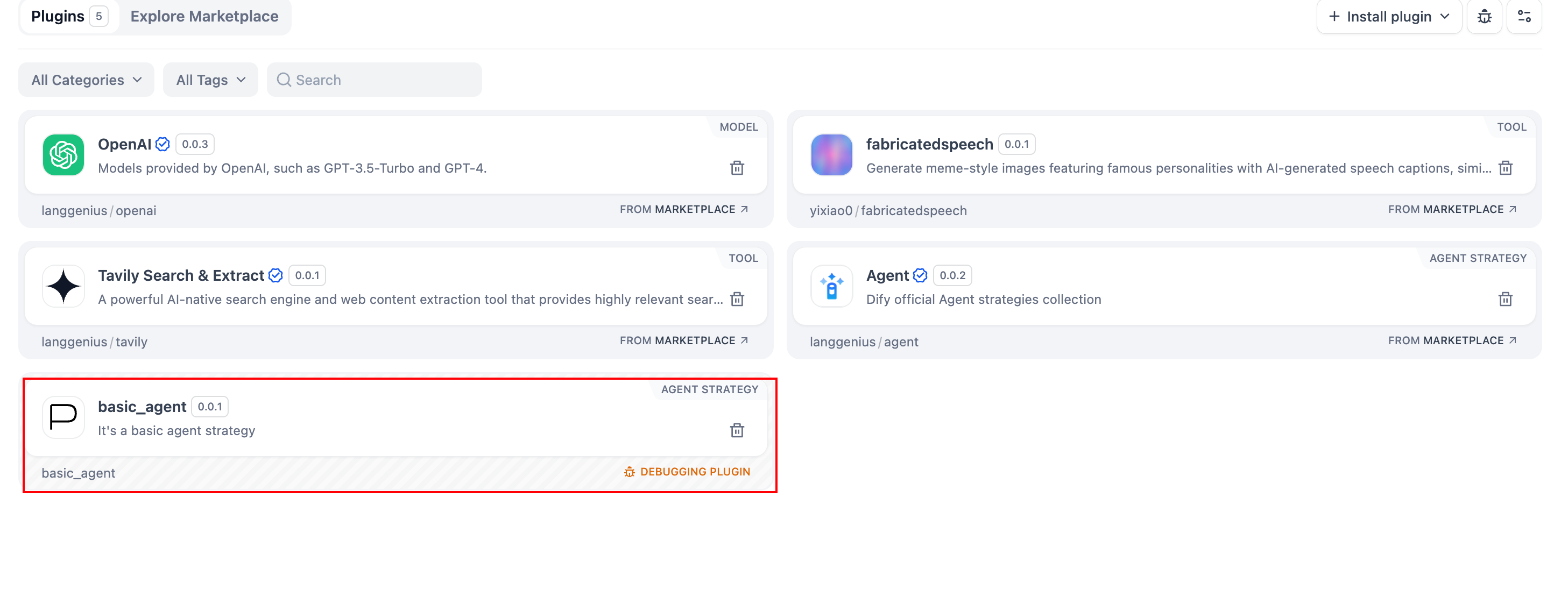
6. 调试插件
声明文件和实现代码完成后,验证插件能否正常运行。Dify 支持远程调试:前往 插件管理 获取调试密钥和远程服务器地址。
.env.example 复制为 .env,并填入远程服务器地址和调试密钥。
INSTALL_METHOD=remote
REMOTE_INSTALL_URL=debug.dify.ai:5003
REMOTE_INSTALL_KEY=********-****-****-****-************
python -m main
打包插件(可选)
一切正常后,运行以下命令打包你的插件:# Replace ./basic_agent/ with your actual plugin project path.
dify plugin package ./basic_agent/
basic_agent.difypkg(与你的插件名称匹配)的文件。这就是你的最终插件包。
恭喜!你已经开发、测试并打包了你的 Agent 策略插件。