

このドキュメントは AI によって自動翻訳されています。不正確な部分がある場合は、英語版 を参照してください。エージェント戦略プラグインは、ツールの選択・呼び出しと結果の処理という推論・意思決定ロジックを LLM に与え、自律的に問題を解決できるようにします。 本ガイドでは、モデルが自分で現在時刻を取得する Function Calling 戦略を構築します。
前提条件
- Difyプラグインスキャフォールディングツール
- Python環境(バージョン 3.12)
ターミナルで
dify version を実行して、スキャフォールディングツールがインストールされていることを確認してください。1. プラグインテンプレートの初期化
以下のコマンドを実行して、エージェントプラグインの開発テンプレートを作成します:dify plugin init
➜  Dify Plugins Developing dify plugin init
Edit profile of the plugin
Plugin name (press Enter to next step): # プラグイン名を入力
Author (press Enter to next step): Author name # プラグイン作成者を入力
Description (press Enter to next step): Description # プラグインの説明を入力
---
Select the language you want to use for plugin development, and press Enter to con
BTW, you need Python 3.12+ to develop the Plugin if you choose Python.
-> python # Python環境を選択
  go (not supported yet)
---
Based on the ability you want to extend, we have divided the Plugin into four type

- Tool: It's a tool provider, but not only limited to tools, you can implement an
- Model: Just a model provider, extending others is not allowed.
- Extension: Other times, you may only need a simple http service to extend the fu
- Agent Strategy: Implement your own logics here, just by focusing on Agent itself

What's more, we have provided the template for you, you can choose one of them b
  tool
-> agent-strategy # エージェント戦略テンプレートを選択
  llm
  text-embedding
---
Configure the permissions of the plugin, use up and down to navigate, tab to sel
Backwards Invocation:
Tools:
    Enabled: [✔]  You can invoke tools inside Dify if it's enabled # デフォルトで有効
Models:
    Enabled: [✔]  You can invoke models inside Dify if it's enabled # デフォルトで有効
    LLM: [✔]  You can invoke LLM models inside Dify if it's enabled # デフォルトで有効
    Text Embedding: [✘]  You can invoke text embedding models inside Dify if it'
    Rerank: [✘]  You can invoke rerank models inside Dify if it's enabled
...
├── GUIDE.md               # ユーザーガイドとドキュメント
├── PRIVACY.md             # プライバシーポリシーとデータ処理ガイドライン
├── README.md              # プロジェクト概要とセットアップ手順
├── _assets/               # 静的アセットディレクトリ
│   └── icon.svg           # エージェント戦略プロバイダーのアイコン/ロゴ
├── main.py                # メインアプリケーションエントリーポイント
├── manifest.yaml          # 基本プラグイン設定
├── provider/              # プロバイダー設定ディレクトリ
│   └── basic_agent.yaml   # エージェントプロバイダー設定
├── requirements.txt       # Python依存関係リスト
└── strategies/            # 戦略実装ディレクトリ
    ├── basic_agent.py     # 基本エージェント戦略の実装
    └── basic_agent.yaml   # 基本エージェント戦略の設定
strategies/ディレクトリにあります。
2. プラグインの開発
エージェント戦略プラグインの開発は、2つのファイルを中心に行われます:- プラグイン宣言:
strategies/basic_agent.yaml - プラグイン実装:
strategies/basic_agent.py
2.1 パラメータの定義
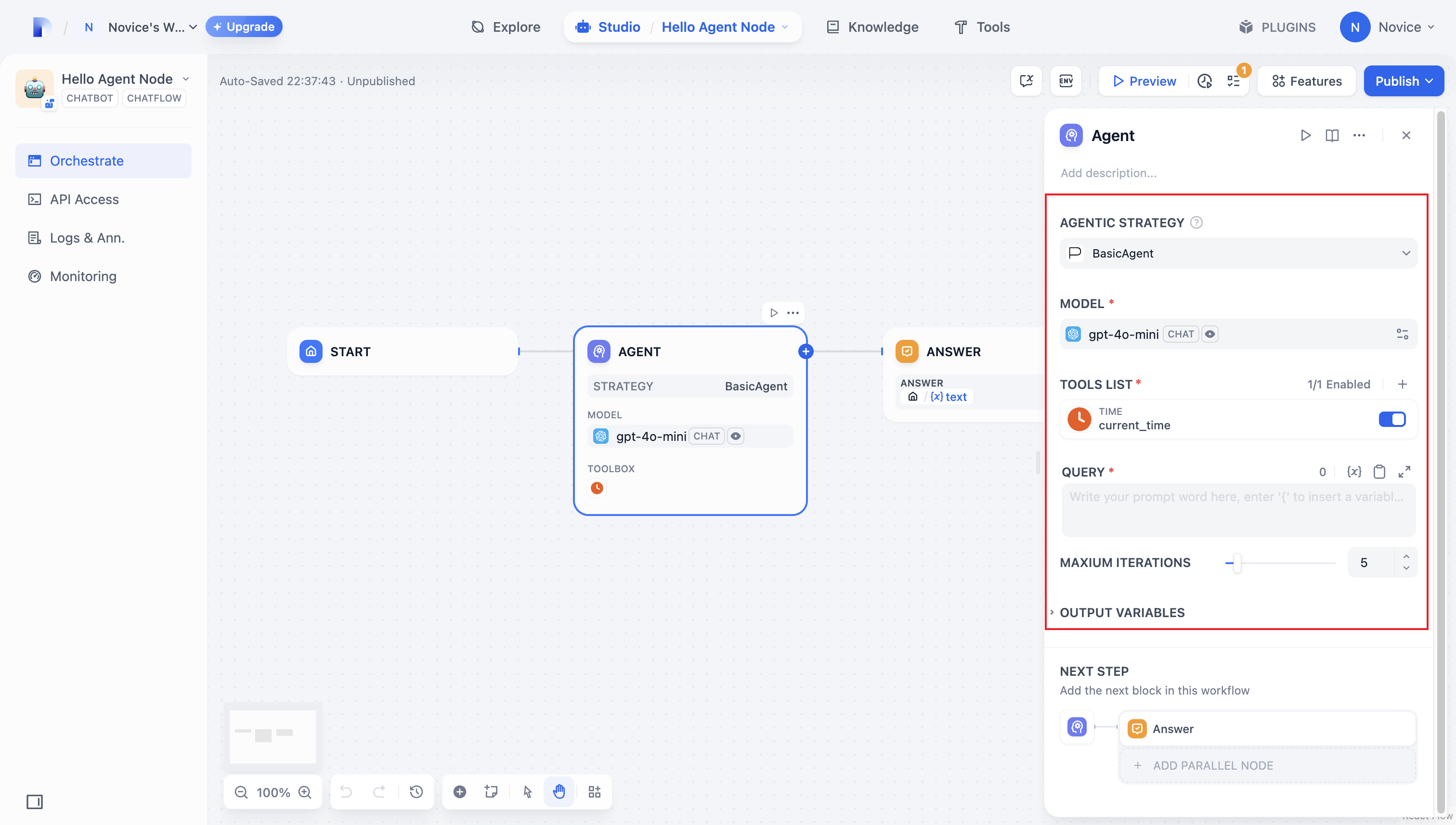
まずstrategies/basic_agent.yaml でプラグインのパラメータを宣言します。これらのパラメータは、LLM の呼び出しやツールの使用など、プラグインのコア機能を支えます。
最初は以下の 4 つのパラメータから始めることをお勧めします:
model: 呼び出す大規模言語モデル(例:GPT-4、GPT-4o-mini)。tools: プラグインの機能を拡張するツールのリスト。query: モデルに送信されるユーザー入力またはプロンプトの内容。maximum_iterations: 過度な計算を防ぐための最大イテレーション数。
identity:
  name: basic_agent # the name of the agent_strategy
  author: novice # the author of the agent_strategy
  label:
    en_US: BasicAgent # the English label of the agent_strategy
description:
  en_US: BasicAgent # the English description of the agent_strategy
parameters:
  - name: model # the name of the model parameter
    type: model-selector # model-type
    scope: tool-call&llm # the scope of the parameter
    required: true
    label:
      en_US: Model
      zh_Hans: 模型
      pt_BR: Model
  - name: tools # the name of the tools parameter
    type: array[tools] # the type of tool parameter
    required: true
    label:
      en_US: Tools list
      zh_Hans: 工具列表
      pt_BR: Tools list
  - name: query # the name of the query parameter
    type: string # the type of query parameter
    required: true
    label:
      en_US: Query
      zh_Hans: 查询
      pt_BR: Query
  - name: maximum_iterations
    type: number
    required: false
    default: 5
    label:
      en_US: Maxium Iterations
      zh_Hans: 最大迭代次数
      pt_BR: Maxium Iterations
    max: 50 # if you set the max and min value, the display of the parameter will be a slider
    min: 1
extra:
  python:
    source: strategies/basic_agent.py
2.2 パラメータの取得と実行
ユーザーがこれらのフィールドを入力すると、プラグインは送信された値を受け取ります。strategies/basic_agent.py で、受信パラメータを検証する Pydantic モデルを定義します:
from dify_plugin.entities.agent import AgentInvokeMessage
from dify_plugin.interfaces.agent import AgentModelConfig, AgentStrategy, ToolEntity
from pydantic import BaseModel

class BasicParams(BaseModel):
    maximum_iterations: int
    model: AgentModelConfig
    tools: list[ToolEntity]
    query: str
_invoke でパラメータを解析し、戦略ロジックを実行します:
class BasicAgentAgentStrategy(AgentStrategy):
    def _invoke(self, parameters: dict[str, Any]) -> Generator[AgentInvokeMessage]:
        params = BasicParams(**parameters)
3. モデルの呼び出し
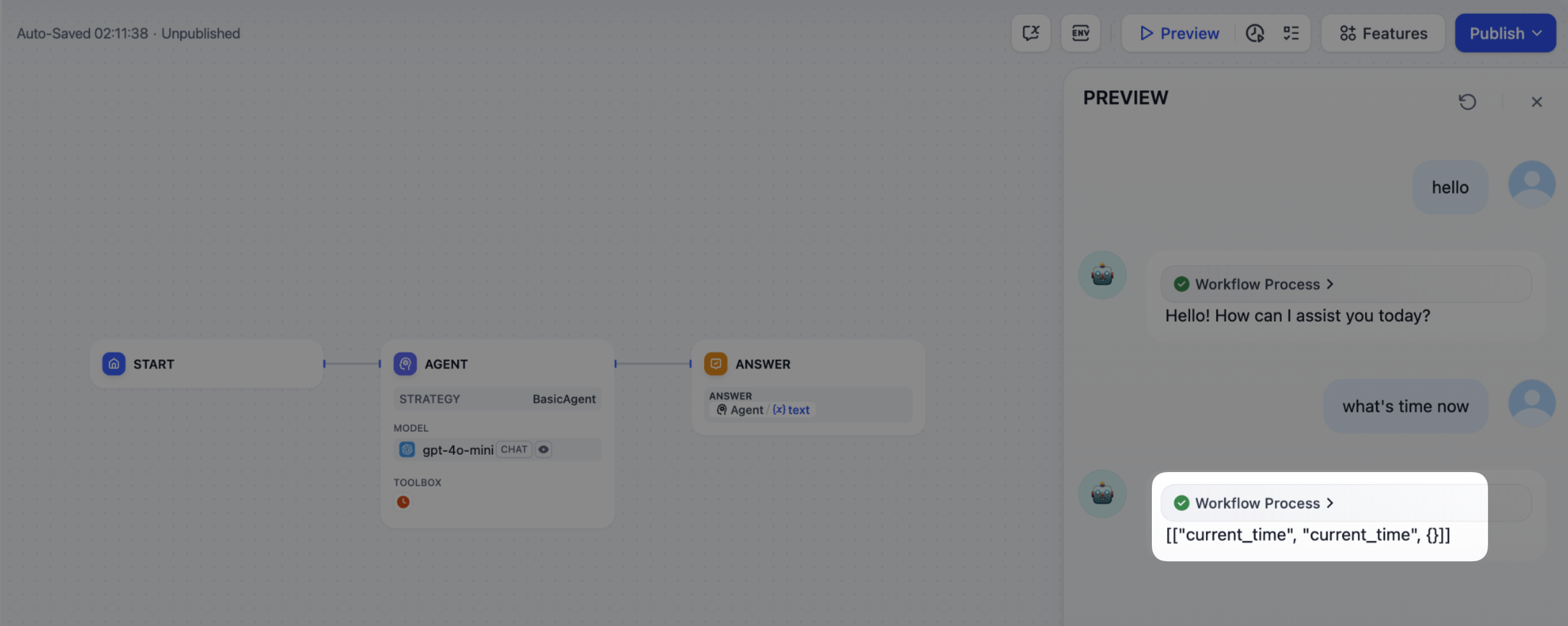
モデルの呼び出しはエージェント戦略の中心です。SDK のsession.model.llm.invoke() を使用して、テキスト生成や対話などのために LLM を呼び出します。
LLM にツール呼び出しを駆動させるには、各ツールのインターフェースに一致する構造化された引数、つまりユーザーの指示から導き出した、ツールが受け入れ可能な入力を出力する必要があります。
このメソッドは以下のパラメータを受け取ります:
modelprompt_messagestoolsstopstream
def invoke(
        self,
        model_config: LLMModelConfig,
        prompt_messages: list[PromptMessage],
        tools: list[PromptMessageTool] | None = None,
        stop: list[str] | None = None,
        stream: bool = True,
    ) -> Generator[LLMResultChunk, None, None] | LLMResult:...
4. ツールの呼び出し
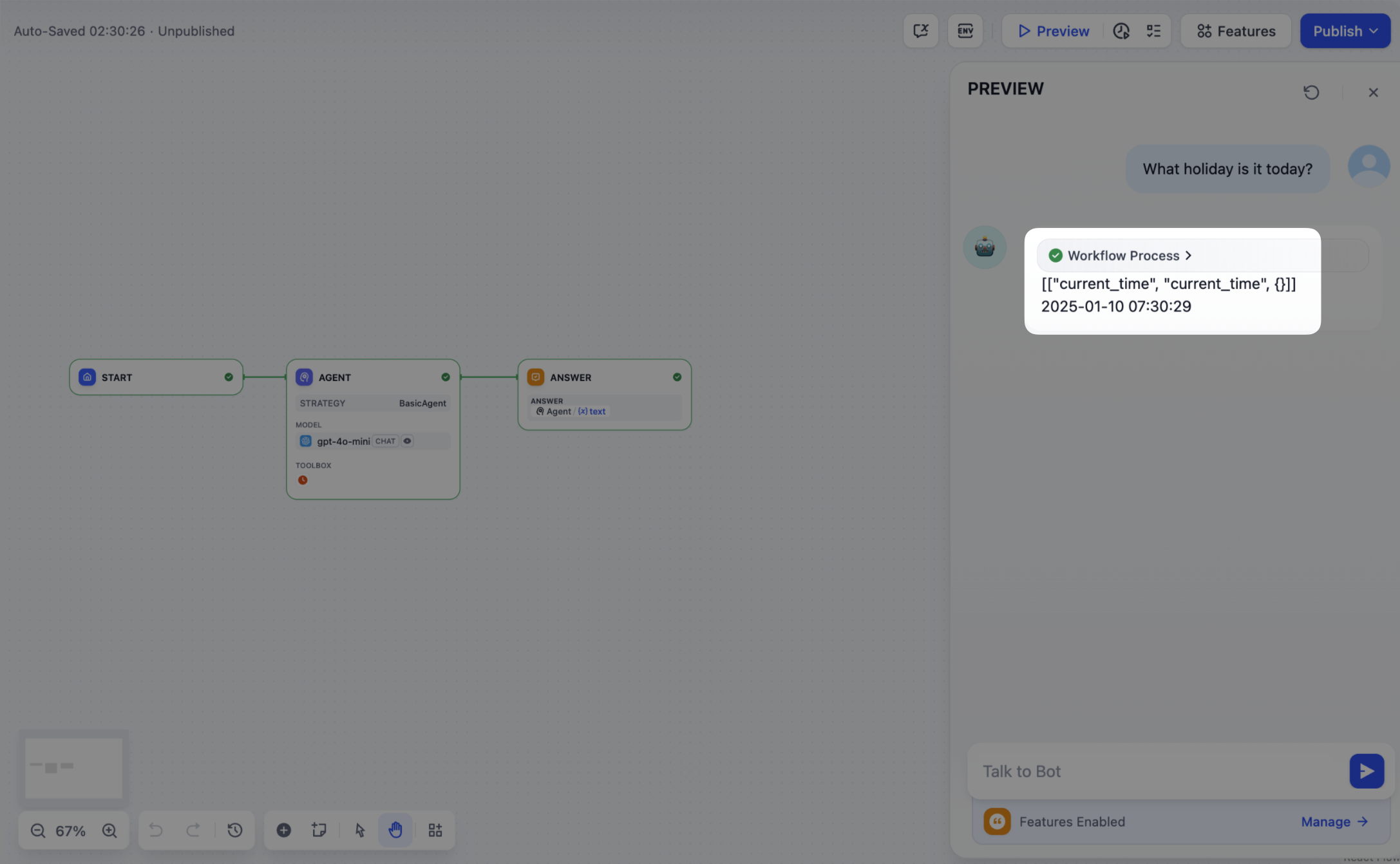
モデルがツールパラメータを生成した後、プラグインは実際にこれらのツールを呼び出す必要があります。session.tool.invoke() を使用してこれらのリクエストを行います。
このメソッドは以下のパラメータを受け取ります:
providertool_nameparameters
 def invoke(
        self,
        provider_type: ToolProviderType,
        provider: str,
        tool_name: str,
        parameters: dict[str, Any],
    ) -> Generator[ToolInvokeMessage, None, None]:...
tool_instances = (
    {tool.identity.name: tool for tool in params.tools} if params.tools else {}
)
for tool_call_id, tool_call_name, tool_call_args in tool_calls:
    tool_instance = tool_instances[tool_call_name]
    self.session.tool.invoke(
        provider_type=ToolProviderType.BUILT_IN,
        provider=tool_instance.identity.provider,
        tool_name=tool_instance.identity.name,
        parameters={**tool_instance.runtime_parameters, **tool_call_args},
    )
5. ログの作成
複雑なタスクには通常、複数のステップが必要です。決定を分析して戦略を改善するには、各ステップの結果を追跡する必要があります。SDK のcreate_log_message と finish_log_message を使用すると、各呼び出しの前後で状態を記録でき、問題診断が速くなります。
例えば:
- モデルを呼び出す前に「モデル呼び出しを開始」というメッセージをログに記録し、実行進捗を示します。
- モデルが応答したら「呼び出し成功」というメッセージをログに記録し、出力をエンドツーエンドで追跡できるようにします。
model_log = self.create_log_message(
            label=f"{params.model.model} Thought",
            data={},
            metadata={"start_at": model_started_at, "provider": params.model.provider},
            status=ToolInvokeMessage.LogMessage.LogStatus.START,
        )
yield model_log
self.session.model.llm.invoke(...)
yield self.finish_log_message(
    log=model_log,
    data={
        "output": response,
        "tool_name": tool_call_names,
        "tool_input": tool_call_inputs,
    },
    metadata={
        "started_at": model_started_at,
        "finished_at": time.perf_counter(),
        "elapsed_time": time.perf_counter() - model_started_at,
        "provider": params.model.provider,
    },
)
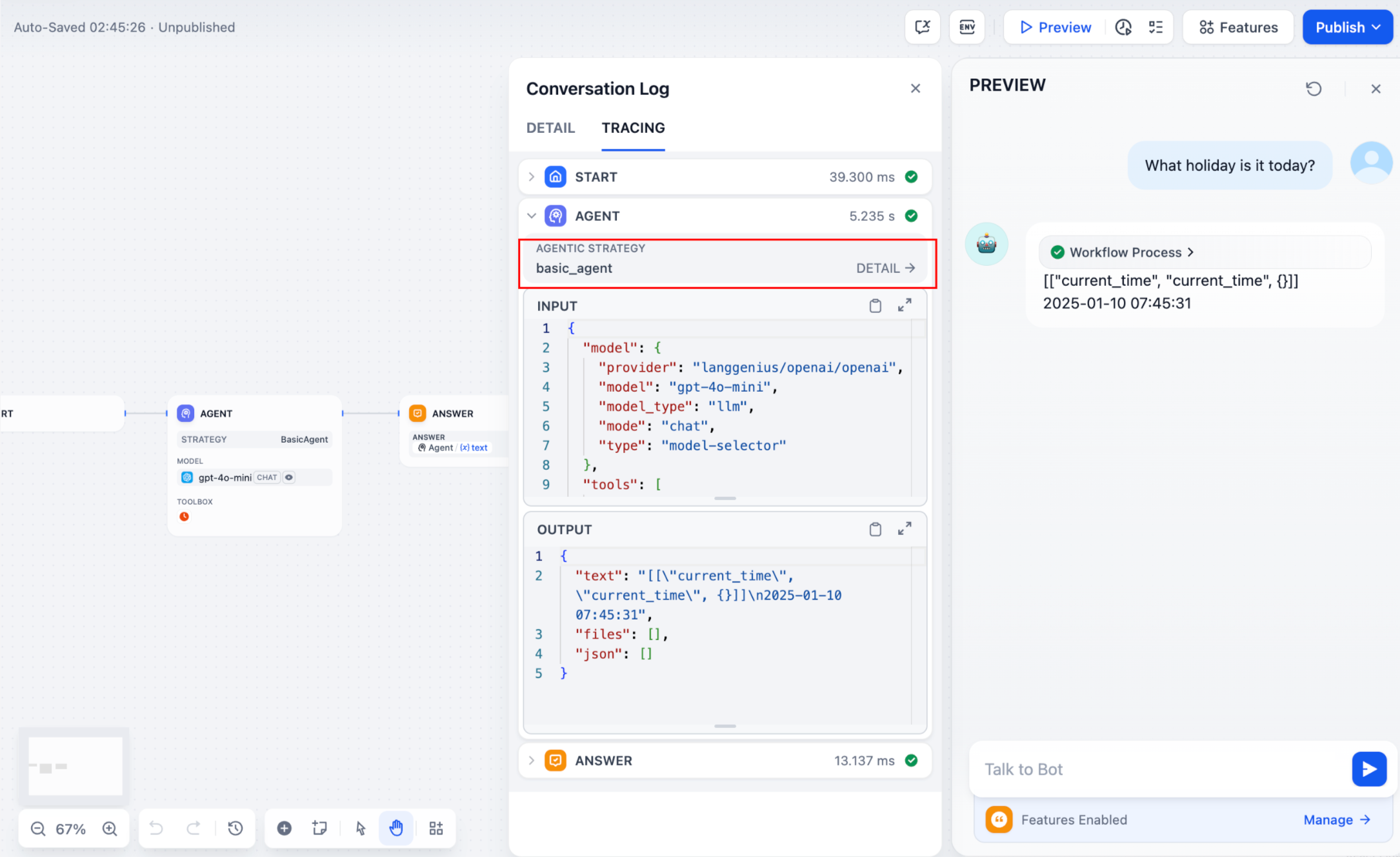
parent パラメータを設定してログを階層的にネストし、追跡しやすくします:
function_call_round_log = self.create_log_message(
    label="Function Call Round1 ",
    data={},
    metadata={},
)
yield function_call_round_log

model_log = self.create_log_message(
    label=f"{params.model.model} Thought",
    data={},
    metadata={"start_at": model_started_at, "provider": params.model.provider},
    status=ToolInvokeMessage.LogMessage.LogStatus.START,
    # add parent log
    parent=function_call_round_log,
)
yield model_log
サンプルコード
- モデルの呼び出し
- ツールの処理
- 完全な機能コードの例
以下のコードは、エージェント戦略プラグインにモデルを呼び出す機能を付与します:
import json
from collections.abc import Generator
from typing import Any, cast

from dify_plugin.entities.agent import AgentInvokeMessage
from dify_plugin.entities.model.llm import LLMModelConfig, LLMResult, LLMResultChunk
from dify_plugin.entities.model.message import (
    PromptMessageTool,
    UserPromptMessage,
)
from dify_plugin.entities.tool import ToolInvokeMessage, ToolParameter, ToolProviderType
from dify_plugin.interfaces.agent import AgentModelConfig, AgentStrategy, ToolEntity
from pydantic import BaseModel

class BasicParams(BaseModel):
    maximum_iterations: int
    model: AgentModelConfig
    tools: list[ToolEntity]
    query: str

class BasicAgentAgentStrategy(AgentStrategy):
    def _invoke(self, parameters: dict[str, Any]) -> Generator[AgentInvokeMessage]:
        params = BasicParams(**parameters)
        chunks: Generator[LLMResultChunk, None, None] | LLMResult = (
            self.session.model.llm.invoke(
                model_config=LLMModelConfig(**params.model.model_dump(mode="json")),
                prompt_messages=[UserPromptMessage(content=params.query)],
                tools=[
                    self._convert_tool_to_prompt_message_tool(tool)
                    for tool in params.tools
                ],
                stop=params.model.completion_params.get("stop", [])
                if params.model.completion_params
                else [],
                stream=True,
            )
        )
        response = ""
        tool_calls = []
        tool_instances = (
            {tool.identity.name: tool for tool in params.tools} if params.tools else {}
        )

        for chunk in chunks:
            # check if there is any tool call
            if self.check_tool_calls(chunk):
                tool_calls = self.extract_tool_calls(chunk)
                tool_call_names = ";".join([tool_call[1] for tool_call in tool_calls])
                try:
                    tool_call_inputs = json.dumps(
                        {tool_call[1]: tool_call[2] for tool_call in tool_calls},
                        ensure_ascii=False,
                    )
                except json.JSONDecodeError:
                    # ensure ascii to avoid encoding error
                    tool_call_inputs = json.dumps(
                        {tool_call[1]: tool_call[2] for tool_call in tool_calls}
                    )
                print(tool_call_names, tool_call_inputs)
            if chunk.delta.message and chunk.delta.message.content:
                if isinstance(chunk.delta.message.content, list):
                    for content in chunk.delta.message.content:
                        response += content.data
                        print(content.data, end="", flush=True)
                else:
                    response += str(chunk.delta.message.content)
                    print(str(chunk.delta.message.content), end="", flush=True)

            if chunk.delta.usage:
                # usage of the model
                usage = chunk.delta.usage

        yield self.create_text_message(
            text=f"{response or json.dumps(tool_calls, ensure_ascii=False)}\n"
        )
        result = ""
        for tool_call_id, tool_call_name, tool_call_args in tool_calls:
            tool_instance = tool_instances[tool_call_name]
            tool_invoke_responses = self.session.tool.invoke(
                provider_type=ToolProviderType.BUILT_IN,
                provider=tool_instance.identity.provider,
                tool_name=tool_instance.identity.name,
                parameters={**tool_instance.runtime_parameters, **tool_call_args},
            )
            if not tool_instance:
                tool_invoke_responses = {
                    "tool_call_id": tool_call_id,
                    "tool_call_name": tool_call_name,
                    "tool_response": f"there is not a tool named {tool_call_name}",
                }
            else:
                # invoke tool
                tool_invoke_responses = self.session.tool.invoke(
                    provider_type=ToolProviderType.BUILT_IN,
                    provider=tool_instance.identity.provider,
                    tool_name=tool_instance.identity.name,
                    parameters={**tool_instance.runtime_parameters, **tool_call_args},
                )
                result = ""
                for tool_invoke_response in tool_invoke_responses:
                    if tool_invoke_response.type == ToolInvokeMessage.MessageType.TEXT:
                        result += cast(
                            ToolInvokeMessage.TextMessage, tool_invoke_response.message
                        ).text
                    elif (
                        tool_invoke_response.type == ToolInvokeMessage.MessageType.LINK
                    ):
                        result += (
                            f"result link: {cast(ToolInvokeMessage.TextMessage, tool_invoke_response.message).text}."
                            + " please tell user to check it."
                        )
                    elif tool_invoke_response.type in {
                        ToolInvokeMessage.MessageType.IMAGE_LINK,
                        ToolInvokeMessage.MessageType.IMAGE,
                    }:
                        result += (
                            "image has been created and sent to user already, "
                            + "you do not need to create it, just tell the user to check it now."
                        )
                    elif (
                        tool_invoke_response.type == ToolInvokeMessage.MessageType.JSON
                    ):
                        text = json.dumps(
                            cast(
                                ToolInvokeMessage.JsonMessage,
                                tool_invoke_response.message,
                            ).json_object,
                            ensure_ascii=False,
                        )
                        result += f"tool response: {text}."
                    else:
                        result += f"tool response: {tool_invoke_response.message!r}."

                tool_response = {
                    "tool_call_id": tool_call_id,
                    "tool_call_name": tool_call_name,
                    "tool_response": result,
                }
        yield self.create_text_message(result)

    def _convert_tool_to_prompt_message_tool(
        self, tool: ToolEntity
    ) -> PromptMessageTool:
        """
        convert tool to prompt message tool
        """
        message_tool = PromptMessageTool(
            name=tool.identity.name,
            description=tool.description.llm if tool.description else "",
            parameters={
                "type": "object",
                "properties": {},
                "required": [],
            },
        )

        parameters = tool.parameters
        for parameter in parameters:
            if parameter.form != ToolParameter.ToolParameterForm.LLM:
                continue

            parameter_type = parameter.type
            if parameter.type in {
                ToolParameter.ToolParameterType.FILE,
                ToolParameter.ToolParameterType.FILES,
            }:
                continue
            enum = []
            if parameter.type == ToolParameter.ToolParameterType.SELECT:
                enum = (
                    [option.value for option in parameter.options]
                    if parameter.options
                    else []
                )

            message_tool.parameters["properties"][parameter.name] = {
                "type": parameter_type,
                "description": parameter.llm_description or "",
            }

            if len(enum) > 0:
                message_tool.parameters["properties"][parameter.name]["enum"] = enum

            if parameter.required:
                message_tool.parameters["required"].append(parameter.name)

        return message_tool

    def check_tool_calls(self, llm_result_chunk: LLMResultChunk) -> bool:
        """
        Check if there is any tool call in llm result chunk
        """
        return bool(llm_result_chunk.delta.message.tool_calls)

    def extract_tool_calls(
        self, llm_result_chunk: LLMResultChunk
    ) -> list[tuple[str, str, dict[str, Any]]]:
        """
        Extract tool calls from llm result chunk

        Returns:
            List[Tuple[str, str, Dict[str, Any]]]: [(tool_call_id, tool_call_name, tool_call_args)]
        """
        tool_calls = []
        for prompt_message in llm_result_chunk.delta.message.tool_calls:
            args = {}
            if prompt_message.function.arguments != "":
                args = json.loads(prompt_message.function.arguments)

            tool_calls.append(
                (
                    prompt_message.id,
                    prompt_message.function.name,
                    args,
                )
            )

        return tool_calls
以下のコードは、モデルを呼び出し、モデルが選択したツールに整形済みのリクエストを送信します:
import json
from collections.abc import Generator
from typing import Any, cast

from dify_plugin.entities.agent import AgentInvokeMessage
from dify_plugin.entities.model.llm import LLMModelConfig, LLMResult, LLMResultChunk
from dify_plugin.entities.model.message import (
    PromptMessageTool,
    UserPromptMessage,
)
from dify_plugin.entities.tool import ToolInvokeMessage, ToolParameter, ToolProviderType
from dify_plugin.interfaces.agent import AgentModelConfig, AgentStrategy, ToolEntity
from pydantic import BaseModel

class BasicParams(BaseModel):
    maximum_iterations: int
    model: AgentModelConfig
    tools: list[ToolEntity]
    query: str

class BasicAgentAgentStrategy(AgentStrategy):
    def _invoke(self, parameters: dict[str, Any]) -> Generator[AgentInvokeMessage]:
        params = BasicParams(**parameters)
        chunks: Generator[LLMResultChunk, None, None] | LLMResult = (
            self.session.model.llm.invoke(
                model_config=LLMModelConfig(**params.model.model_dump(mode="json")),
                prompt_messages=[UserPromptMessage(content=params.query)],
                tools=[
                    self._convert_tool_to_prompt_message_tool(tool)
                    for tool in params.tools
                ],
                stop=params.model.completion_params.get("stop", [])
                if params.model.completion_params
                else [],
                stream=True,
            )
        )
        response = ""
        tool_calls = []
        tool_instances = (
            {tool.identity.name: tool for tool in params.tools} if params.tools else {}
        )

        for chunk in chunks:
            # check if there is any tool call
            if self.check_tool_calls(chunk):
                tool_calls = self.extract_tool_calls(chunk)
                tool_call_names = ";".join([tool_call[1] for tool_call in tool_calls])
                try:
                    tool_call_inputs = json.dumps(
                        {tool_call[1]: tool_call[2] for tool_call in tool_calls},
                        ensure_ascii=False,
                    )
                except json.JSONDecodeError:
                    # ensure ascii to avoid encoding error
                    tool_call_inputs = json.dumps(
                        {tool_call[1]: tool_call[2] for tool_call in tool_calls}
                    )
                print(tool_call_names, tool_call_inputs)
            if chunk.delta.message and chunk.delta.message.content:
                if isinstance(chunk.delta.message.content, list):
                    for content in chunk.delta.message.content:
                        response += content.data
                        print(content.data, end="", flush=True)
                else:
                    response += str(chunk.delta.message.content)
                    print(str(chunk.delta.message.content), end="", flush=True)

            if chunk.delta.usage:
                # usage of the model
                usage = chunk.delta.usage

        yield self.create_text_message(
            text=f"{response or json.dumps(tool_calls, ensure_ascii=False)}\n"
        )
        result = ""
        for tool_call_id, tool_call_name, tool_call_args in tool_calls:
            tool_instance = tool_instances[tool_call_name]
            tool_invoke_responses = self.session.tool.invoke(
                provider_type=ToolProviderType.BUILT_IN,
                provider=tool_instance.identity.provider,
                tool_name=tool_instance.identity.name,
                parameters={**tool_instance.runtime_parameters, **tool_call_args},
            )
            if not tool_instance:
                tool_invoke_responses = {
                    "tool_call_id": tool_call_id,
                    "tool_call_name": tool_call_name,
                    "tool_response": f"there is not a tool named {tool_call_name}",
                }
            else:
                # invoke tool
                tool_invoke_responses = self.session.tool.invoke(
                    provider_type=ToolProviderType.BUILT_IN,
                    provider=tool_instance.identity.provider,
                    tool_name=tool_instance.identity.name,
                    parameters={**tool_instance.runtime_parameters, **tool_call_args},
                )
                result = ""
                for tool_invoke_response in tool_invoke_responses:
                    if tool_invoke_response.type == ToolInvokeMessage.MessageType.TEXT:
                        result += cast(
                            ToolInvokeMessage.TextMessage, tool_invoke_response.message
                        ).text
                    elif (
                        tool_invoke_response.type == ToolInvokeMessage.MessageType.LINK
                    ):
                        result += (
                            f"result link: {cast(ToolInvokeMessage.TextMessage, tool_invoke_response.message).text}."
                            + " please tell user to check it."
                        )
                    elif tool_invoke_response.type in {
                        ToolInvokeMessage.MessageType.IMAGE_LINK,
                        ToolInvokeMessage.MessageType.IMAGE,
                    }:
                        result += (
                            "image has been created and sent to user already, "
                            + "you do not need to create it, just tell the user to check it now."
                        )
                    elif (
                        tool_invoke_response.type == ToolInvokeMessage.MessageType.JSON
                    ):
                        text = json.dumps(
                            cast(
                                ToolInvokeMessage.JsonMessage,
                                tool_invoke_response.message,
                            ).json_object,
                            ensure_ascii=False,
                        )
                        result += f"tool response: {text}."
                    else:
                        result += f"tool response: {tool_invoke_response.message!r}."

                tool_response = {
                    "tool_call_id": tool_call_id,
                    "tool_call_name": tool_call_name,
                    "tool_response": result,
                }
        yield self.create_text_message(result)

    def _convert_tool_to_prompt_message_tool(
        self, tool: ToolEntity
    ) -> PromptMessageTool:
        """
        convert tool to prompt message tool
        """
        message_tool = PromptMessageTool(
            name=tool.identity.name,
            description=tool.description.llm if tool.description else "",
            parameters={
                "type": "object",
                "properties": {},
                "required": [],
            },
        )

        parameters = tool.parameters
        for parameter in parameters:
            if parameter.form != ToolParameter.ToolParameterForm.LLM:
                continue

            parameter_type = parameter.type
            if parameter.type in {
                ToolParameter.ToolParameterType.FILE,
                ToolParameter.ToolParameterType.FILES,
            }:
                continue
            enum = []
            if parameter.type == ToolParameter.ToolParameterType.SELECT:
                enum = (
                    [option.value for option in parameter.options]
                    if parameter.options
                    else []
                )

            message_tool.parameters["properties"][parameter.name] = {
                "type": parameter_type,
                "description": parameter.llm_description or "",
            }

            if len(enum) > 0:
                message_tool.parameters["properties"][parameter.name]["enum"] = enum

            if parameter.required:
                message_tool.parameters["required"].append(parameter.name)

        return message_tool

    def check_tool_calls(self, llm_result_chunk: LLMResultChunk) -> bool:
        """
        Check if there is any tool call in llm result chunk
        """
        return bool(llm_result_chunk.delta.message.tool_calls)

    def extract_tool_calls(
        self, llm_result_chunk: LLMResultChunk
    ) -> list[tuple[str, str, dict[str, Any]]]:
        """
        Extract tool calls from llm result chunk

        Returns:
            List[Tuple[str, str, Dict[str, Any]]]: [(tool_call_id, tool_call_name, tool_call_args)]
        """
        tool_calls = []
        for prompt_message in llm_result_chunk.delta.message.tool_calls:
            args = {}
            if prompt_message.function.arguments != "":
                args = json.loads(prompt_message.function.arguments)

            tool_calls.append(
                (
                    prompt_message.id,
                    prompt_message.function.name,
                    args,
                )
            )

        return tool_calls
モデルの呼び出し、ツールの処理、複数ラウンドのログ記録を網羅した完全なサンプル:
import json
import time
from collections.abc import Generator
from typing import Any, cast

from dify_plugin.entities.agent import AgentInvokeMessage
from dify_plugin.entities.model.llm import LLMModelConfig, LLMResult, LLMResultChunk
from dify_plugin.entities.model.message import (
    PromptMessageTool,
    UserPromptMessage,
)
from dify_plugin.entities.tool import ToolInvokeMessage, ToolParameter, ToolProviderType
from dify_plugin.interfaces.agent import AgentModelConfig, AgentStrategy, ToolEntity
from pydantic import BaseModel

class BasicParams(BaseModel):
    maximum_iterations: int
    model: AgentModelConfig
    tools: list[ToolEntity]
    query: str

class BasicAgentAgentStrategy(AgentStrategy):
    def _invoke(self, parameters: dict[str, Any]) -> Generator[AgentInvokeMessage]:
        params = BasicParams(**parameters)
        function_call_round_log = self.create_log_message(
            label="Function Call Round1 ",
            data={},
            metadata={},
        )
        yield function_call_round_log
        model_started_at = time.perf_counter()
        model_log = self.create_log_message(
            label=f"{params.model.model} Thought",
            data={},
            metadata={"start_at": model_started_at, "provider": params.model.provider},
            status=ToolInvokeMessage.LogMessage.LogStatus.START,
            parent=function_call_round_log,
        )
        yield model_log
        chunks: Generator[LLMResultChunk, None, None] | LLMResult = (
            self.session.model.llm.invoke(
                model_config=LLMModelConfig(**params.model.model_dump(mode="json")),
                prompt_messages=[UserPromptMessage(content=params.query)],
                tools=[
                    self._convert_tool_to_prompt_message_tool(tool)
                    for tool in params.tools
                ],
                stop=params.model.completion_params.get("stop", [])
                if params.model.completion_params
                else [],
                stream=True,
            )
        )
        response = ""
        tool_calls = []
        tool_instances = (
            {tool.identity.name: tool for tool in params.tools} if params.tools else {}
        )
        tool_call_names = ""
        tool_call_inputs = ""
        for chunk in chunks:
            # check if there is any tool call
            if self.check_tool_calls(chunk):
                tool_calls = self.extract_tool_calls(chunk)
                tool_call_names = ";".join([tool_call[1] for tool_call in tool_calls])
                try:
                    tool_call_inputs = json.dumps(
                        {tool_call[1]: tool_call[2] for tool_call in tool_calls},
                        ensure_ascii=False,
                    )
                except json.JSONDecodeError:
                    # ensure ascii to avoid encoding error
                    tool_call_inputs = json.dumps(
                        {tool_call[1]: tool_call[2] for tool_call in tool_calls}
                    )
                print(tool_call_names, tool_call_inputs)
            if chunk.delta.message and chunk.delta.message.content:
                if isinstance(chunk.delta.message.content, list):
                    for content in chunk.delta.message.content:
                        response += content.data
                        print(content.data, end="", flush=True)
                else:
                    response += str(chunk.delta.message.content)
                    print(str(chunk.delta.message.content), end="", flush=True)

            if chunk.delta.usage:
                # usage of the model
                usage = chunk.delta.usage

        yield self.finish_log_message(
            log=model_log,
            data={
                "output": response,
                "tool_name": tool_call_names,
                "tool_input": tool_call_inputs,
            },
            metadata={
                "started_at": model_started_at,
                "finished_at": time.perf_counter(),
                "elapsed_time": time.perf_counter() - model_started_at,
                "provider": params.model.provider,
            },
        )
        yield self.create_text_message(
            text=f"{response or json.dumps(tool_calls, ensure_ascii=False)}\n"
        )
        result = ""
        for tool_call_id, tool_call_name, tool_call_args in tool_calls:
            tool_instance = tool_instances[tool_call_name]
            tool_invoke_responses = self.session.tool.invoke(
                provider_type=ToolProviderType.BUILT_IN,
                provider=tool_instance.identity.provider,
                tool_name=tool_instance.identity.name,
                parameters={**tool_instance.runtime_parameters, **tool_call_args},
            )
            if not tool_instance:
                tool_invoke_responses = {
                    "tool_call_id": tool_call_id,
                    "tool_call_name": tool_call_name,
                    "tool_response": f"there is not a tool named {tool_call_name}",
                }
            else:
                # invoke tool
                tool_invoke_responses = self.session.tool.invoke(
                    provider_type=ToolProviderType.BUILT_IN,
                    provider=tool_instance.identity.provider,
                    tool_name=tool_instance.identity.name,
                    parameters={**tool_instance.runtime_parameters, **tool_call_args},
                )
                result = ""
                for tool_invoke_response in tool_invoke_responses:
                    if tool_invoke_response.type == ToolInvokeMessage.MessageType.TEXT:
                        result += cast(
                            ToolInvokeMessage.TextMessage, tool_invoke_response.message
                        ).text
                    elif (
                        tool_invoke_response.type == ToolInvokeMessage.MessageType.LINK
                    ):
                        result += (
                            f"result link: {cast(ToolInvokeMessage.TextMessage, tool_invoke_response.message).text}."
                            + " please tell user to check it."
                        )
                    elif tool_invoke_response.type in {
                        ToolInvokeMessage.MessageType.IMAGE_LINK,
                        ToolInvokeMessage.MessageType.IMAGE,
                    }:
                        result += (
                            "image has been created and sent to user already, "
                            + "you do not need to create it, just tell the user to check it now."
                        )
                    elif (
                        tool_invoke_response.type == ToolInvokeMessage.MessageType.JSON
                    ):
                        text = json.dumps(
                            cast(
                                ToolInvokeMessage.JsonMessage,
                                tool_invoke_response.message,
                            ).json_object,
                            ensure_ascii=False,
                        )
                        result += f"tool response: {text}."
                    else:
                        result += f"tool response: {tool_invoke_response.message!r}."

                tool_response = {
                    "tool_call_id": tool_call_id,
                    "tool_call_name": tool_call_name,
                    "tool_response": result,
                }
        yield self.create_text_message(result)

    def _convert_tool_to_prompt_message_tool(
        self, tool: ToolEntity
    ) -> PromptMessageTool:
        """
        convert tool to prompt message tool
        """
        message_tool = PromptMessageTool(
            name=tool.identity.name,
            description=tool.description.llm if tool.description else "",
            parameters={
                "type": "object",
                "properties": {},
                "required": [],
            },
        )

        parameters = tool.parameters
        for parameter in parameters:
            if parameter.form != ToolParameter.ToolParameterForm.LLM:
                continue

            parameter_type = parameter.type
            if parameter.type in {
                ToolParameter.ToolParameterType.FILE,
                ToolParameter.ToolParameterType.FILES,
            }:
                continue
            enum = []
            if parameter.type == ToolParameter.ToolParameterType.SELECT:
                enum = (
                    [option.value for option in parameter.options]
                    if parameter.options
                    else []
                )

            message_tool.parameters["properties"][parameter.name] = {
                "type": parameter_type,
                "description": parameter.llm_description or "",
            }

            if len(enum) > 0:
                message_tool.parameters["properties"][parameter.name]["enum"] = enum

            if parameter.required:
                message_tool.parameters["required"].append(parameter.name)

        return message_tool

    def check_tool_calls(self, llm_result_chunk: LLMResultChunk) -> bool:
        """
        Check if there is any tool call in llm result chunk
        """
        return bool(llm_result_chunk.delta.message.tool_calls)

    def extract_tool_calls(
        self, llm_result_chunk: LLMResultChunk
    ) -> list[tuple[str, str, dict[str, Any]]]:
        """
        Extract tool calls from llm result chunk

        Returns:
            List[Tuple[str, str, Dict[str, Any]]]: [(tool_call_id, tool_call_name, tool_call_args)]
        """
        tool_calls = []
        for prompt_message in llm_result_chunk.delta.message.tool_calls:
            args = {}
            if prompt_message.function.arguments != "":
                args = json.loads(prompt_message.function.arguments)

            tool_calls.append(
                (
                    prompt_message.id,
                    prompt_message.function.name,
                    args,
                )
            )

        return tool_calls
6. プラグインのデバッグ
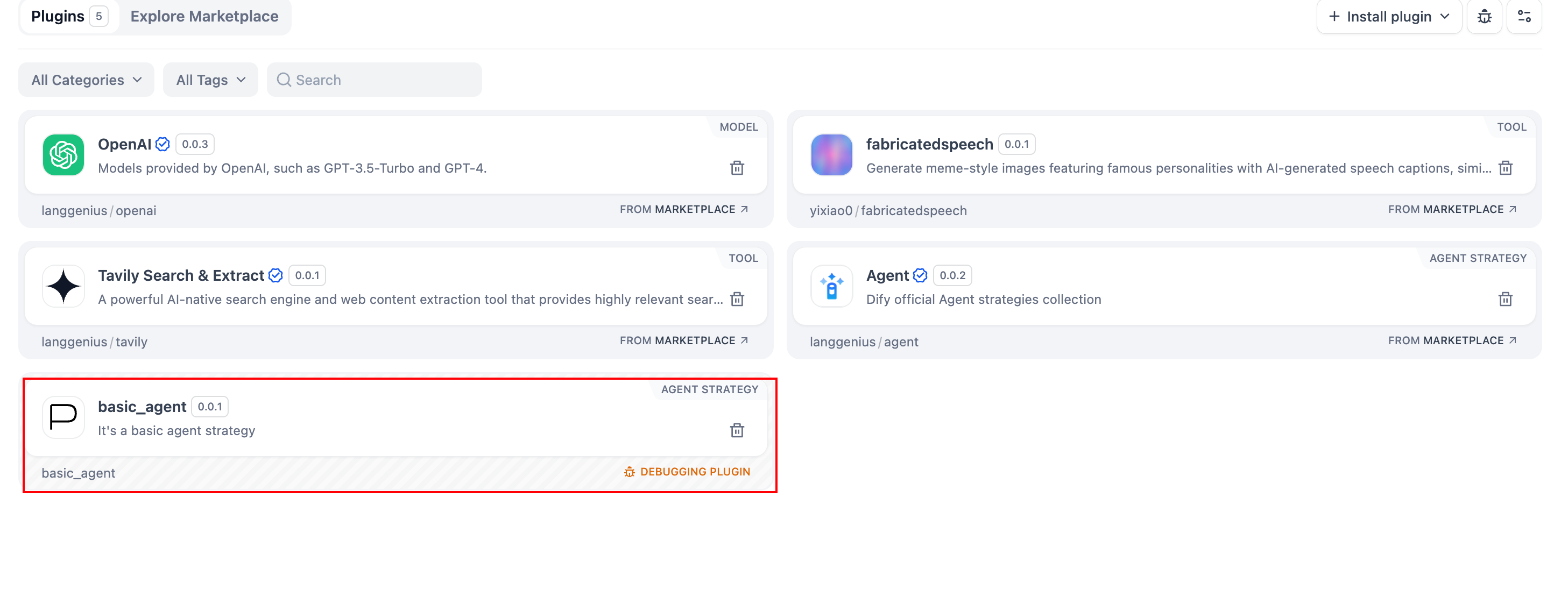
宣言ファイルと実装コードが完成したら、プラグインが正しく動作することを確認します。Dify はリモートデバッグに対応しています。プラグイン管理 に移動して、デバッグキーとリモートサーバーアドレスを取得してください。
.env.example を .env にコピーし、リモートサーバーアドレスとデバッグキーを入力します。
INSTALL_METHOD=remote
REMOTE_INSTALL_URL=debug.dify.ai:5003
REMOTE_INSTALL_KEY=********-****-****-****-************
python -m main
プラグインのパッケージング(オプション)
すべてが正常に動作したら、以下を実行してプラグインをパッケージングします:# ./basic_agent/を実際のプラグインプロジェクトパスに置き換えてください。
dify plugin package ./basic_agent/
basic_agent.difypkg(プラグイン名と一致)という名前のファイルが表示されます。これが最終的なプラグインパッケージです。
おめでとうございます!エージェント戦略プラグインの開発、テスト、パッケージングが完了しました。