What is Alibaba Cloud Monitor
Alibaba Cloud provides a fully managed, maintenance-free observability platform that enables one-click monitoring, tracing, and evaluation of Dify applications.
Alibaba Cloud Monitor natively supports Python/Golang/Java applications through LoongSuite agents and open-source OpenTelemetry agents. In addition to one-click monitoring of Dify LLM applications, it also supports end-to-end observability of Dify components and their upstream and downstream dependencies through non-invasive agents.For more details, please refer to the Cloud Monitor documentation. 1. Get Alibaba Cloud Endpoint and License Key
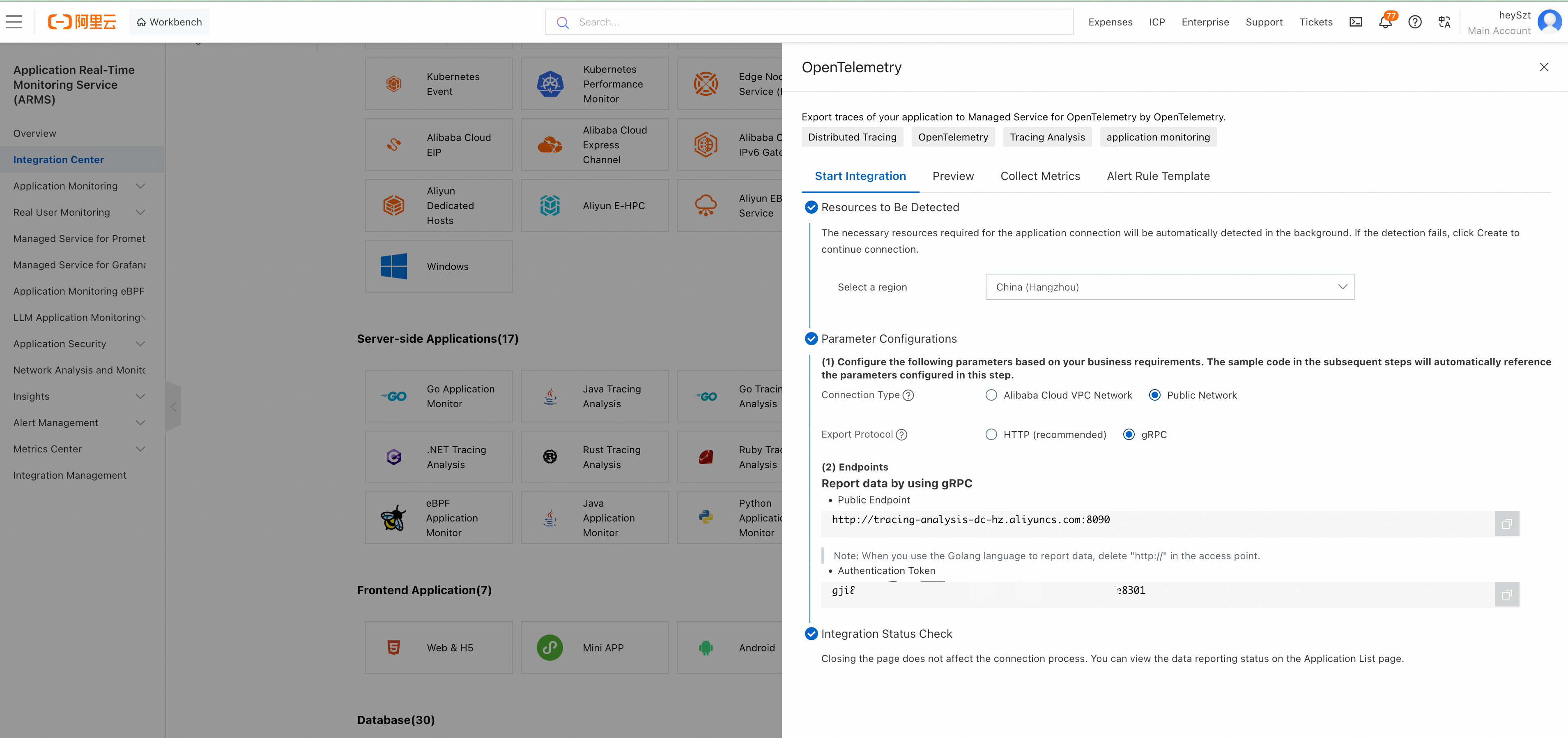
- Log in to the ARMS console, and click Integration Center in the left navigation bar.
- In the Server-side Applications area, click the OpenTelemetry card.
- In the OpenTelemetry panel that appears, select gRPC as the export protocol, and select the connection method and region according to your actual deployment.
- Save the Public Endpoint and Authentication Token (License Key).
The Endpoint does not include a port number, for example http://tracing-cn-heyuan.arms.aliyun.com.
Prerequisites: Dify Cloud or Community Edition version must be ≥ v1.6.0
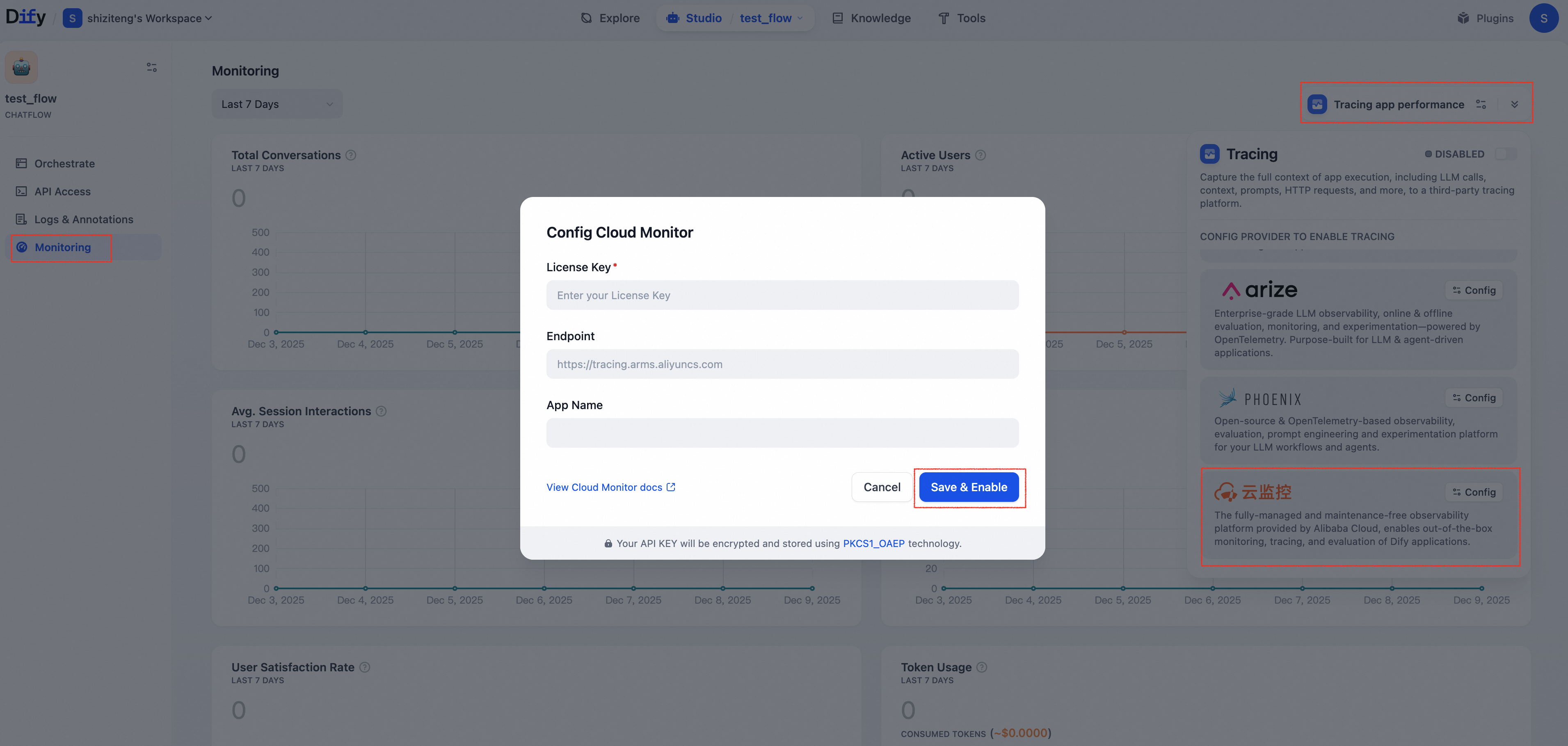
- Log in to the Dify console and navigate to the application you want to monitor.
- Open Monitoring in the left navigation bar.
- Click Tracing app performance, then click Configure in the Cloud Monitor area.
- In the dialog that appears, enter the License Key and Endpoint obtained in step 1, and customize the App Name (the application name displayed in the ARMS console), then click Save & Enable.
View Monitoring Data in Alibaba Cloud Monitor
After configuration, debug or production data from applications in Dify can be monitored in Cloud Monitor.
Method 1: Jump to ARMS Console from Dify Application
In the Dify console, select an application with tracing enabled, go to Tracing Configuration, and click View in the Cloud Monitor area.
Method 2: View Directly in ARMS Console
Go to the corresponding Dify application in the LLM Application Monitoring > Application List page of the ARMS console.
Access More Data
Cloud Monitor provides multi-language non-invasive agents that support accessing various components of the Dify cluster to achieve end-to-end tracing.
| Dify Component | Agent | Details |
|---|
| Nginx | OpenTelemetry Agent | Use OpenTelemetry for Nginx Tracing |
| API | LoongSuite-Python Agent | loongsuite-python-agent |
| Sandbox | LoongSuite-Go Agent | loongsuite-go-agent |
| Worker | OpenTelemetry Agent | Submit Python Application Data via OpenTelemetry |
| Plugin-Daemon | LoongSuite-Go Agent | loongsuite-go-agent |
Monitoring Data List
Cloud Monitor supports collecting data from Dify’s Workflow/Chatflow/Chat/Agent applications, including execution details of workflows and workflow nodes, covering model calls, tool calls, knowledge retrieval, execution details of various process nodes, as well as metadata such as conversations and user information.
| Workflow | Alibaba Cloud Monitor Trace |
|---|
| workflow_id | Unique identifier of the Workflow |
| conversation_id | Conversation ID |
| workflow_run_id | ID of this run |
| tenant_id | Tenant ID |
| elapsed_time | Duration of this run |
| status | Run status |
| version | Workflow version |
| total_tokens | Total tokens used in this run |
| file_list | List of processed files |
| triggered_from | Source that triggered this run |
| workflow_run_inputs | Input data for this run |
| workflow_run_outputs | Output data for this run |
| error | Errors that occurred during this run |
| query | Query used during runtime |
| workflow_app_log_id | Workflow application log ID |
| message_id | Associated message ID |
| start_time | Run start time |
| end_time | Run end time |
Workflow Trace Metadata
- workflow_id - Unique identifier of the Workflow
- conversation_id - Conversation ID
- workflow_run_id - ID of this run
- tenant_id - Tenant ID
- elapsed_time - Duration of this run
- status - Run status
- version - Workflow version
- total_tokens - Total tokens used in this run
- file_list - List of processed files
- triggered_from - Trigger source
| Message | Alibaba Cloud Monitor Trace |
|---|
| message_id | Message ID |
| message_data | Message data |
| user_session_id | User’s session_id |
| conversation_model | Conversation model |
| message_tokens | Number of tokens in the message |
| answer_tokens | Number of tokens in the answer |
| total_tokens | Total tokens in message and answer |
| error | Error information |
| inputs | Input data |
| outputs | Output data |
| file_list | List of processed files |
| start_time | Start time |
| end_time | End time |
| message_file_data | File data associated with the message |
| conversation_mode | Conversation mode |
Message Trace Metadata
- conversation_id - ID of the conversation to which the message belongs
- ls_provider - Model provider
- ls_model_name - Model ID
- status - Message status
- from_end_user_id - ID of the sending user
- from_account_id - ID of the sending account
- agent_based - Whether it is agent-based
- workflow_run_id - Workflow run ID
- from_source - Message source
- message_id - Message ID
| Dataset Retrieval | Alibaba Cloud Monitor Trace |
|---|
| message_id | Message ID |
| inputs | Input content |
| documents | Document data |
| start_time | Start time |
| end_time | End time |
| message_data | Message data |
Dataset Retrieval Trace Metadata
- message_id - Message ID
- ls_provider - Model provider
- ls_model_name - Model ID
- status - Message status
- from_end_user_id - ID of the sending user
- from_account_id - ID of the sending account
- agent_based - Whether it is agent-based
- workflow_run_id - Workflow run ID
- from_source - Message source
| Tool | Alibaba Cloud Monitor Trace |
|---|
| message_id | Message ID |
| tool_name | Tool name |
| start_time | Start time |
| end_time | End time |
| tool_inputs | Tool inputs |
| tool_outputs | Tool outputs |
| message_data | Message data |
| error | Error information (if any) |
| inputs | Input content of the message |
| outputs | Answer content of the message |
| tool_config | Tool configuration |
| time_cost | Time cost |
| tool_parameters | Tool parameters |
| file_url | URL of associated file |
Tool Trace Metadata
- message_id - Message ID
- tool_name - Tool name
- tool_inputs - Tool inputs
- tool_outputs - Tool outputs
- tool_config - Tool configuration
- time_cost - Time cost
- error - Error information
- tool_parameters - Tool parameters
- message_file_id - Message file ID
- created_by_role - Creator role
- created_user_id - Creator user ID