> ## Documentation Index
> Fetch the complete documentation index at: https://docs.dify.ai/llms.txt
> Use this file to discover all available pages before exploring further.
# 自定义端点
> 本文档由 AI 自动翻译。如有任何不准确之处,请参考 [英文原版](/en/cloud/use-dify/workspace/api-extension/api-extension)。
开发者可通过自定义端点扩展模块能力,当前支持以下模块扩展:
* `moderation` 敏感内容审计
* `external_data_tool` 外部数据工具
在扩展模块能力之前,你需要准备一个 API 和用于鉴权的 API Key。
除了需要开发对应的模块能力,还需要遵照以下规范,以便 Dify 正确调用 API。
## API 规范
Dify 将会以以下规范调用你的接口:
```
POST {Your-API-Endpoint}
```
### Header
| Header | Value | Desc |
| --------------- | ------------------ | --------------------------------------------------------------------- |
| `Content-Type` | application/json | 请求内容为 JSON 格式。 |
| `Authorization` | Bearer \{api\_key} | API Key 以 Token 令牌的方式传输,你需要解析该 `api_key` 并确认是否和提供的 API Key 一致,保证接口安全。 |
### Request Body
```
{
"point": string, // 扩展点,不同模块可能包含多个扩展点
"params": {
... // 各模块扩展点传入参数
}
}
```
### API 返回
```
{
... // API 返回的内容,不同扩展点返回见不同模块的规范设计
}
```
## 校验
在 Dify 配置自定义端点时,Dify 将会发送一个请求至 API Endpoint,以检验 API 的可用性。
当 API Endpoint 接收到 `point=ping` 时,接口应返回 `result=pong`,具体如下:
### Header
```
Content-Type: application/json
Authorization: Bearer {api_key}
```
### Request Body
```
{
"point": "ping"
}
```
### API 期望返回
```
{
"result": "pong"
}
```
## 范例
此处以外部数据工具为例,场景为根据地区获取外部天气信息作为上下文。
### API 范例
```
POST https://fake-domain.com/api/dify/receive
```
**Header**
```
Content-Type: application/json
Authorization: Bearer 123456
```
**Request Body**
```
{
"point": "app.external_data_tool.query",
"params": {
"app_id": "61248ab4-1125-45be-ae32-0ce91334d021",
"tool_variable": "weather_retrieve",
"inputs": {
"location": "London"
},
"query": "How's the weather today?"
}
}
```
**API 返回**
```
{
"result": "City: London\nTemperature: 10°C\nRealFeel®: 8°C\nAir Quality: Poor\nWind Direction: ENE\nWind Speed: 8 km/h\nWind Gusts: 14 km/h\nPrecipitation: Light rain"
}
```
### 代码范例
代码基于 Python FastAPI 框架。
1. 安装依赖
```
pip install fastapi[all] uvicorn
```
2. 按照接口规范编写代码
```
from fastapi import FastAPI, Body, HTTPException, Header
from pydantic import BaseModel
app = FastAPI()
class InputData(BaseModel):
point: str
params: dict = {}
@app.post("/api/dify/receive")
async def dify_receive(data: InputData = Body(...), authorization: str = Header(None)):
"""
Receive API query data from Dify.
"""
expected_api_key = "123456" # TODO Your API key of this API
auth_scheme, _, api_key = authorization.partition(' ')
if auth_scheme.lower() != "bearer" or api_key != expected_api_key:
raise HTTPException(status_code=401, detail="Unauthorized")
point = data.point
# for debug
print(f"point: {point}")
if point == "ping":
return {
"result": "pong"
}
if point == "app.external_data_tool.query":
return handle_app_external_data_tool_query(params=data.params)
# elif point == "{point name}":
# TODO other point implementation here
raise HTTPException(status_code=400, detail="Not implemented")
def handle_app_external_data_tool_query(params: dict):
app_id = params.get("app_id")
tool_variable = params.get("tool_variable")
inputs = params.get("inputs")
query = params.get("query")
# for debug
print(f"app_id: {app_id}")
print(f"tool_variable: {tool_variable}")
print(f"inputs: {inputs}")
print(f"query: {query}")
# TODO your external data tool query implementation here,
# return must be a dict with key "result", and the value is the query result
if inputs.get("location") == "London":
return {
"result": "City: London\nTemperature: 10°C\nRealFeel®: 8°C\nAir Quality: Poor\nWind Direction: ENE\nWind "
"Speed: 8 km/h\nWind Gusts: 14 km/h\nPrecipitation: Light rain"
}
else:
return {"result": "Unknown city"}
```
3. 启动 API 服务,默认端口为 8000,API 完整地址为:`http://127.0.0.1:8000/api/dify/receive`,配置的 API Key 为 `123456`。
```
uvicorn main:app --reload --host 0.0.0.0
```
4. 在 Dify 配置该 API。
5. 在 App 中选择该自定义端点。
App 调试时,Dify 将请求配置的 API,并发送以下内容(范例):
```
{
"point": "app.external_data_tool.query",
"params": {
"app_id": "61248ab4-1125-45be-ae32-0ce91334d021",
"tool_variable": "weather_retrieve",
"inputs": {
"location": "London"
},
"query": "How's the weather today?"
}
}
```
API 返回为:
```
{
"result": "City: London\nTemperature: 10°C\nRealFeel®: 8°C\nAir Quality: Poor\nWind Direction: ENE\nWind Speed: 8 km/h\nWind Gusts: 14 km/h\nPrecipitation: Light rain"
}
```
## 本地调试
由于 Dify 无法访问内网 API 服务,为了方便本地调试 API 服务,可以使用 [Ngrok](https://ngrok.com) 将 API 服务的端点暴露到公网,实现云端调试本地代码。操作步骤:
1. 进入 [https://ngrok.com](https://ngrok.com) 官网,注册并下载 Ngrok 文件。
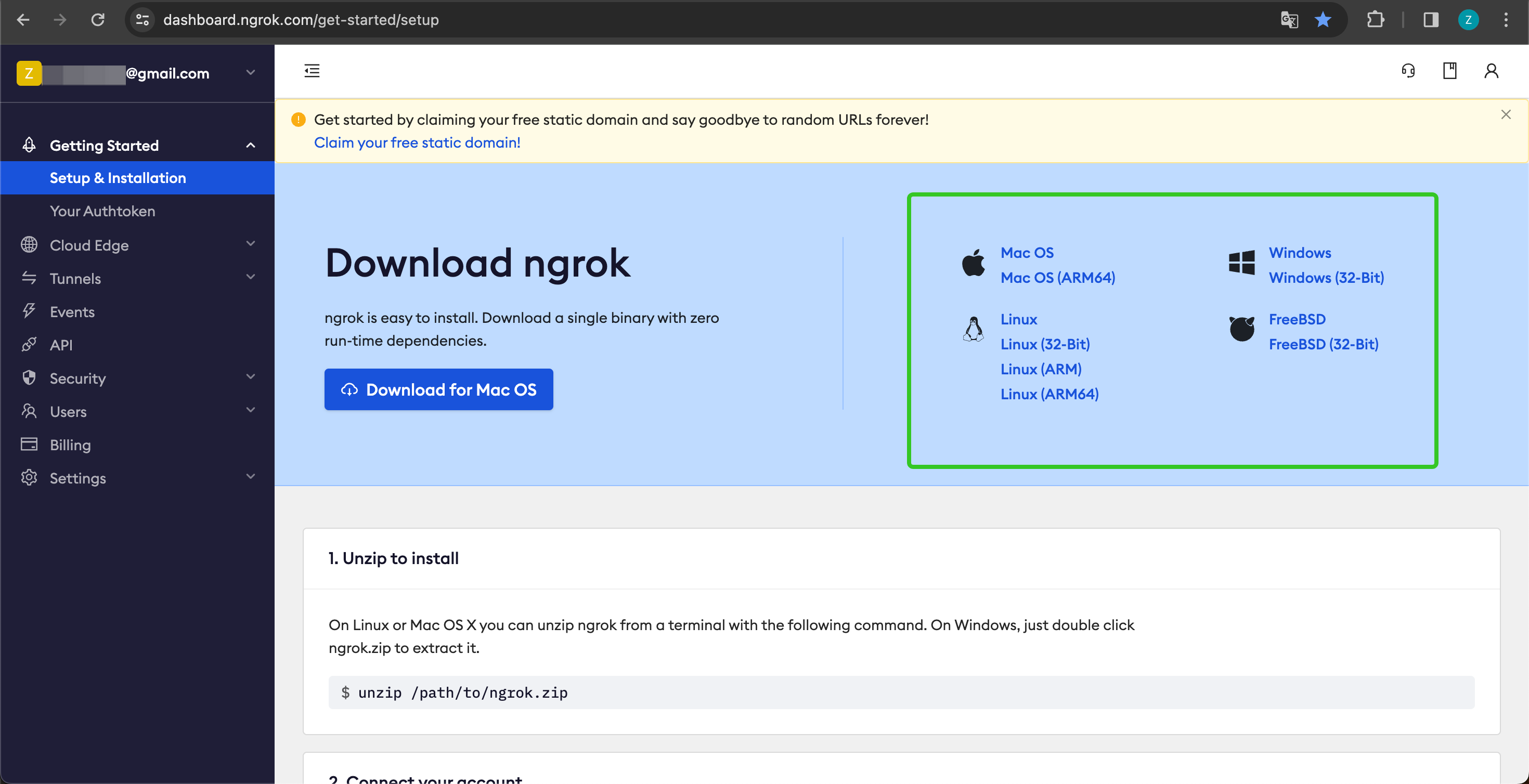
2. 下载完成后,进入下载目录,根据下方说明解压压缩包,并执行说明中的初始化脚本。
```shell theme={null}
unzip /path/to/ngrok.zip
./ngrok config add-authtoken 你的 Token
```
3. 查看本地 API 服务的端口:
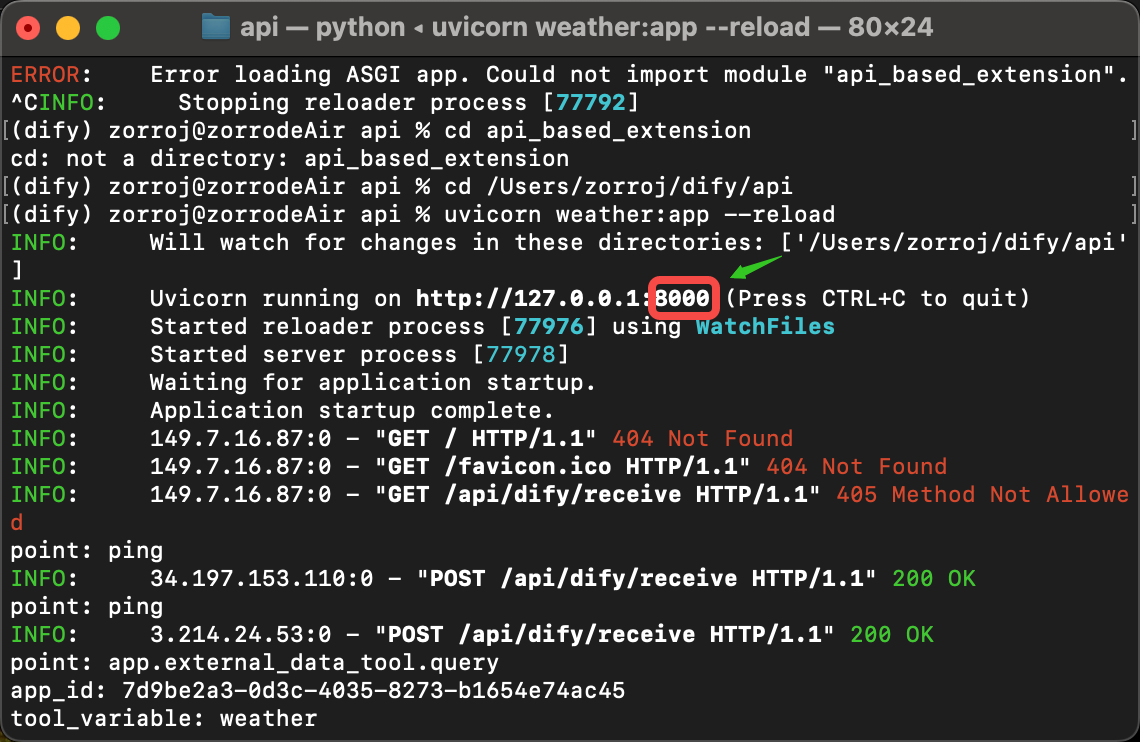
并运行以下命令启动:
```shell theme={null}
./ngrok http 端口号
```
启动成功的样例如下:
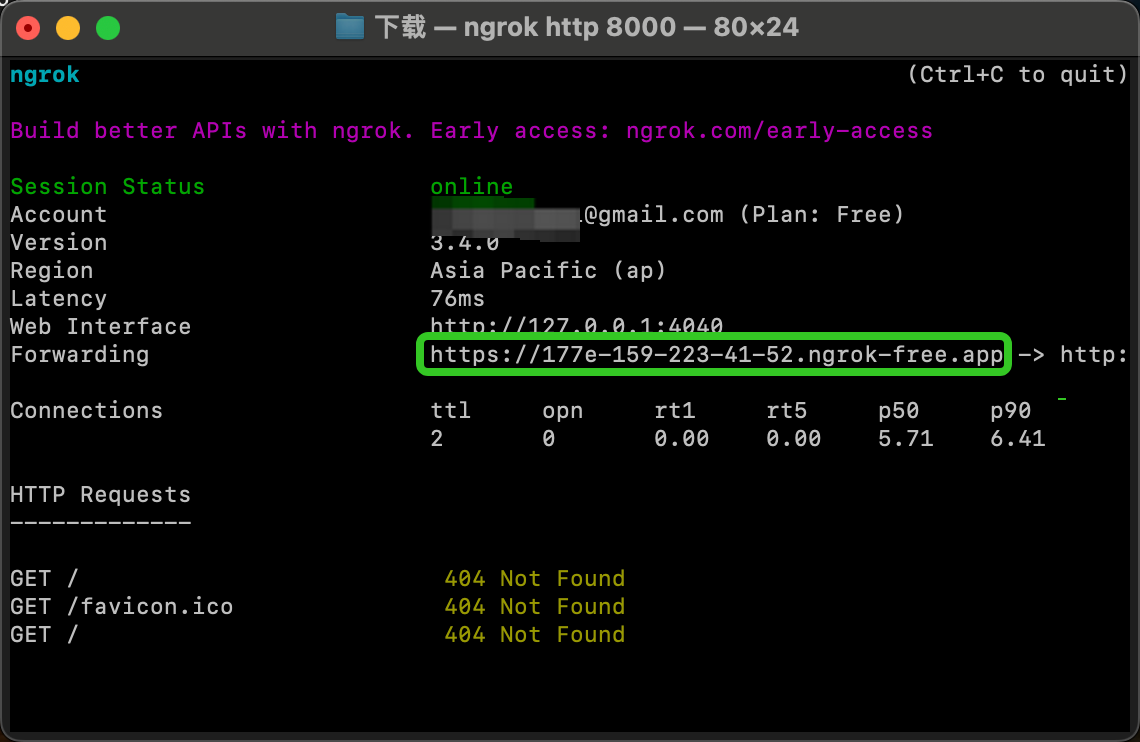
4. 我们找到 Forwarding 中,如上图:`https://177e-159-223-41-52.ngrok-free.app`(此为示例域名,请替换为自己的)即为公网域名。
按照上述的范例,我们把本地已经启动的服务端点暴露出去,将代码范例接口:`http://127.0.0.1:8000/api/dify/receive` 替换为 `https://177e-159-223-41-52.ngrok-free.app/api/dify/receive`
此 API 端点即可公网访问。至此,我们即可在 Dify 配置该 API 端点进行本地调试代码,配置步骤请参考 [外部数据工具](/zh/cloud/use-dify/workspace/api-extension/external-data-tool-api-extension)。
## 使用 Cloudflare Workers 部署自定义端点
我们推荐你使用 Cloudflare Workers 来部署你的自定义端点,因为 Cloudflare Workers 可以方便的提供一个公网地址,而且可以免费使用。
详细说明请参考 [使用 Cloudflare Workers 部署自定义端点](/zh/cloud/use-dify/workspace/api-extension/cloudflare-worker)。