> ## Documentation Index
> Fetch the complete documentation index at: https://docs.dify.ai/llms.txt
> Use this file to discover all available pages before exploring further.
# トリガープラグイン
> サードパーティの webhook イベントをワークフロー開始シグナルに変換する Dify 1.10.0 以降のトリガープラグインを構築する
> このドキュメントは AI によって自動翻訳されています。不正確な部分がある場合は、[英語版](/en/develop-plugin/dev-guides-and-walkthroughs/trigger-plugin) を参照してください。
## トリガープラグインとは?
トリガーは Dify v1.10.0 で新しいタイプの開始ノードとして導入されました。コード、ツール、ナレッジ検索などの機能ノードとは異なり、トリガーは **サードパーティのイベントを Dify が認識して処理できる入力形式に変換します**。
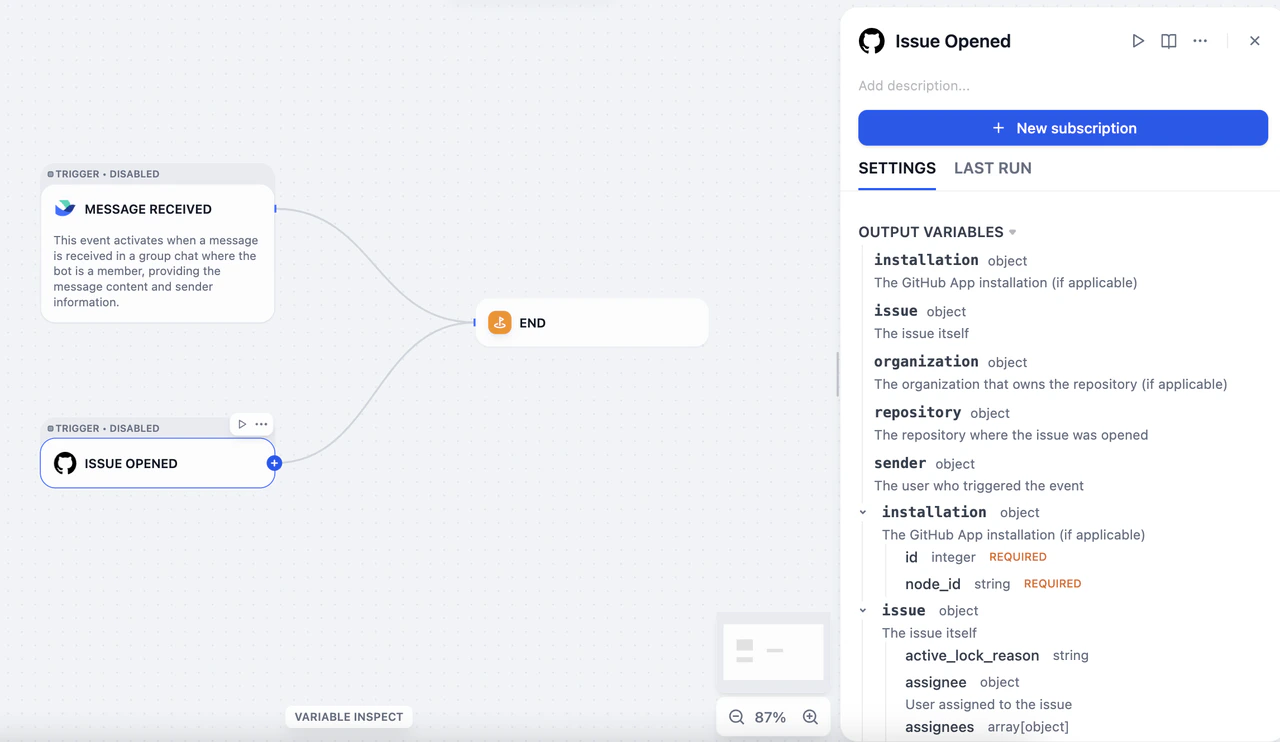 例えば、Gmail で Dify を `new email` イベントの受信者として設定すると、新しいメールを受信するたびに、Gmail はイベントを Dify に自動的に送信し、そのイベントでワークフローをトリガーできます。しかし:
* Gmail の元のイベント形式は Dify の入力形式と互換性がありません。
* 世界中には数千のプラットフォームがあり、それぞれ独自のイベント形式を持っています。
トリガープラグインはこのギャップを埋めます。異なるプラットフォームからのイベントを定義・解析し、Dify が受け入れられる入力形式に統一します。
## 技術概要
Dify のトリガーは、Web 全体で広く採用されているメカニズムである webhook に基づいて構築されています。GitHub、Slack、Linear などの主要な SaaS プラットフォームは webhook をサポートし、充実したドキュメントを提供しています。
webhook は HTTP ベースのイベントディスパッチャーです。イベント受信アドレスを設定すると、プラットフォームは購読したイベントが発生するたびに、イベントデータをそのアドレスに自動的にプッシュします。
異なるプラットフォームからの webhook イベントを統一的に処理するために、Dify は 2 つのコアコンセプトを定義しています:**Subscription** と **Event**。
* **Subscription**:サードパーティプラットフォームの開発者コンソールで Dify のネットワークアドレスをターゲットサーバーとして登録する設定です。
* **Event**:プラットフォームは複数のタイプのイベント(*メール受信*、*メール削除*、*メールを既読にマーク*など)を送信する可能性があり、これらはすべて登録されたアドレスにプッシュされます。トリガープラグインは複数のイベントタイプを処理でき、各イベントは Dify ワークフロー内のプラグイントリガーノードに対応します。
## プラグイン開発
トリガープラグインの開発プロセスは、他のプラグインタイプ(ツール、データソース、モデルなど)と同じです。
`dify plugin init` コマンドを使用して開発テンプレートを作成します。生成されるファイル構造は標準のプラグイン形式仕様に従います。
```text theme={null}
├── _assets
│ └── icon.svg
├── events
│ └── star
│ ├── star_created.py
│ └── star_created.yaml
├── main.py
├── manifest.yaml
├── provider
│ ├── github.py
│ └── github.yaml
├── README.md
├── PRIVACY.md
└── requirements.txt
```
* `manifest.yaml`:プラグインの基本的なメタデータを記述します。
* `provider` ディレクトリ:プロバイダーのメタデータ、サブスクリプション作成のコード、webhook リクエスト受信後のイベント分類のコードを含みます。
* `events` ディレクトリ:イベント処理とフィルタリングのコードを含み、ノードレベルでのローカルイベントフィルタリングをサポートします。関連するイベントをグループ化するためにサブディレクトリを作成できます。
トリガープラグインの場合、最小必要 Dify バージョンを `1.10.0` に、SDK バージョンを `>= 0.6.0` に設定します。
以降のセクションでは、GitHub を例にして開発プロセスを順を追って説明します。
### サブスクリプションの作成
Webhook の設定方法は、主要な SaaS プラットフォーム間で大きく異なります:
* 一部のプラットフォーム(GitHub など)は API ベースの webhook 設定をサポートしています。これらのプラットフォームでは、OAuth 認証が完了すると、Dify は自動的に webhook をセットアップできます。
* 他のプラットフォーム(Notion など)は webhook 設定 API を提供しておらず、ユーザーが手動で認証を行う必要がある場合があります。
これらの違いに対応するため、サブスクリプションプロセスを 2 つの部分に分けています:**Subscription Constructor** と **Subscription** 自体。
Notion のようなプラットフォームでは、サブスクリプションを作成するには、ユーザーが Dify から提供されたコールバック URL を手動でコピーし、Notion ワークスペースに貼り付けて webhook 設定を完了する必要があります。このプロセスは、Dify インターフェースの **Paste URL to create a new subscription** オプションに対応します。
例えば、Gmail で Dify を `new email` イベントの受信者として設定すると、新しいメールを受信するたびに、Gmail はイベントを Dify に自動的に送信し、そのイベントでワークフローをトリガーできます。しかし:
* Gmail の元のイベント形式は Dify の入力形式と互換性がありません。
* 世界中には数千のプラットフォームがあり、それぞれ独自のイベント形式を持っています。
トリガープラグインはこのギャップを埋めます。異なるプラットフォームからのイベントを定義・解析し、Dify が受け入れられる入力形式に統一します。
## 技術概要
Dify のトリガーは、Web 全体で広く採用されているメカニズムである webhook に基づいて構築されています。GitHub、Slack、Linear などの主要な SaaS プラットフォームは webhook をサポートし、充実したドキュメントを提供しています。
webhook は HTTP ベースのイベントディスパッチャーです。イベント受信アドレスを設定すると、プラットフォームは購読したイベントが発生するたびに、イベントデータをそのアドレスに自動的にプッシュします。
異なるプラットフォームからの webhook イベントを統一的に処理するために、Dify は 2 つのコアコンセプトを定義しています:**Subscription** と **Event**。
* **Subscription**:サードパーティプラットフォームの開発者コンソールで Dify のネットワークアドレスをターゲットサーバーとして登録する設定です。
* **Event**:プラットフォームは複数のタイプのイベント(*メール受信*、*メール削除*、*メールを既読にマーク*など)を送信する可能性があり、これらはすべて登録されたアドレスにプッシュされます。トリガープラグインは複数のイベントタイプを処理でき、各イベントは Dify ワークフロー内のプラグイントリガーノードに対応します。
## プラグイン開発
トリガープラグインの開発プロセスは、他のプラグインタイプ(ツール、データソース、モデルなど)と同じです。
`dify plugin init` コマンドを使用して開発テンプレートを作成します。生成されるファイル構造は標準のプラグイン形式仕様に従います。
```text theme={null}
├── _assets
│ └── icon.svg
├── events
│ └── star
│ ├── star_created.py
│ └── star_created.yaml
├── main.py
├── manifest.yaml
├── provider
│ ├── github.py
│ └── github.yaml
├── README.md
├── PRIVACY.md
└── requirements.txt
```
* `manifest.yaml`:プラグインの基本的なメタデータを記述します。
* `provider` ディレクトリ:プロバイダーのメタデータ、サブスクリプション作成のコード、webhook リクエスト受信後のイベント分類のコードを含みます。
* `events` ディレクトリ:イベント処理とフィルタリングのコードを含み、ノードレベルでのローカルイベントフィルタリングをサポートします。関連するイベントをグループ化するためにサブディレクトリを作成できます。
トリガープラグインの場合、最小必要 Dify バージョンを `1.10.0` に、SDK バージョンを `>= 0.6.0` に設定します。
以降のセクションでは、GitHub を例にして開発プロセスを順を追って説明します。
### サブスクリプションの作成
Webhook の設定方法は、主要な SaaS プラットフォーム間で大きく異なります:
* 一部のプラットフォーム(GitHub など)は API ベースの webhook 設定をサポートしています。これらのプラットフォームでは、OAuth 認証が完了すると、Dify は自動的に webhook をセットアップできます。
* 他のプラットフォーム(Notion など)は webhook 設定 API を提供しておらず、ユーザーが手動で認証を行う必要がある場合があります。
これらの違いに対応するため、サブスクリプションプロセスを 2 つの部分に分けています:**Subscription Constructor** と **Subscription** 自体。
Notion のようなプラットフォームでは、サブスクリプションを作成するには、ユーザーが Dify から提供されたコールバック URL を手動でコピーし、Notion ワークスペースに貼り付けて webhook 設定を完了する必要があります。このプロセスは、Dify インターフェースの **Paste URL to create a new subscription** オプションに対応します。
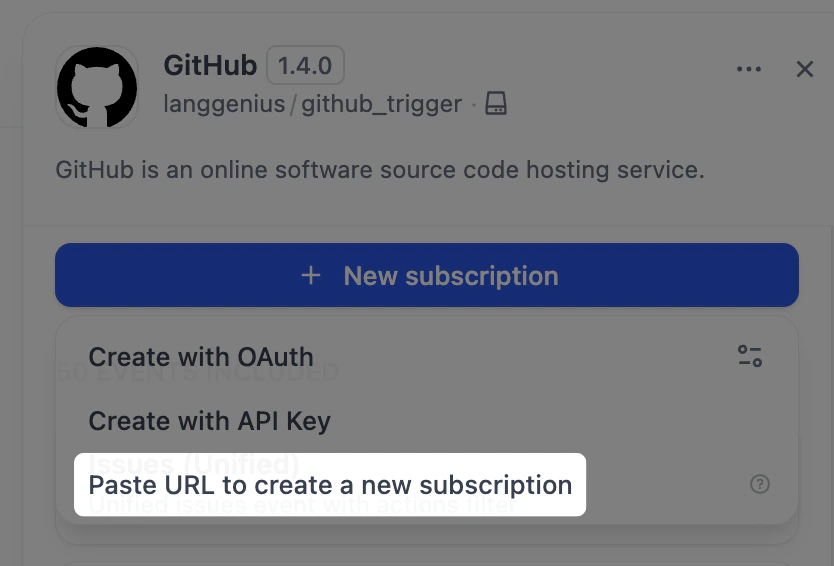 手動 URL 貼り付けによるサブスクリプション作成をサポートするには、`github.yaml` と `github.py` の 2 つのファイルを変更します。
GitHub の webhook は暗号化メカニズムを使用しているため、受信リクエストを復号化して検証するためにシークレットキーが必要です。`github.yaml` で `webhook_secret` を宣言します。
```yaml theme={null}
subscription_schema:
- name: "webhook_secret"
type: "secret-input"
required: false
label:
zh_Hans: "Webhook Secret"
en_US: "Webhook Secret"
ja_JP: "Webhookシークレット"
help:
en_US: "Optional webhook secret for validating GitHub webhook requests"
ja_JP: "GitHub Webhookリクエストの検証用のオプションのWebhookシークレット"
zh_Hans: "可选的用于验证 GitHub webhook 请求的 webhook 密钥"
```
まず、`dispatch_event` インターフェースを実装します。コールバック URL に送信されるすべてのリクエストはこのインターフェースによって処理され、処理されたイベントはデバッグと検証のために **Request Logs** セクションに表示されます。
手動 URL 貼り付けによるサブスクリプション作成をサポートするには、`github.yaml` と `github.py` の 2 つのファイルを変更します。
GitHub の webhook は暗号化メカニズムを使用しているため、受信リクエストを復号化して検証するためにシークレットキーが必要です。`github.yaml` で `webhook_secret` を宣言します。
```yaml theme={null}
subscription_schema:
- name: "webhook_secret"
type: "secret-input"
required: false
label:
zh_Hans: "Webhook Secret"
en_US: "Webhook Secret"
ja_JP: "Webhookシークレット"
help:
en_US: "Optional webhook secret for validating GitHub webhook requests"
ja_JP: "GitHub Webhookリクエストの検証用のオプションのWebhookシークレット"
zh_Hans: "可选的用于验证 GitHub webhook 请求的 webhook 密钥"
```
まず、`dispatch_event` インターフェースを実装します。コールバック URL に送信されるすべてのリクエストはこのインターフェースによって処理され、処理されたイベントはデバッグと検証のために **Request Logs** セクションに表示されます。
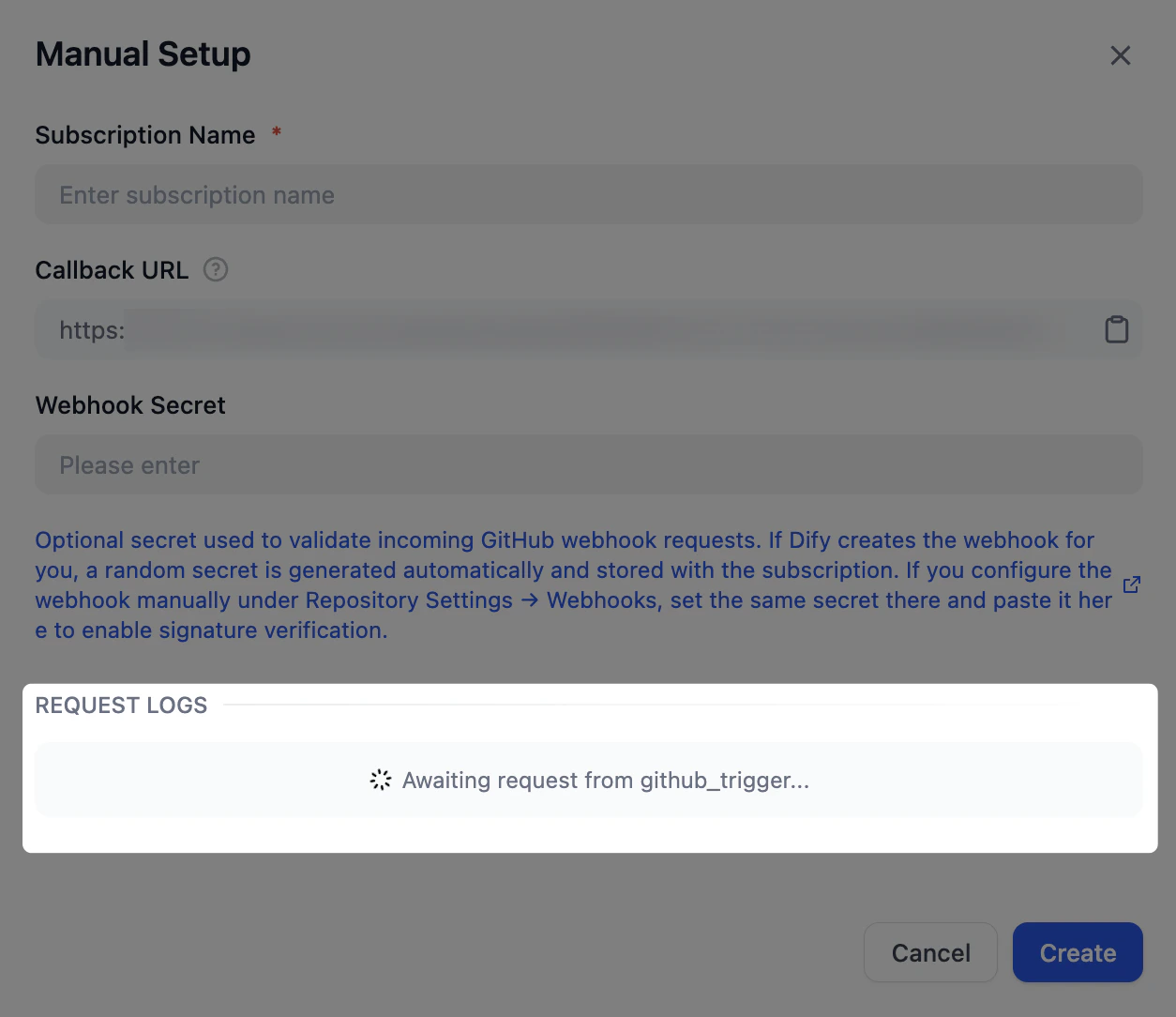 コードでは、`subscription.properties` を通じて `github.yaml` で宣言された `webhook_secret` を取得できます。
`dispatch_event` メソッドは、リクエストの内容からイベントタイプを判定します。以下の例では、この抽出は `_dispatch_trigger_event` メソッドが処理します。
完全なコードサンプルについては、[Dify の GitHub トリガープラグイン](https://github.com/langgenius/dify-plugin-sdks/tree/main/python/examples/github_trigger)を参照してください。
```python theme={null}
class GithubTrigger(Trigger):
"""Handle GitHub webhook event dispatch."""
def _dispatch_event(self, subscription: Subscription, request: Request) -> EventDispatch:
webhook_secret = subscription.properties.get("webhook_secret")
if webhook_secret:
self._validate_signature(request=request, webhook_secret=webhook_secret)
event_type: str | None = request.headers.get("X-GitHub-Event")
if not event_type:
raise TriggerDispatchError("Missing GitHub event type header")
payload: Mapping[str, Any] = self._validate_payload(request)
response = Response(response='{"status": "ok"}', status=200, mimetype="application/json")
event: str = self._dispatch_trigger_event(event_type=event_type, payload=payload)
return EventDispatch(events=[event] if event else [], response=response)
```
### イベント処理
イベントが抽出されると、対応する実装は元の HTTP リクエストをフィルタリングし、Dify ワークフローが受け入れられる入力形式に変換する必要があります。
Issue イベントを例にとると、`events/issues/issues.yaml` でイベントを、`events/issues/issues.py` でその実装を定義します。イベントの出力は `issues.yaml` の `output_schema` セクションで定義し、ツールプラグインと同じ JSON Schema 仕様に従います。
```yaml theme={null}
identity:
name: issues
author: langgenius
label:
en_US: Issues
zh_Hans: 议题
ja_JP: イシュー
description:
en_US: Unified issues event with actions filter
zh_Hans: 带 actions 过滤的统一 issues 事件
ja_JP: アクションフィルタ付きの統合イシューイベント
output_schema:
type: object
properties:
action:
type: string
issue:
type: object
description: The issue itself
extra:
python:
source: events/issues/issues.py
```
```python theme={null}
from collections.abc import Mapping
from typing import Any
from werkzeug import Request
from dify_plugin.entities.trigger import Variables
from dify_plugin.errors.trigger import EventIgnoreError
from dify_plugin.interfaces.trigger import Event
class IssuesUnifiedEvent(Event):
"""Unified Issues event. Filters by actions and common issue attributes."""
def _on_event(self, request: Request, parameters: Mapping[str, Any], payload: Mapping[str, Any]) -> Variables:
payload = request.get_json()
if not payload:
raise ValueError("No payload received")
allowed_actions = parameters.get("actions") or []
action = payload.get("action")
if allowed_actions and action not in allowed_actions:
raise EventIgnoreError()
issue = payload.get("issue")
if not isinstance(issue, Mapping):
raise ValueError("No issue in payload")
return Variables(variables={**payload})
```
### イベントフィルタリング
特定のイベントをフィルタリングするには(例えば、特定のラベルを持つ Issue イベントのみに焦点を当てる場合)、`issues.yaml` のイベント定義に `parameters` を追加します。その後、`_on_event` メソッドで、設定された条件を満たさないイベントに対して `EventIgnoreError` 例外をスローします。
```yaml theme={null}
parameters:
- name: added_label
label:
en_US: Added Label
zh_Hans: 添加的标签
ja_JP: 追加されたラベル
type: string
required: false
description:
en_US: "Only trigger if these specific labels were added (e.g., critical, priority-high, security, comma-separated). Leave empty to trigger for any label addition."
zh_Hans: "仅当添加了这些特定标签时触发(例如:critical, priority-high, security,逗号分隔)。留空则对任何标签添加触发。"
ja_JP: "これらの特定のラベルが追加された場合のみトリガー(例: critical, priority-high, security,カンマ区切り)。空の場合は任意のラベル追加でトリガー。"
```
```python theme={null}
def _check_added_label(self, payload: Mapping[str, Any], added_label_param: str | None) -> None:
"""Check if the added label matches the allowed labels"""
if not added_label_param:
return
allowed_labels = [label.strip() for label in added_label_param.split(",") if label.strip()]
if not allowed_labels:
return
# The payload contains the label that was added
label = payload.get("label", {})
label_name = label.get("name", "")
if label_name not in allowed_labels:
raise EventIgnoreError()
def _on_event(self, request: Request, parameters: Mapping[str, Any], payload: Mapping[str, Any]) -> Variables:
# ...
# Apply all filters
self._check_added_label(payload, parameters.get("added_label"))
return Variables(variables={**payload})
```
### OAuth または API キーによるサブスクリプション作成
OAuth または API キーによる自動サブスクリプション作成を有効にするには、`github.yaml` と `github.py` ファイルを変更します。
`github.yaml` に以下のフィールドを追加します。
```yaml theme={null}
subscription_constructor:
parameters:
- name: "repository"
label:
en_US: "Repository"
zh_Hans: "仓库"
ja_JP: "リポジトリ"
type: "dynamic-select"
required: true
placeholder:
en_US: "owner/repo"
zh_Hans: "owner/repo"
ja_JP: "owner/repo"
help:
en_US: "GitHub repository in format owner/repo (e.g., microsoft/vscode)"
zh_Hans: "GitHub 仓库,格式为 owner/repo(例如:microsoft/vscode)"
ja_JP: "GitHubリポジトリは owner/repo 形式で入力してください(例: microsoft/vscode)"
credentials_schema:
access_tokens:
help:
en_US: Get your Access Tokens from GitHub
ja_JP: GitHub からアクセストークンを取得してください
zh_Hans: 从 GitHub 获取您的 Access Tokens
label:
en_US: Access Tokens
ja_JP: アクセストークン
zh_Hans: Access Tokens
placeholder:
en_US: Please input your GitHub Access Tokens
ja_JP: GitHub のアクセストークンを入力してください
zh_Hans: 请输入你的 GitHub Access Tokens
required: true
type: secret-input
url: https://github.com/settings/tokens?type=beta
extra:
python:
source: provider/github.py
```
`subscription_constructor` は、サブスクリプションの構築方法を定義するために Dify が抽象化した概念です。以下のフィールドが含まれます:
* `parameters`(オプション):購読するイベントタイプやターゲット GitHub リポジトリなど、サブスクリプション作成に必要なパラメータを定義します。
* `credentials_schema`(オプション):API キーまたはアクセストークンを使用してサブスクリプションを作成するために必要な認証情報を宣言します(GitHub の `access_tokens` など)。
* `oauth_schema`(オプション):OAuth によるサブスクリプション作成に必要です。定義方法の詳細については、[ツールプラグインに OAuth サポートを追加する](/ja/develop-plugin/dev-guides-and-walkthroughs/tool-oauth) を参照してください。
`github.py` で、自動サブスクリプションロジックを実装する `Constructor` クラスを作成します。
```python theme={null}
class GithubSubscriptionConstructor(TriggerSubscriptionConstructor):
"""Manage GitHub trigger subscriptions."""
def _validate_api_key(self, credentials: Mapping[str, Any]) -> None:
# ...
def _create_subscription(
self,
endpoint: str,
parameters: Mapping[str, Any],
credentials: Mapping[str, Any],
credential_type: CredentialType,
) -> Subscription:
repository = parameters.get("repository")
if not repository:
raise ValueError("repository is required (format: owner/repo)")
try:
owner, repo = repository.split("/")
except ValueError:
raise ValueError("repository must be in format 'owner/repo'") from None
events: list[str] = parameters.get("events", [])
webhook_secret = uuid.uuid4().hex
url = f"https://api.github.com/repos/{owner}/{repo}/hooks"
headers = {
"Authorization": f"Bearer {credentials.get('access_tokens')}",
"Accept": "application/vnd.github+json",
}
webhook_data = {
"name": "web",
"active": True,
"events": events,
"config": {"url": endpoint, "content_type": "json", "insecure_ssl": "0", "secret": webhook_secret},
}
try:
response = requests.post(url, json=webhook_data, headers=headers, timeout=10)
except requests.RequestException as exc:
raise SubscriptionError(f"Network error while creating webhook: {exc}", error_code="NETWORK_ERROR") from exc
if response.status_code == 201:
webhook = response.json()
return Subscription(
expires_at=int(time.time()) + self._WEBHOOK_TTL,
endpoint=endpoint,
parameters=parameters,
properties={
"external_id": str(webhook["id"]),
"repository": repository,
"events": events,
"webhook_secret": webhook_secret,
"active": webhook.get("active", True),
},
)
response_data: dict[str, Any] = response.json() if response.content else {}
error_msg = response_data.get("message", "Unknown error")
error_details = response_data.get("errors", [])
detailed_error = f"Failed to create GitHub webhook: {error_msg}"
if error_details:
detailed_error += f" Details: {error_details}"
raise SubscriptionError(
detailed_error,
error_code="WEBHOOK_CREATION_FAILED",
external_response=response_data,
)
```
***
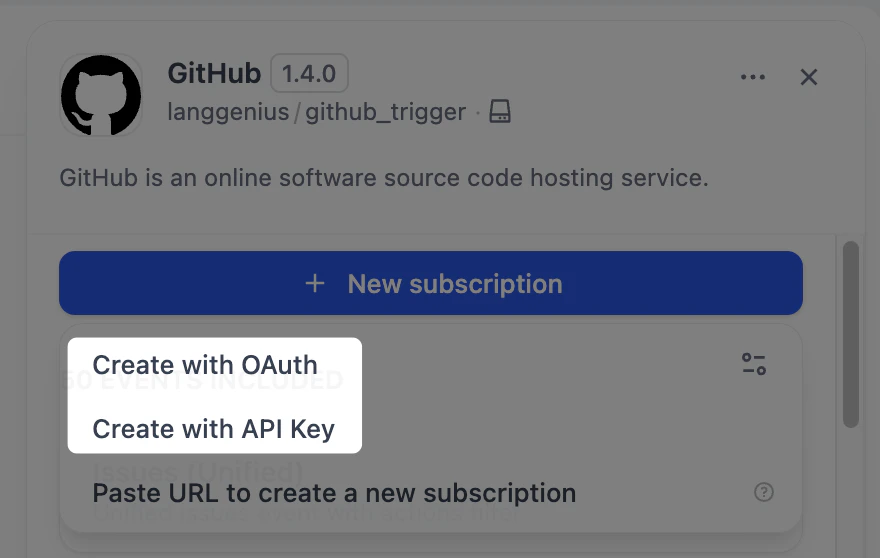
これら 2 つのファイルを変更すると、Dify インターフェースに **Create with API Key** オプションが表示されます。
同じ `Constructor` クラスは OAuth による自動サブスクリプション作成もサポートします:`subscription_constructor` の下に `oauth_schema` フィールドを追加すると、OAuth 認証を有効にできます。
コードでは、`subscription.properties` を通じて `github.yaml` で宣言された `webhook_secret` を取得できます。
`dispatch_event` メソッドは、リクエストの内容からイベントタイプを判定します。以下の例では、この抽出は `_dispatch_trigger_event` メソッドが処理します。
完全なコードサンプルについては、[Dify の GitHub トリガープラグイン](https://github.com/langgenius/dify-plugin-sdks/tree/main/python/examples/github_trigger)を参照してください。
```python theme={null}
class GithubTrigger(Trigger):
"""Handle GitHub webhook event dispatch."""
def _dispatch_event(self, subscription: Subscription, request: Request) -> EventDispatch:
webhook_secret = subscription.properties.get("webhook_secret")
if webhook_secret:
self._validate_signature(request=request, webhook_secret=webhook_secret)
event_type: str | None = request.headers.get("X-GitHub-Event")
if not event_type:
raise TriggerDispatchError("Missing GitHub event type header")
payload: Mapping[str, Any] = self._validate_payload(request)
response = Response(response='{"status": "ok"}', status=200, mimetype="application/json")
event: str = self._dispatch_trigger_event(event_type=event_type, payload=payload)
return EventDispatch(events=[event] if event else [], response=response)
```
### イベント処理
イベントが抽出されると、対応する実装は元の HTTP リクエストをフィルタリングし、Dify ワークフローが受け入れられる入力形式に変換する必要があります。
Issue イベントを例にとると、`events/issues/issues.yaml` でイベントを、`events/issues/issues.py` でその実装を定義します。イベントの出力は `issues.yaml` の `output_schema` セクションで定義し、ツールプラグインと同じ JSON Schema 仕様に従います。
```yaml theme={null}
identity:
name: issues
author: langgenius
label:
en_US: Issues
zh_Hans: 议题
ja_JP: イシュー
description:
en_US: Unified issues event with actions filter
zh_Hans: 带 actions 过滤的统一 issues 事件
ja_JP: アクションフィルタ付きの統合イシューイベント
output_schema:
type: object
properties:
action:
type: string
issue:
type: object
description: The issue itself
extra:
python:
source: events/issues/issues.py
```
```python theme={null}
from collections.abc import Mapping
from typing import Any
from werkzeug import Request
from dify_plugin.entities.trigger import Variables
from dify_plugin.errors.trigger import EventIgnoreError
from dify_plugin.interfaces.trigger import Event
class IssuesUnifiedEvent(Event):
"""Unified Issues event. Filters by actions and common issue attributes."""
def _on_event(self, request: Request, parameters: Mapping[str, Any], payload: Mapping[str, Any]) -> Variables:
payload = request.get_json()
if not payload:
raise ValueError("No payload received")
allowed_actions = parameters.get("actions") or []
action = payload.get("action")
if allowed_actions and action not in allowed_actions:
raise EventIgnoreError()
issue = payload.get("issue")
if not isinstance(issue, Mapping):
raise ValueError("No issue in payload")
return Variables(variables={**payload})
```
### イベントフィルタリング
特定のイベントをフィルタリングするには(例えば、特定のラベルを持つ Issue イベントのみに焦点を当てる場合)、`issues.yaml` のイベント定義に `parameters` を追加します。その後、`_on_event` メソッドで、設定された条件を満たさないイベントに対して `EventIgnoreError` 例外をスローします。
```yaml theme={null}
parameters:
- name: added_label
label:
en_US: Added Label
zh_Hans: 添加的标签
ja_JP: 追加されたラベル
type: string
required: false
description:
en_US: "Only trigger if these specific labels were added (e.g., critical, priority-high, security, comma-separated). Leave empty to trigger for any label addition."
zh_Hans: "仅当添加了这些特定标签时触发(例如:critical, priority-high, security,逗号分隔)。留空则对任何标签添加触发。"
ja_JP: "これらの特定のラベルが追加された場合のみトリガー(例: critical, priority-high, security,カンマ区切り)。空の場合は任意のラベル追加でトリガー。"
```
```python theme={null}
def _check_added_label(self, payload: Mapping[str, Any], added_label_param: str | None) -> None:
"""Check if the added label matches the allowed labels"""
if not added_label_param:
return
allowed_labels = [label.strip() for label in added_label_param.split(",") if label.strip()]
if not allowed_labels:
return
# The payload contains the label that was added
label = payload.get("label", {})
label_name = label.get("name", "")
if label_name not in allowed_labels:
raise EventIgnoreError()
def _on_event(self, request: Request, parameters: Mapping[str, Any], payload: Mapping[str, Any]) -> Variables:
# ...
# Apply all filters
self._check_added_label(payload, parameters.get("added_label"))
return Variables(variables={**payload})
```
### OAuth または API キーによるサブスクリプション作成
OAuth または API キーによる自動サブスクリプション作成を有効にするには、`github.yaml` と `github.py` ファイルを変更します。
`github.yaml` に以下のフィールドを追加します。
```yaml theme={null}
subscription_constructor:
parameters:
- name: "repository"
label:
en_US: "Repository"
zh_Hans: "仓库"
ja_JP: "リポジトリ"
type: "dynamic-select"
required: true
placeholder:
en_US: "owner/repo"
zh_Hans: "owner/repo"
ja_JP: "owner/repo"
help:
en_US: "GitHub repository in format owner/repo (e.g., microsoft/vscode)"
zh_Hans: "GitHub 仓库,格式为 owner/repo(例如:microsoft/vscode)"
ja_JP: "GitHubリポジトリは owner/repo 形式で入力してください(例: microsoft/vscode)"
credentials_schema:
access_tokens:
help:
en_US: Get your Access Tokens from GitHub
ja_JP: GitHub からアクセストークンを取得してください
zh_Hans: 从 GitHub 获取您的 Access Tokens
label:
en_US: Access Tokens
ja_JP: アクセストークン
zh_Hans: Access Tokens
placeholder:
en_US: Please input your GitHub Access Tokens
ja_JP: GitHub のアクセストークンを入力してください
zh_Hans: 请输入你的 GitHub Access Tokens
required: true
type: secret-input
url: https://github.com/settings/tokens?type=beta
extra:
python:
source: provider/github.py
```
`subscription_constructor` は、サブスクリプションの構築方法を定義するために Dify が抽象化した概念です。以下のフィールドが含まれます:
* `parameters`(オプション):購読するイベントタイプやターゲット GitHub リポジトリなど、サブスクリプション作成に必要なパラメータを定義します。
* `credentials_schema`(オプション):API キーまたはアクセストークンを使用してサブスクリプションを作成するために必要な認証情報を宣言します(GitHub の `access_tokens` など)。
* `oauth_schema`(オプション):OAuth によるサブスクリプション作成に必要です。定義方法の詳細については、[ツールプラグインに OAuth サポートを追加する](/ja/develop-plugin/dev-guides-and-walkthroughs/tool-oauth) を参照してください。
`github.py` で、自動サブスクリプションロジックを実装する `Constructor` クラスを作成します。
```python theme={null}
class GithubSubscriptionConstructor(TriggerSubscriptionConstructor):
"""Manage GitHub trigger subscriptions."""
def _validate_api_key(self, credentials: Mapping[str, Any]) -> None:
# ...
def _create_subscription(
self,
endpoint: str,
parameters: Mapping[str, Any],
credentials: Mapping[str, Any],
credential_type: CredentialType,
) -> Subscription:
repository = parameters.get("repository")
if not repository:
raise ValueError("repository is required (format: owner/repo)")
try:
owner, repo = repository.split("/")
except ValueError:
raise ValueError("repository must be in format 'owner/repo'") from None
events: list[str] = parameters.get("events", [])
webhook_secret = uuid.uuid4().hex
url = f"https://api.github.com/repos/{owner}/{repo}/hooks"
headers = {
"Authorization": f"Bearer {credentials.get('access_tokens')}",
"Accept": "application/vnd.github+json",
}
webhook_data = {
"name": "web",
"active": True,
"events": events,
"config": {"url": endpoint, "content_type": "json", "insecure_ssl": "0", "secret": webhook_secret},
}
try:
response = requests.post(url, json=webhook_data, headers=headers, timeout=10)
except requests.RequestException as exc:
raise SubscriptionError(f"Network error while creating webhook: {exc}", error_code="NETWORK_ERROR") from exc
if response.status_code == 201:
webhook = response.json()
return Subscription(
expires_at=int(time.time()) + self._WEBHOOK_TTL,
endpoint=endpoint,
parameters=parameters,
properties={
"external_id": str(webhook["id"]),
"repository": repository,
"events": events,
"webhook_secret": webhook_secret,
"active": webhook.get("active", True),
},
)
response_data: dict[str, Any] = response.json() if response.content else {}
error_msg = response_data.get("message", "Unknown error")
error_details = response_data.get("errors", [])
detailed_error = f"Failed to create GitHub webhook: {error_msg}"
if error_details:
detailed_error += f" Details: {error_details}"
raise SubscriptionError(
detailed_error,
error_code="WEBHOOK_CREATION_FAILED",
external_response=response_data,
)
```
***
これら 2 つのファイルを変更すると、Dify インターフェースに **Create with API Key** オプションが表示されます。
同じ `Constructor` クラスは OAuth による自動サブスクリプション作成もサポートします:`subscription_constructor` の下に `oauth_schema` フィールドを追加すると、OAuth 認証を有効にできます。
 ## さらに詳しく
トリガープラグイン開発におけるコアクラスのインターフェース定義は以下の通りです。
### Trigger
```python theme={null}
class Trigger(ABC):
@abstractmethod
def _dispatch_event(self, subscription: Subscription, request: Request) -> EventDispatch:
"""
Internal method to implement event dispatch logic.
Subclasses must override this method to handle incoming webhook events.
Implementation checklist:
1. Validate the webhook request:
- Check the signature/HMAC using the properties stored in subscription.properties when the subscription was created
- Verify the request is from the expected source
2. Extract event information:
- Parse event type from headers or body
- Extract relevant payload data
3. Return EventDispatch with:
- events: List of Event names to invoke (can be single or multiple)
- response: Appropriate HTTP response for the webhook
Args:
subscription: The Subscription object with endpoint and properties fields
request: Incoming webhook HTTP request
Returns:
EventDispatch: Event dispatch routing information
Raises:
TriggerValidationError: For security validation failures
TriggerDispatchError: For parsing or routing errors
"""
raise NotImplementedError("This plugin should implement `_dispatch_event` method to enable event dispatch")
```
### TriggerSubscriptionConstructor
```python theme={null}
class TriggerSubscriptionConstructor(ABC, OAuthProviderProtocol):
# OPTIONAL
def _validate_api_key(self, credentials: Mapping[str, Any]) -> None:
raise NotImplementedError(
"This plugin should implement `_validate_api_key` method to enable credentials validation"
)
# OPTIONAL
def _oauth_get_authorization_url(self, redirect_uri: str, system_credentials: Mapping[str, Any]) -> str:
raise NotImplementedError(
"The trigger you are using does not support OAuth, please implement `_oauth_get_authorization_url` method"
)
# OPTIONAL
def _oauth_get_credentials(
self, redirect_uri: str, system_credentials: Mapping[str, Any], request: Request
) -> TriggerOAuthCredentials:
raise NotImplementedError(
"The trigger you are using does not support OAuth, please implement `_oauth_get_credentials` method"
)
# OPTIONAL
def _oauth_refresh_credentials(
self, redirect_uri: str, system_credentials: Mapping[str, Any], credentials: Mapping[str, Any]
) -> OAuthCredentials:
raise NotImplementedError(
"The trigger you are using does not support OAuth, please implement `_oauth_refresh_credentials` method"
)
@abstractmethod
def _create_subscription(
self,
endpoint: str,
parameters: Mapping[str, Any],
credentials: Mapping[str, Any],
credential_type: CredentialType,
) -> Subscription:
"""
Internal method to implement subscription logic.
Subclasses must override this method to handle subscription creation.
Implementation checklist:
1. Use the endpoint parameter provided by Dify
2. Register webhook with external service using their API
3. Store all necessary information in Subscription.properties for future operations (e.g., dispatch_event)
4. Return Subscription with:
- expires_at: Set appropriate expiration time
- endpoint: The webhook endpoint URL allocated by Dify for receiving events, same as the endpoint parameter
- parameters: The parameters of the subscription
- properties: All configuration and external IDs
Args:
endpoint: The webhook endpoint URL allocated by Dify for receiving events
parameters: Subscription creation parameters
credentials: Authentication credentials
credential_type: The type of the credentials, e.g., "api-key", "oauth2", "unauthorized"
Returns:
Subscription: Subscription details with metadata for future operations
Raises:
SubscriptionError: For operational failures (API errors, invalid credentials)
ValueError: For programming errors (missing required params)
"""
raise NotImplementedError(
"This plugin should implement `_create_subscription` method to enable event subscription"
)
@abstractmethod
def _delete_subscription(
self, subscription: Subscription, credentials: Mapping[str, Any], credential_type: CredentialType
) -> UnsubscribeResult:
"""
Internal method to implement unsubscription logic.
Subclasses must override this method to handle subscription removal.
Implementation guidelines:
1. Extract necessary IDs from subscription.properties (e.g., external_id)
2. Use credentials and credential_type to call external service API to delete the webhook
3. Handle common errors (not found, unauthorized, etc.)
4. Always return UnsubscribeResult with detailed status
5. Never raise exceptions for operational failures - use UnsubscribeResult.success=False
Args:
subscription: The Subscription object with endpoint and properties fields
Returns:
UnsubscribeResult: Always returns result, never raises for operational failures
"""
raise NotImplementedError(
"This plugin should implement `_delete_subscription` method to enable event unsubscription"
)
@abstractmethod
def _refresh_subscription(
self, subscription: Subscription, credentials: Mapping[str, Any], credential_type: CredentialType
) -> Subscription:
"""
Internal method to implement subscription refresh logic.
Subclasses must override this method to handle simple expiration extension.
Implementation patterns:
1. For webhooks without expiration (e.g., GitHub):
- Update the Subscription.expires_at=-1 then Dify will never call this method again
2. For lease-based subscriptions (e.g., Microsoft Graph):
- Use the information in Subscription.properties to call service's lease renewal API if available
- Handle renewal limits (some services limit renewal count)
- Update Subscription.properties and Subscription.expires_at for the next renewal if needed
Args:
subscription: Current subscription with properties
credential_type: The type of the credentials, e.g., "api-key", "oauth2", "unauthorized"
credentials: Current authentication credentials from credentials_schema.
For API key auth, according to `credentials_schema` defined in the YAML.
For OAuth auth, according to `oauth_schema.credentials_schema` defined in the YAML.
For unauthorized auth, there is no credentials.
Returns:
Subscription: Same subscription with extended expiration
or new properties and expires_at for the next renewal
Raises:
SubscriptionError: For operational failures (API errors, invalid credentials)
"""
raise NotImplementedError("This plugin should implement `_refresh` method to enable subscription refresh")
# OPTIONAL
def _fetch_parameter_options(
self, parameter: str, credentials: Mapping[str, Any], credential_type: CredentialType
) -> list[ParameterOption]:
"""
Fetch the parameter options of the trigger.
Implementation guidelines:
When you need to fetch parameter options from an external service, use the credentials
and credential_type to call the external service API, then return the options to Dify
for user selection.
Args:
parameter: The parameter name for which to fetch options
credentials: Authentication credentials for the external service
credential_type: The type of credentials (e.g., "api-key", "oauth2", "unauthorized")
Returns:
list[ParameterOption]: A list of available options for the parameter
Examples:
GitHub Repositories:
>>> result = provider.fetch_parameter_options(parameter="repository")
>>> print(result) # [ParameterOption(label="owner/repo", value="owner/repo")]
Slack Channels:
>>> result = provider.fetch_parameter_options(parameter="channel")
>>> print(result)
```
### Event
```python theme={null}
class Event(ABC):
@abstractmethod
def _on_event(self, request: Request, parameters: Mapping[str, Any], payload: Mapping[str, Any]) -> Variables:
"""
Transform the incoming webhook request into structured Variables.
This method should:
1. Parse the webhook payload from the request
2. Apply filtering logic based on parameters
3. Extract relevant data matching the output_schema
4. Return a structured Variables object
Args:
request: The incoming webhook HTTP request containing the raw payload.
Use request.get_json() to parse JSON body.
parameters: User-configured parameters for filtering and transformation
(e.g., label filters, regex patterns, threshold values).
These come from the subscription configuration.
payload: The decoded payload from previous step `Trigger.dispatch_event`.
It will be delivered into `_on_event` method.
Returns:
Variables: Structured variables matching the output_schema
defined in the event's YAML configuration.
Raises:
EventIgnoreError: When the event should be filtered out based on parameters
ValueError: When the payload is invalid or missing required fields
Example:
>>> def _on_event(self, request, parameters):
... payload = request.get_json()
...
... # Apply filters
... if not self._matches_filters(payload, parameters):
... raise EventIgnoreError()
...
... # Transform data
... return Variables(variables={
... "title": payload["issue"]["title"],
... "author": payload["issue"]["user"]["login"],
... "url": payload["issue"]["html_url"],
... })
"""
def _fetch_parameter_options(self, parameter: str) -> list[ParameterOption]:
"""
Fetch the parameter options of the trigger.
To be implemented by subclasses.
Implementing it is optional, which is why it's not an abstract method.
"""
raise NotImplementedError(
"This plugin should implement `_fetch_parameter_options` method to enable dynamic select parameter"
)
```
## さらに詳しく
トリガープラグイン開発におけるコアクラスのインターフェース定義は以下の通りです。
### Trigger
```python theme={null}
class Trigger(ABC):
@abstractmethod
def _dispatch_event(self, subscription: Subscription, request: Request) -> EventDispatch:
"""
Internal method to implement event dispatch logic.
Subclasses must override this method to handle incoming webhook events.
Implementation checklist:
1. Validate the webhook request:
- Check the signature/HMAC using the properties stored in subscription.properties when the subscription was created
- Verify the request is from the expected source
2. Extract event information:
- Parse event type from headers or body
- Extract relevant payload data
3. Return EventDispatch with:
- events: List of Event names to invoke (can be single or multiple)
- response: Appropriate HTTP response for the webhook
Args:
subscription: The Subscription object with endpoint and properties fields
request: Incoming webhook HTTP request
Returns:
EventDispatch: Event dispatch routing information
Raises:
TriggerValidationError: For security validation failures
TriggerDispatchError: For parsing or routing errors
"""
raise NotImplementedError("This plugin should implement `_dispatch_event` method to enable event dispatch")
```
### TriggerSubscriptionConstructor
```python theme={null}
class TriggerSubscriptionConstructor(ABC, OAuthProviderProtocol):
# OPTIONAL
def _validate_api_key(self, credentials: Mapping[str, Any]) -> None:
raise NotImplementedError(
"This plugin should implement `_validate_api_key` method to enable credentials validation"
)
# OPTIONAL
def _oauth_get_authorization_url(self, redirect_uri: str, system_credentials: Mapping[str, Any]) -> str:
raise NotImplementedError(
"The trigger you are using does not support OAuth, please implement `_oauth_get_authorization_url` method"
)
# OPTIONAL
def _oauth_get_credentials(
self, redirect_uri: str, system_credentials: Mapping[str, Any], request: Request
) -> TriggerOAuthCredentials:
raise NotImplementedError(
"The trigger you are using does not support OAuth, please implement `_oauth_get_credentials` method"
)
# OPTIONAL
def _oauth_refresh_credentials(
self, redirect_uri: str, system_credentials: Mapping[str, Any], credentials: Mapping[str, Any]
) -> OAuthCredentials:
raise NotImplementedError(
"The trigger you are using does not support OAuth, please implement `_oauth_refresh_credentials` method"
)
@abstractmethod
def _create_subscription(
self,
endpoint: str,
parameters: Mapping[str, Any],
credentials: Mapping[str, Any],
credential_type: CredentialType,
) -> Subscription:
"""
Internal method to implement subscription logic.
Subclasses must override this method to handle subscription creation.
Implementation checklist:
1. Use the endpoint parameter provided by Dify
2. Register webhook with external service using their API
3. Store all necessary information in Subscription.properties for future operations (e.g., dispatch_event)
4. Return Subscription with:
- expires_at: Set appropriate expiration time
- endpoint: The webhook endpoint URL allocated by Dify for receiving events, same as the endpoint parameter
- parameters: The parameters of the subscription
- properties: All configuration and external IDs
Args:
endpoint: The webhook endpoint URL allocated by Dify for receiving events
parameters: Subscription creation parameters
credentials: Authentication credentials
credential_type: The type of the credentials, e.g., "api-key", "oauth2", "unauthorized"
Returns:
Subscription: Subscription details with metadata for future operations
Raises:
SubscriptionError: For operational failures (API errors, invalid credentials)
ValueError: For programming errors (missing required params)
"""
raise NotImplementedError(
"This plugin should implement `_create_subscription` method to enable event subscription"
)
@abstractmethod
def _delete_subscription(
self, subscription: Subscription, credentials: Mapping[str, Any], credential_type: CredentialType
) -> UnsubscribeResult:
"""
Internal method to implement unsubscription logic.
Subclasses must override this method to handle subscription removal.
Implementation guidelines:
1. Extract necessary IDs from subscription.properties (e.g., external_id)
2. Use credentials and credential_type to call external service API to delete the webhook
3. Handle common errors (not found, unauthorized, etc.)
4. Always return UnsubscribeResult with detailed status
5. Never raise exceptions for operational failures - use UnsubscribeResult.success=False
Args:
subscription: The Subscription object with endpoint and properties fields
Returns:
UnsubscribeResult: Always returns result, never raises for operational failures
"""
raise NotImplementedError(
"This plugin should implement `_delete_subscription` method to enable event unsubscription"
)
@abstractmethod
def _refresh_subscription(
self, subscription: Subscription, credentials: Mapping[str, Any], credential_type: CredentialType
) -> Subscription:
"""
Internal method to implement subscription refresh logic.
Subclasses must override this method to handle simple expiration extension.
Implementation patterns:
1. For webhooks without expiration (e.g., GitHub):
- Update the Subscription.expires_at=-1 then Dify will never call this method again
2. For lease-based subscriptions (e.g., Microsoft Graph):
- Use the information in Subscription.properties to call service's lease renewal API if available
- Handle renewal limits (some services limit renewal count)
- Update Subscription.properties and Subscription.expires_at for the next renewal if needed
Args:
subscription: Current subscription with properties
credential_type: The type of the credentials, e.g., "api-key", "oauth2", "unauthorized"
credentials: Current authentication credentials from credentials_schema.
For API key auth, according to `credentials_schema` defined in the YAML.
For OAuth auth, according to `oauth_schema.credentials_schema` defined in the YAML.
For unauthorized auth, there is no credentials.
Returns:
Subscription: Same subscription with extended expiration
or new properties and expires_at for the next renewal
Raises:
SubscriptionError: For operational failures (API errors, invalid credentials)
"""
raise NotImplementedError("This plugin should implement `_refresh` method to enable subscription refresh")
# OPTIONAL
def _fetch_parameter_options(
self, parameter: str, credentials: Mapping[str, Any], credential_type: CredentialType
) -> list[ParameterOption]:
"""
Fetch the parameter options of the trigger.
Implementation guidelines:
When you need to fetch parameter options from an external service, use the credentials
and credential_type to call the external service API, then return the options to Dify
for user selection.
Args:
parameter: The parameter name for which to fetch options
credentials: Authentication credentials for the external service
credential_type: The type of credentials (e.g., "api-key", "oauth2", "unauthorized")
Returns:
list[ParameterOption]: A list of available options for the parameter
Examples:
GitHub Repositories:
>>> result = provider.fetch_parameter_options(parameter="repository")
>>> print(result) # [ParameterOption(label="owner/repo", value="owner/repo")]
Slack Channels:
>>> result = provider.fetch_parameter_options(parameter="channel")
>>> print(result)
```
### Event
```python theme={null}
class Event(ABC):
@abstractmethod
def _on_event(self, request: Request, parameters: Mapping[str, Any], payload: Mapping[str, Any]) -> Variables:
"""
Transform the incoming webhook request into structured Variables.
This method should:
1. Parse the webhook payload from the request
2. Apply filtering logic based on parameters
3. Extract relevant data matching the output_schema
4. Return a structured Variables object
Args:
request: The incoming webhook HTTP request containing the raw payload.
Use request.get_json() to parse JSON body.
parameters: User-configured parameters for filtering and transformation
(e.g., label filters, regex patterns, threshold values).
These come from the subscription configuration.
payload: The decoded payload from previous step `Trigger.dispatch_event`.
It will be delivered into `_on_event` method.
Returns:
Variables: Structured variables matching the output_schema
defined in the event's YAML configuration.
Raises:
EventIgnoreError: When the event should be filtered out based on parameters
ValueError: When the payload is invalid or missing required fields
Example:
>>> def _on_event(self, request, parameters):
... payload = request.get_json()
...
... # Apply filters
... if not self._matches_filters(payload, parameters):
... raise EventIgnoreError()
...
... # Transform data
... return Variables(variables={
... "title": payload["issue"]["title"],
... "author": payload["issue"]["user"]["login"],
... "url": payload["issue"]["html_url"],
... })
"""
def _fetch_parameter_options(self, parameter: str) -> list[ParameterOption]:
"""
Fetch the parameter options of the trigger.
To be implemented by subclasses.
Implementing it is optional, which is why it's not an abstract method.
"""
raise NotImplementedError(
"This plugin should implement `_fetch_parameter_options` method to enable dynamic select parameter"
)
```