> ## Documentation Index
> Fetch the complete documentation index at: https://docs.dify.ai/llms.txt
> Use this file to discover all available pages before exploring further.
# Endpoint Plugin
> Define, configure, and implement HTTP Endpoints in a Dify plugin, using the Neko Cat project as an example
Endpoints are HTTP interfaces exposed by a plugin for integration with external systems. This guide explains their structure using the [Neko Cat](https://github.com/langgenius/dify-plugin-sdks/tree/main/python/examples/neko) project as an example. For the complete plugin code, see the [GitHub repository](https://github.com/langgenius/dify-plugin-sdks/tree/main/python/examples/neko).
## Group Definition
An Endpoint group is a collection of multiple Endpoints. When you create a new Endpoint in a Dify plugin, you may need to fill in the following configuration.
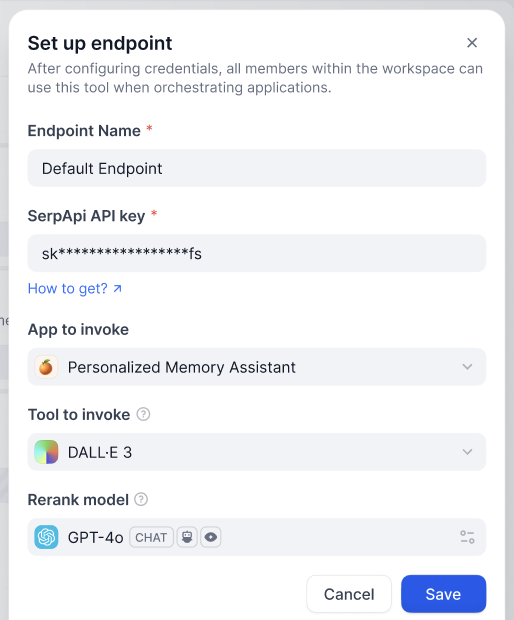
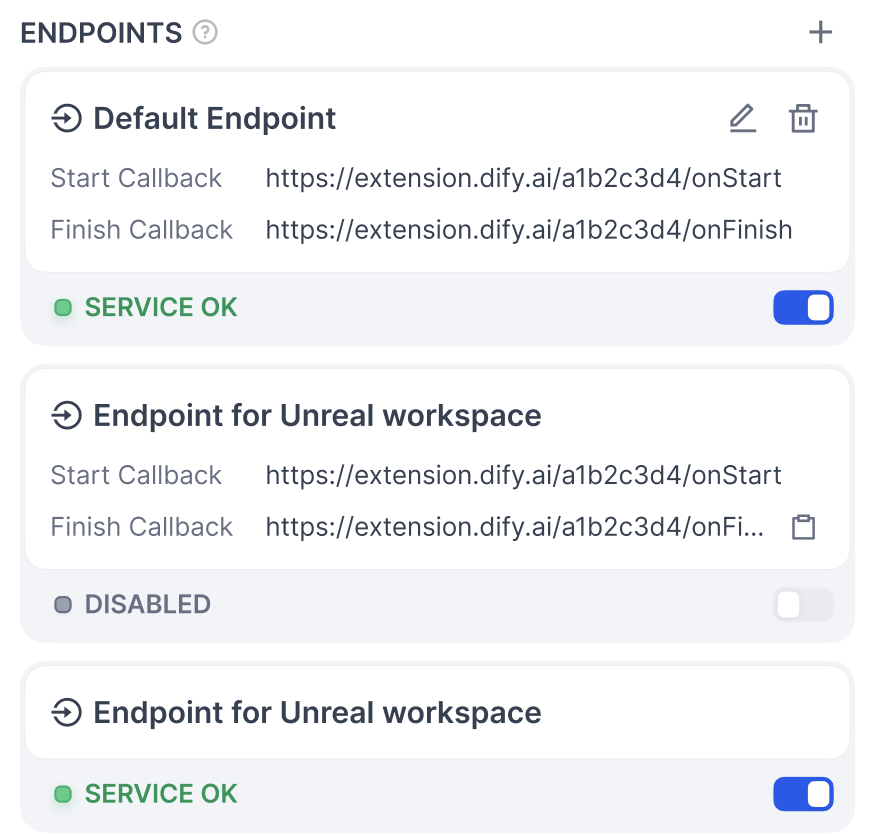
Besides the **Endpoint Name**, you can add form items by writing the group's configuration. After saving, you can see the multiple interfaces the group contains, all sharing the same configuration.
### Structure
* **`settings`** (map\[string] [ProviderConfig](/en/develop-plugin/features-and-specs/plugin-types/general-specifications#providerconfig)): Endpoint configuration definition.
* **`endpoints`** (list\[string], required): Points to the specific `endpoint` interface definitions.
```yaml theme={null}
settings:
api_key:
type: secret-input
required: true
label:
en_US: API key
zh_Hans: API key
ja_Jp: API key
pt_BR: API key
placeholder:
en_US: Please input your API key
zh_Hans: 请输入你的 API key
ja_Jp: あなたの API key を入れてください
pt_BR: Por favor, insira sua chave API
endpoints:
- endpoints/duck.yaml
- endpoints/neko.yaml
```
## Interface Definition
* **`path`** (string): Follows the Werkzeug interface standard.
* **`method`** (string): Interface method; supports only `HEAD`, `GET`, `POST`, `PUT`, `DELETE`, and `OPTIONS`.
* **`extra`** (object): Configuration information beyond the basic details.
* **`python`** (object)
* **`source`** (string): The source code that implements this interface.
```yaml theme={null}
path: "/duck/"
method: "GET"
extra:
python:
source: "endpoints/duck.py"
```
## Interface Implementation
Implement a subclass of `dify_plugin.Endpoint` and its `_invoke` method.
* **Input parameters**
* **`r`** (Request): The `Request` object from `werkzeug`.
* **`values`** (Mapping): Path parameters parsed from the path.
* **`settings`** (Mapping): Configuration information for this Endpoint.
* **Return**
* A `Response` object from `werkzeug`; streaming responses are supported.
* Returning a string directly is not supported.
Example code:
```python theme={null}
import json
from typing import Mapping
from werkzeug import Request, Response
from dify_plugin import Endpoint
class Duck(Endpoint):
def _invoke(self, r: Request, values: Mapping, settings: Mapping) -> Response:
"""
Invokes the endpoint with the given request.
"""
app_id = values["app_id"]
def generator():
yield f"{app_id}
"
return Response(generator(), status=200, content_type="text/html")
```
## Notes
* Endpoints are only instantiated when the plugin is called; they are not long-running services.
* Pay attention to security when developing Endpoints, and avoid executing dangerous operations.
* Endpoints can handle webhook callbacks or provide interfaces for other systems to connect to.
If you're new to plugin development, start with [Getting Started with Plugin Development](/en/develop-plugin/dev-guides-and-walkthroughs/tool-plugin) and the [Developer Cheatsheet](/en/develop-plugin/dev-guides-and-walkthroughs/cheatsheet).
## Related Resources
* [Basic Concepts of Plugin Development](/en/develop-plugin/getting-started/getting-started-dify-plugin): The overall architecture of plugin development.
* [Neko Cat Example](/en/develop-plugin/dev-guides-and-walkthroughs/endpoint): An example of extension plugin development.
* [General Specifications Definition](/en/develop-plugin/features-and-specs/plugin-types/general-specifications): Common structures like ProviderConfig.
* [Develop a Slack Bot Plugin Example](/en/develop-plugin/dev-guides-and-walkthroughs/develop-a-slack-bot-plugin): Another plugin development example.
* [Getting Started with Plugin Development](/en/develop-plugin/dev-guides-and-walkthroughs/tool-plugin): Develop a plugin from scratch.
* [Reverse Invocation of Dify Services](/en/develop-plugin/features-and-specs/advanced-development/reverse-invocation-app): Use the reverse invocation feature.